Working for clients
Freelancers, consultants, the self-employed: you sell your time. Usually that takes a time tracker, a spreadsheet of hours, an invoicing service, and your mail open beside them, with your memory holding it all together.
In Sioul it is one loop, in one window. The client's mail comes to their project. The work is counted while you do it. The invoice is made from what was counted, and waits in your budget until it is paid.
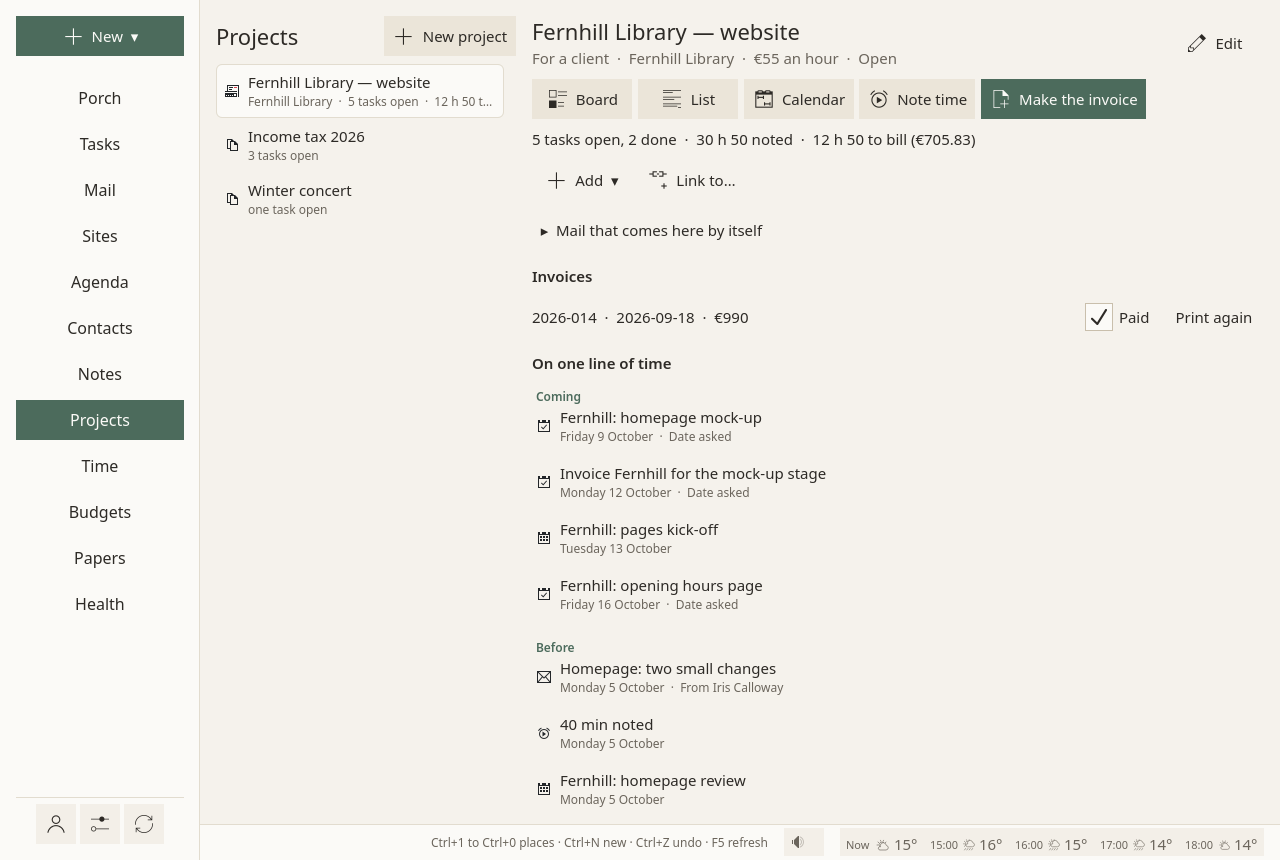
The loop, from the first mail to the paid invoice
- A project per client. New ▾ ▸ A project, then For a client: its time is billed at an hourly rate: who it is for, what an hour costs, and the budget where its money is expected. When For names one of your contacts (their name, or their organisation), the invoice takes the contact's postal address. Link to…, at the end of the project, ties the client's contact to it, with whatever else belongs there: a note, an event, a site. Projects
- Their mail comes by itself. Give the project the client's domain or addresses, words of a subject, or of an attachment's name ("quote"): the messages that match are filed with it as they arrive, each with the reason it came. Replies follow their conversation. Sioul checks who sent each message first: forged mail is never filed with a client's project, even when its address looks like theirs. Mail that comes here by itself
- The work fits in your working hours. The project's tasks, as a board, a list or a calendar; the one next step, placed in the hours you keep for work. Tasks
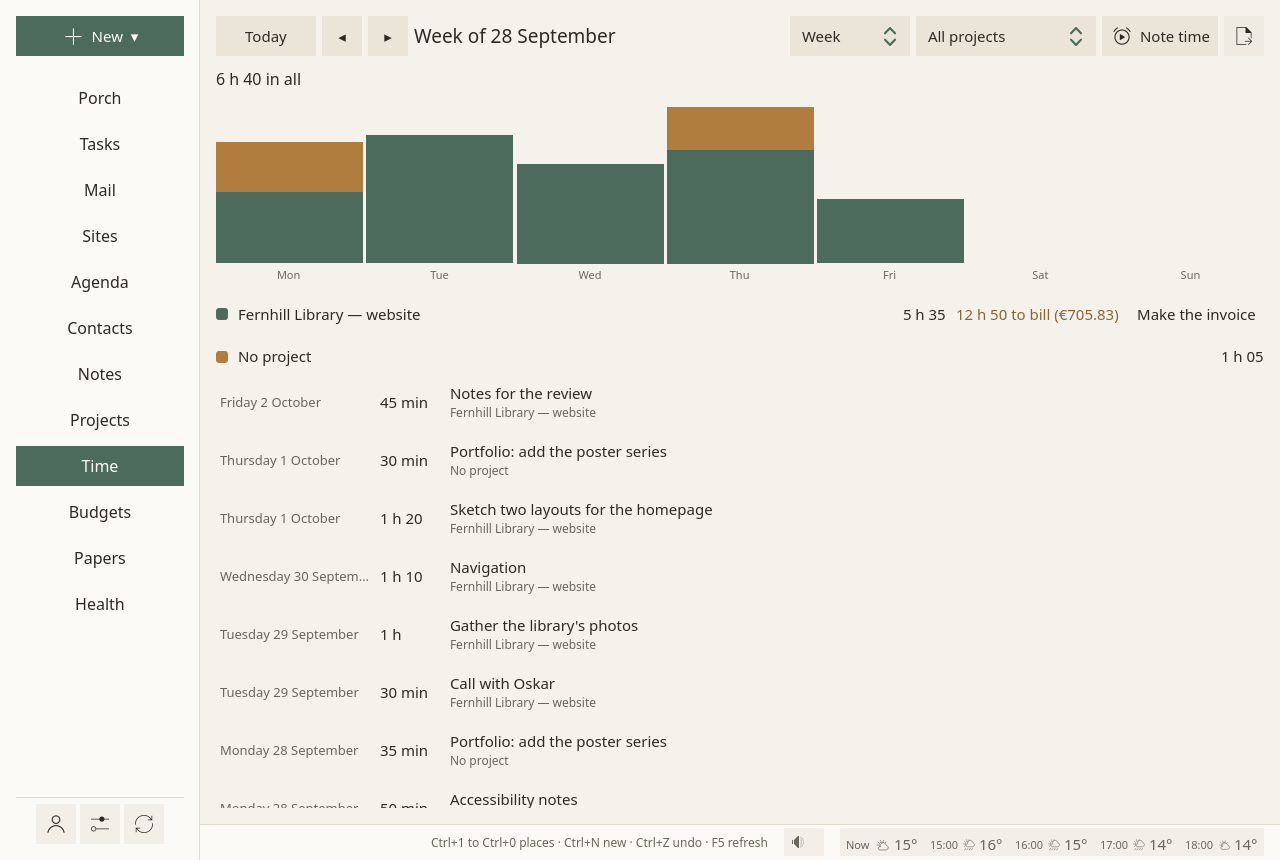
- Time counts while you work. The minutes of a focus session go to its task, and to the task's project. A meeting, a call, work done away from the timer: Note time,
1h30. A task can be left off the bill. Where time comes from - What is left to bill stays in view: for each project, in hours and in money, on the Time page and beside the project. The Time page
- The invoice, from that time. Make the invoice: one line per task, at the project's rate; a number that follows the last one and is never given twice; the time it bills marked as billed, so that the next invoice leaves it out; a PDF, ready to send. Invoices
- Until it is paid. The total is expected in the project's budget, due thirty days later. Paid puts the money in. Budgets
Set once
Settings ▸ Invoices: your name or business name, your address, your SIRET or your business number, the VAT line, how invoice numbers start, your currency, your payment details, your hourly rate. Every invoice then carries them. Settings ▸ Invoices
For a French micro-entrepreneur, the invoice prints your SIRET, « TVA non applicable, art. 293 B du CGI » when you give it as your VAT line, the late-payment penalties, the €40 recovery fee and "no discount for early payment". It prints the date or period of the service too: the first and last days of the sessions it bills, or their one day. It does not add « EI » after your name by itself: as an entrepreneur individuel, write it right after your name there (« Camille Exemple EI »). Elsewhere, the VAT line and the payment details are yours to word.
With the usual prefix, the year, invoice numbers start again each January; with a prefix of your own, they go on from the last one (Invoices).
For your accountant
Billable time, as a spreadsheet (CSV): one project, a stretch of time (this month, last month, from one day to another), one line per task with its hours, its rate and its amount, then the total. A title that came from someone's mail is written as plain text, never as a formula. A spreadsheet of billable time
On your desktop and your laptop
Time noted on one device is on the others a minute later, and so are the invoices: sealed end to end, through a folder your sync already carries (Nextcloud, Dropbox, Syncthing). There is no server of ours in between. Projects travel with your notes folder, or through the same sharing where no sync carries that folder; tasks and events through your calendar's server. One device numbers the invoices, so that a number is never given twice. Sharing between your devices
On a phone: Sioul for Android has shipped with each version since 0.0.2, for 64-bit phones with Android 9 or later (Install). It shares with your computers through the same folder, when your phone's sync app carries it (On a phone).
And then it rests
Outside your working hours, client projects and the Time page rest: "Work projects rest until work comes back." Being paid by the hour is no reason to work every evening. Hours
Not there yet
- Invoices are for hourly work, without VAT added to their totals. Quotes, fixed-price lines, expenses and VAT amounts are not made yet.
- « EI » after your name is not added for you: an entrepreneur individuel's name must come with « EI » or « entrepreneur individuel » (service-public.gouv.fr, sheet F31808). Write it right after your name in Settings ▸ Invoices.
- Electronic invoices. From 1 September 2027, a French micro-enterprise, under the VAT franchise too, must issue its invoices to French businesses electronically, through an approved platform (« plateforme agréée »), with the client's SIREN. Sioul makes PDF invoices only, for now (Time and invoices).
Compared with other apps
Toggl Track, Clockify, Harvest, Kimai and Freebe do more for quotes, expenses and VAT, and Freebe already makes the electronic invoices France will ask for. Sioul keeps the whole loop, from the client's mail to the paid invoice, in one window and in files on your devices. The tables, as of October 2026: Time and invoices and Projects.
Yours
Your time, your clients and your invoices stay on your device, in plain files: no account to open, no subscription, no server of ours. Sioul is free software (GPL-3.0-or-later). Privacy and security