Settings
In short
Settings is the sliders icon at the bottom of the left column. It holds what belongs to Sioul as a whole; what belongs to one page is on that page, behind its ⚙ (below). Each setting says in one sentence what it changes, and is saved as soon as you change it: nothing to confirm, nothing to apply. Your settings follow you to your other devices when you share between them; your passwords never do.
The Settings page has a tab for each of the sections below, from Display to Invoices; a phone adds This phone, a computer Texts. Words, after What reaches you, holds the words Sioul recognises things by (further down).
Protected by default
- Your settings hold no password, no key and no token: those go to your system's keyring, even when you type them in a settings panel.
- Your settings travel to your other devices only if you share between them, and then sealed, with the rest of the sharing.
- A settings file found empty, after a crash or with a full disk, is not emptied on your other devices at once: the status line says so, and nothing of it is taken out elsewhere for ten minutes.
- Show passwords as you type stays on the device where you chose it, and a phone whose screen others see can keep its home screen discreet (Details on the home screen, below).
Display
- Language: the system's, English or French. Every sentence Sioul says follows it.
- Colours: light, dark, or as the system has them. As the system's, Sioul turns dark or light with it, at once, its icons too (Windows 10's dark mode included); with high contrast on, by the lightness of the system's own colours.
- Show the places' names beside their icons: the places on the left of the window show their names beside their icons, in a wider column, for whoever reads words more easily than icons. Without it, their icons alone; each one's name shows when the pointer rests on it, when the keyboard reaches it, or at a long press on a touch screen. It travels with your settings to your other devices, when you share them. The button at the left end of the title bar, over the places, or F9, changes it too.
- Show passwords as you type: every password, passphrase and key field shows what you type from the start, on this device. Without it, the eye at the end of each field shows or hides what you typed, at any time.
- Colours for this screen (on a computer): sites are shown in your screen's own colours, read from its colour profile, so that a wide-gamut screen does not make them louder than they are. A sentence under it says what this screen gets: its profile's name, or that your desktop already adapts colours (on Wayland, on macOS), or that the screen has no profile. On unless you turn it off. Sites says more.
- Calmer colours on sites (on a computer): Off, A little, More. Loud colours on websites are softened, greys and soft tints stay as they are. Every site follows it at once.
- Details on the home screen (on a phone): Sioul's cards on the phone's home screen name what they show: a dose due, a code you just asked a site for, your reminders, a call declined, the next step's title; the latest messages on the Porch, with their sender, subject and first line; the coming events of your calendars, with their titles (First steps). Turned off, they name nothing: the date, the weather and what now is for, then that a code, a reminder or mail waits, the events' times without their titles, and that a next step waits: for a phone whose home screen others see. This phone only.
Hours
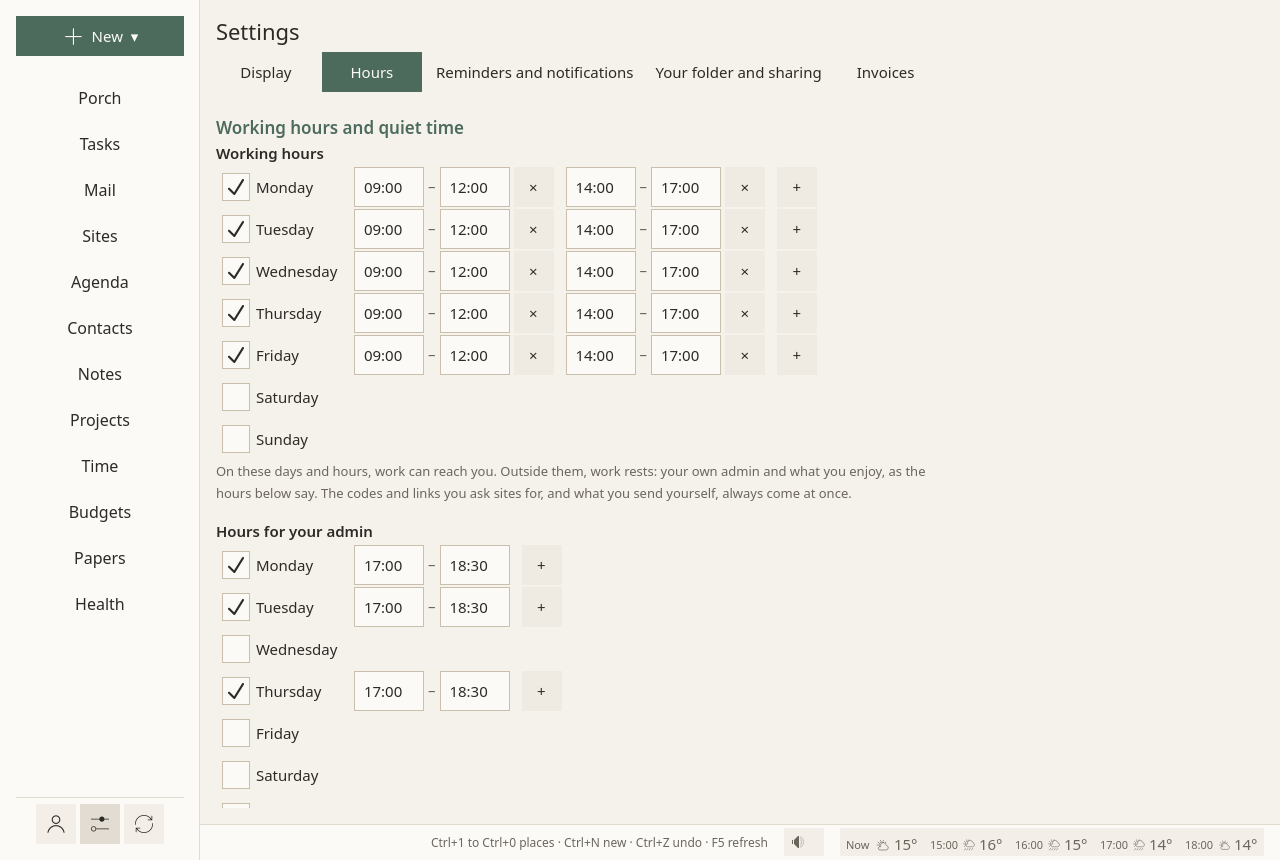
- Working hours: on these days and hours, work can reach you. Outside them, work rests.
- Hours for your admin: your own admin comes forward then: offices, bills, letters, health errands.
- Meals and sleep, on the Health page: one sentence, and a button to them. Leisure is every other time, neither work nor admin: there is nothing to set for it. Meals and sleep are set on the Health page, and while you sleep nothing disturbs.
- Time off: holidays, sick leave, quiet from the first day to the last, as on a day off, with a word on them.
Each day of each week is on or off, with one range of hours or several: + adds a range, × takes one away. What each kind of hours brings, and what waits: Hours.
What reaches you
One place for when each thing reaches you: mail, calls and other apps' messages by who sends them, Sioul's own notifications by what they are, at each time of your day. On top, what holds now, in sentences, and Start from: As Sioul does now, Quieter or More reachable. Then five views:
- By time: a card for each time of your day, in sentences; Change… opens its rows.
- By person: what reaches you by mail, by phone and by message from each list of people, Tell me of new mail, Include newsletters, and who is on which list.
- Sioul's own: codes, doses, reminders, Health's notices, your sites and other apps, with Sites' notifications gathered.
- Exceptions: the people who always get through, and each conversation, app or site with a choice of its own.
- Do not disturb: what turns it on, what holds while it does, what each device does.
Free time's Nothing at all is on its card. See What reaches you, and when.
Reminders
Each reminder comes once, as a quiet notification, without sound, never repeated. Remembering "on the 30th" is what fails most, with autism and with ADHD (Landsiedel, Williams & Abbot-Smith 2017; Altgassen, Kretschmer & Kliegel 2014), and reminders help where memory is the bottleneck (Jamieson et al. 2014).
- Before an event: a quiet reminder this long before each event: none, 5, 10, 15 (unless you change it) or 30 minutes, 1 or 2 hours. It is counted before the event's time to get ready and get there: an event at 14:00 with 30 minutes to get there is reminded at 13:15. Each event may say its own: Remind, in its form and in its details (Agenda). Not for whole days, nor for calendars you only read. On a phone, the setting says whether Android lets these reminders come on time.
- Events, the working day before: half an hour before work ends, the working day before an event: what, when, where. The alarms an event carries are told at their time too; one within five minutes of Sioul's reminder is told once.
- Dates asked: working days before: when work starts, so many working days before a task's date asked (2 unless you change it); 0 for none.
- A wait over: when a wait after a step done is over (an answer due), once, when work is there.
- Payments planned: working days before: when work starts, so many working days before a planned payment (a bill, a tax); 0 for none. The reminder says whether the account will hold it.
- With Sioul's window closed: your session starts a small watcher that tells reminders when the window is closed; nothing else runs, no mail is fetched. It needs the
sioulcommand installed next to Sioul (Install). Not on Windows yet. - Gathered at: what your sites notify waits, then comes in one notification at these times: 09:00, 13:00 and 18:00 unless you set others. On a phone, other apps' notifications from automatons come back then. See The gathered times.
When each reminder may come, and new mail, is in What reaches you. Doses of medicine are reminded from the Health page, and papers to renew from Papers. On a phone, the doses, the events and new mail are told; the other reminders come on a computer (On a phone).
Pauses
Free time and the pause, set up on a calm day: how far the end of work may move, whether movement is offered; for the pause, what helps you, your line, the breathing guide, what the rest of the day holds after it, whose numbers show; What comes during a pause, its card in What reaches you; Try the pause screen. Free time's Nothing at all is on its card in What reaches you. See Pauses.
This phone
On a phone, what sets it up, nothing that decides when (that is What reaches you):
- Calls: Sioul as Android's caller ID & spam app, so that a call whose row says later goes to your voicemail; what Sioul does with calls, what it never does, and what always rings; reading the contacts; the Call screening, apart from do-not-disturb, for numbers nobody knows and hidden numbers: its switch, its hours, what becomes of each kind of number, and the numbers you called (The call screening); where a declined call goes; texts. See Calls.
- Other apps: Android's Notification access (two steps for Sioul installed from a file), Hold other apps' notifications until their time, the apps that rang before Sioul held them, with Make it silent. Each app, conversation and site's own choice is in What reaches you ▸ Exceptions. See Other apps' notifications, on a phone.
- On your computers: the part Messages from your phone, off until you turn it on, and for each app whether its messages go to your computers' Porch: not at all, who and when, or the words too (the SMS app's words unless you say otherwise); under each app, Answer from your computers, on unless you switch it off, lets a reply written on a computer go through that app's own Reply. See On your computers.
- Texts: what Sioul does with your texts once you allow it, each permission with what it is for, Allow in Android…, and, once Android has not given them after you asked, the steps it may want for an app installed from a file, with Sioul's app info (Install), the part Texts, how many texts and how much media your phone holds and how much has gone to your computers, the largest media file brought there, and what its carrier takes for a multimedia message, read only. See Texts.
- Do not disturb on this phone: Android's Do Not Disturb access, which Sioul's modes need, and what each mode lets through; Starred on this phone, who of your Always through people is not starred there; Keep this phone in step in the background, and Allow in the background. See What each system does.
- Alarms and notifications: Android's pages for exact alarms, which reminders, doses and the alarm at waking need to come on time, and for Sioul's own notifications.
Texts
On a computer, the multimedia messages sent from it: Multimedia messages sent from here, up to your carrier's limit (600 kB with French carriers) or 300 kB, for older phones and some networks abroad; under it, what your phone said its carrier takes, a line for each SIM. See Texts.
Your folder and sharing
- The notes folder: your folder of Markdown files, read as a vault: your notes, and beside them your projects, budgets, papers and letters. Sioul links to it; it never owns it (Notes).
- Rename to sioul-projects.toml: shown while your projects' file has its first name,
sioul-cases.toml. It renames the file and its entries in one write, every project kept, with a copy of the old file beside it. Never done by itself: press it once each of your devices has this version of Sioul, since an older one reads only the first name (Where projects live). - Between your devices: sharing with your other devices what Sioul keeps on this one, part by part, sealed with a passphrase; your notes and papers too, if you switch them on. See Sharing between your devices.
- Show earlier versions: what another device's change replaced here, kept on this device, with Put back (Putting back an older version).
Invoices
Printed on the invoices you make from Time and Projects:
- Your name or business name, Your address (on lines, as on an envelope); in France, an entrepreneur individuel writes « EI » right after the name (« Camille Exemple EI »), which French law asks for;
- SIRET, or the business number where you are; empty until you are registered;
- VAT line: for a French micro-entrepreneur, « TVA non applicable, art. 293 B du CGI »;
- Invoice numbers start with: numbers then follow each other, 2026-001, 2026-002…; left empty, the prefix is the year, so numbering starts again each year, while a prefix of your own goes on counting;
- Currency: a three-letter code, such as EUR, USD, CHF;
- Payment details: printed at the bottom: bank details, terms, late fees;
- Invoices go into: the folder of their PDFs,
Documents/Invoicesin your home folder when empty; - An hour costs: the rate when a project does not set its own.
Each page's own settings
One setting, one place. What belongs to a page is behind the ⚙ at the end of that page's first row:
| Page | Behind its ⚙ |
|---|---|
| Porch | the projects shown there, where scans arrive, the calls your phones declined, how a message reads, how mail is sorted |
| by conversation, how often folders are fetched, your filters, your own spam filter, how a message reads, the lists you left | |
| Tasks | office hours, kinds, categories, task lists, where new tasks go, what is work and what is yours, GitHub |
| Agenda | calendars, the hour the day opens on |
| Contacts | address books, the map |
| Notes | where new notes go |
| Sites | your Bitwarden account |
| Health | where the errands go, the usual meals, naps and night, the pause to move, the limit on chats |
The ⚙ opens them on the page's right, the page staying beside them: two fifths of the window and a little more, from 520 to 760 pixels; on a phone, over the whole screen. Escape or a click outside closes them.
Each address's own settings are on its card in Accounts. How long text reads (the font, its size and the space between lines) is in the ⚙ of the pages where messages are read, Mail and the Porch, and behind Aa in Notes: one setting, shown where it is used.
Your filters
In the Mail page's ⚙, under Filters: what is done to new mail on its server, by conditions (into a folder, archived, to spam, flagged, marked read, to the trash, a keyword), one list for all your addresses, each filter in a sentence. Run them on the inboxes… says first what would change. Your filters travel with your settings. How to make one, and when they act: Mail, Filters.
Your own spam filter
In the Mail page's ⚙, under Your own spam filter: what it does with each of its verdicts on a stranger's mail (Move to spam, Flag only or Do nothing), how sure it must be (Spam from, 95% unless you change it; Maybe spam from, 50%), and its training, on one computer: by hand with Train now, then by itself once a week while that computer is plugged in and idle, unless you switch that off. Your phone never trains it: it uses the computer's table, which comes sealed with the sharing. Its settings: Mail, Your own spam filter; what it does on the Porch: Spam, and your own filter; what training reads and keeps: Privacy and security.
What travels with you
When you share between your devices, your settings go with the part Settings and accounts, sealed like everything there. A setting changed on two devices keeps the later change, setting by setting.
What stays on each device: where its folders are (the notes folder, where scans arrive), how text reads on its screen (Aa), Show passwords as you type, a phone's Details on the home screen, and how its pages were left. Passwords, keys and tokens never travel: each device keeps its own in its keyring.
Where settings are kept
In one plain text file, config.toml, in your configuration folder (~/.config/sioul/ on Linux). You can read it and change it by hand: when Sioul writes it, your comments and your order stay. It holds no secret: the keys and tokens you type in a settings panel (the AI shield's key, GitHub's token) go to your system's keyring, like passwords.
Going further
- Back to the default: clearing a setting takes its line out of
config.toml, and its default comes back. - Lists travel whole: your pinned sites, your hours, your days off and your mail filters each travel as one list, so that when two devices change the same list before they exchange, the later list is kept. Change such a list on one device at a time.
- Not emptied everywhere at once: a settings file found empty or gone, after a crash or with a full disk, counts as taken out only if it stays so for ten minutes; meanwhile the status line says so, and nothing of it is taken out on your other devices.
Words Sioul looks for
Sioul recognises things by their words: a code in a message, a bill, a letter from the tax office, the folder that is your Junk, a call ringing in a chat, a sender borrowing a bank's name. Those words come in language packs (French and English; German, Spanish and Italian for codes, approvals, folders, replies and dates) and country packs (France), and Settings ▸ Words shows them: add your own, take away those that misfire.
- Languages read and countries, at the top: a tick for each language Sioul has words for, and for each country it has names for (its public bodies, its banks' approval services, its brands). A ticked language adds its words to every list; Sioul never ticks one by itself.
- One line for each thing recognised, in four groups (mail; money and papers; the phone; tasks and a public address), with how many words it holds and, once you changed it, how many you added and took away. Open a line: a sentence says what its words do, then each list, one word to a chip: × takes a word away, the field adds one. Whole words; capitals and accents do not matter. Back to the defaults takes that line's changes out.
- Your changes are kept as differences: the words you added and those you took away, never a copy of a list, so the words a newer Sioul brings still reach you. A word you take away and add again is there. Your changes travel with your other settings.
- Your provider's spam marks ("[SPAM]" at the start of a subject) are taken off before your own spam filter reads a message. A change counts from the filter's next training, on every device at once.
- Voicemail by mail is read only from the operators you name, by the domain their mail comes from; none is named at first (Calls).
- A public address: the words that make a message to it hostile or rude, and those of each topic. Add the words of your own field to the support topic.
Compared with other apps
Every app has settings, and a table would compare nothing you choose an app for, so there is none here. What Sioul does its own way is said above: one place for each setting, a sentence for each, saved at once, the same settings on each of your devices, and no secret among them.
For technical readers
- The file:
config.tomlin~/.config/sioul/on Linux (or$XDG_CONFIG_HOME/sioul/),%APPDATA%\sioul\on Windows,~/Library/Application Support/sioul/on macOS. Sioul writes it in place (toml_edit), one key at a time, keeping comments and order; an empty value removes the key, so its default comes back. - Secrets: account passwords, the AI shield's key and the GitHub token go to the system's keyring (the Secret Service, the macOS Keychain, the Windows Credential Manager, Android's KeyStore), never to
config.toml. - Shared entry by entry: each setting is one entry, and each account one entry, keyed by its
id; a list such as your pinned sites ([[site]]), your hours ([[window]]), your days off or your filters ([[mail.filter]]) travels whole, as one entry. The later change wins by a hybrid logical clock, so that a change made after seeing another always comes after it. Each entry is a sealed record (XChaCha20-Poly1305, under a key made from your passphrase by Argon2id), as for the rest of the sharing. - Kept on each device:
case_store(the notes folder),reading,history_weeks,letters.inbox(where scans arrive),dnd.background, and each account'smaildirandhistory_weeks. The senders' lists travel in their own part, Senders. Per-device view choices (passwords shown, the home screen's details, how pages were left) are kept in the window's state, outsideconfig.toml. - The panels: a page's ⚙ opens on its right, 42% of the window, between 520 and 760 pixels and leaving the page 240; under 720 pixels (a phone), the whole width. The Settings page reads 720 pixels wide at most, 1,100 for What reaches you's cards.
- The words (
[words]):languagesandcountries, then a table for each list you changed, such as[words.folders.trash], withadd(your words) andremove(the shipped ones you took away); for a list of names, such as the brands,addgives each name its words andremovelists names. A configuration from before October 2026 getslanguages = ["fr", "en"]andcountries = ["FR"]at its first start, so that nothing changes until you change it. The packs are incrates/sioul-core/data/words/; one installed in$XDG_DATA_HOME/sioul/words/or$XDG_DATA_DIRS/sioul/words/replaces Sioul's own when itscheckeddate is later. The spam filter's table keeps the words it was trained with, so that every device reads alike. How the lists are made: the words Sioul looks for.