Projects¶
In short¶
A project is any matter you follow: work for a client, whose time is billed, or one of your own, such as housing, health, a tax return or a trip. Its page gathers what belongs to it: its tasks, its events, its mail, its notes, the time you spent on it and its invoices, on one line of time, with what is coming first. As mail arrives, Sioul files it there by rules you give the project, after checking who sent it. The list of projects is one plain file in your own notes folder.
Protected by default¶
- Mail is checked before it is filed. As it arrives, a forged message (its domain says it did not send it), or one that borrows a known name, is set aside first and never filed into a project, even when its address looks like your client's. The project's page checks its mail the same way each time it shows it, and so does what an AI agent reads of the project: such a message never appears on its line of time, and neither does a conversation that only such a message ties to it.
- A message that fails the sender checks (both of the signatures that servers use to vouch for a sender failed) is never filed by a route on your client's address or domain. A route on words of the subject, the text or an attachment's name can still file it, since those do not rest on who sent it; on the project's page, it then says "whose address could not be verified".
- Every message filed says why it came: "sender's domain: example.org".
- Your projects are one plain file in your own notes folder, and mail is filed on your device. Between your devices that file travels with your notes folder, or sealed through Sioul's sharing once Projects and money is on: the folder and its server see that something changed, never what (Sharing).
- There is no server of Sioul's, and nothing about your projects goes to one.
Making a project¶
New project (or New ▾ ▸ A project):
- Name.
- For a client: its time is billed at an hourly rate. Then: For (who it is for), An hour costs (else the rate in Settings ▸ Invoices), and Invoices expected in: the budget where the money is expected until paid. When For names one of your contacts (their name, or their organisation), the invoices take its postal address.
- Without it, the project is yours. Yours, outside work keeps its tasks in view in quiet time, with family and friends.
- Where it stands: open, waiting, or closed.
Take out of the list removes a project. Its tasks, notes, mail and time stay where they are; they are no longer gathered under it.
A project's page¶
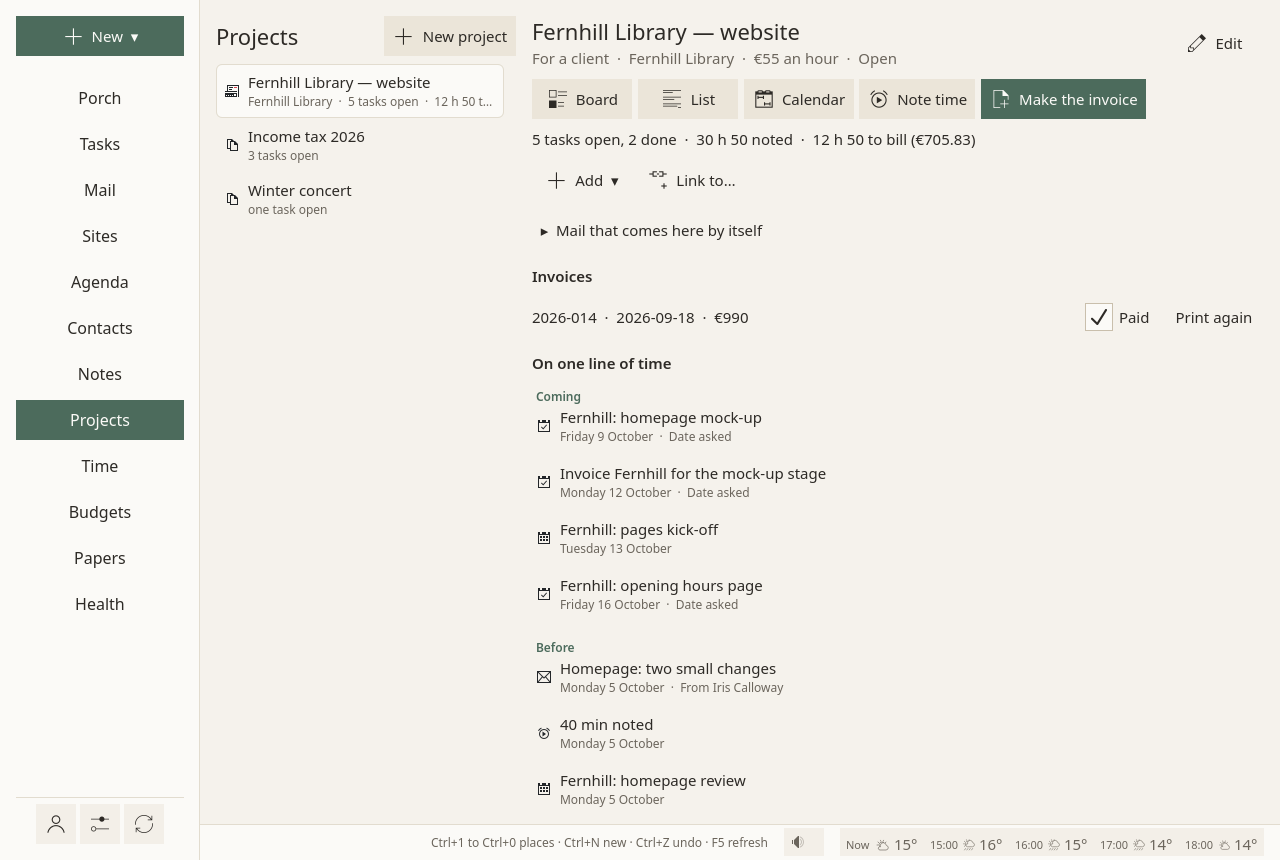
On the left, every project, with its open tasks and the time left to bill. On the right, the project open:
- On one line of time: what is coming first (dates asked of its open tasks, events), then what happened before, newest first: tasks done, mail, notes changed, time noted, invoices.
- Its tasks, as a Board, a List or a Calendar: each opens the Tasks page, kept to this project. The Calendar is the Tasks page's own (List, Board, Calendar): each task on its days, the date asked as a small diamond.
- Note time: a meeting, a call, work done away from the timer.
- Make the invoice, when billable time waits to be billed. See Time and invoices.
- Add ▾ and Link to…, at the end: something new tied to the project, or a tie to something that exists, such as the client's contact.
Mail that comes here by itself¶
Mail that comes here by itself, on the project's page, gives the project its routes. A message comes to the project when one route matches; every line filled in a route must match:
- From the domains: the sender's domain, or any of its subdomains;
- From the addresses;
- Words in the subject;
- Words in the text;
- Words in an attachment's name ("quote" takes
Quote_2026.pdf).
Several words or domains on one line: any one of them. Words are matched whole, without case or accents.
A reply in a conversation of the project goes with it, and so does a message you tie to it by hand (Link to…): what you tie stays as you tied it, even a message the checks would set aside. Every routing keeps its reason, shown on request: "sender's domain: example.org".
As it arrives, and each time the project's page shows it, mail is checked before a route files it (above): forged mail and mail that borrows a known name are set aside first, and a route on your client's address or domain does not file a message that failed the sender checks. The other way round, a project's route is stronger than a spam flag, so your client's real mail is not lost among spam, and Sioul's own spam filter leaves a project's conversations alone.
Where projects live¶
In one file, sioul-projects.toml, at the root of your notes folder: readable, and written by hand if you like. It travels with your notes folder, or through Sioul's sharing once you switch Projects and money on in it (Sharing). A project's tasks and events carry its identifier in a standard field, so other calendar programs keep the grouping.
If your notes folder still holds sioul-cases.toml, the file's name before projects had one name, nothing changes: Sioul reads it and writes it as it is, so that a device not yet updated reads it too. When each of your devices has this version, Rename to sioul-projects.toml, in Settings ▸ Your folder and sharing, renames it, with a copy of the old file kept beside it. Links to a project written before still open it.
In quiet time¶
Projects for clients rest outside working hours: "Work projects rest until work comes back." Show anyway shows them all the same. While you sleep, the whole page waits behind one sentence and Show anyway. See Hours.
Going further¶
- A lane on the Porch: Projects shown here, in the Porch's ⚙, gives a project its own lane there (The Porch).
- Yours, outside work: a project of your own, marked so, stays in view in quiet time, when work projects rest.
- By hand, if you like: the list of projects is a readable file,
sioul-projects.toml, which you can edit; its form is below. - An AI agent you connect (Using an AI agent) can read a project's page as the window shows it, with one-time codes, sign-in links, account and card numbers masked in its mail. It changes nothing there.
Compared with other apps¶
As of October 2026, from each app's own documentation.
✓ documented; partly, with a note; ✗ not found in the app's own documentation (for Sioul: not built); ? not confirmed; — not applicable. Sioul's column was checked against its code.
| Sioul | Trello | Asana | Notion | Nextcloud Deck | Vikunja | |
|---|---|---|---|---|---|---|
| Mail filed into the project by itself, by your rules | ✓ | partly¹ | partly² | ?³ | ✗⁴ | ?⁵ |
| Board | ✓ | ✓ | ✓ | ✓ | ✓ | ✓ |
| List | ✓ | partly⁶ | ✓ | ✓ | ✗⁷ | ✓ |
| Calendar or timeline (Gantt) | ✓⁸ | partly⁶ | ✓ | ✓ | partly⁹ | ✓ |
| Tasks that wait for others | ✓ | ✗¹⁰ | ✓¹¹ | ✓ | ✗⁷ | ✓ |
| Time spent, noted on the project | ✓ | ✗¹⁰ | ✓¹² | ✗¹⁰ | ✗⁷ | partly¹³ |
| Invoices made from the project's time | ✓ | ✗¹⁰ | ✗¹⁰ | ✗¹⁰ | ✗⁷ | ✗¹⁰ |
| Links both ways to notes, people and events | ✓ | ? | ? | partly¹⁴ | ? | partly¹⁵ |
| Shared with other people | ✗¹⁶ | ✓ | ✓ | ✓ | ✓ | ✓ |
| Tasks other apps can read (CalDAV) | ✓ | ✗¹⁰ | ✗¹⁰ | ✗¹⁰ | partly⁹ | ✓¹⁷ |
| Free software, on your own device or server | ✓ | ✗¹⁸ | ✗¹⁸ | ✗¹⁸ | ✓ | ✓ |
- You send or forward a message to the board's own address; it becomes a card.
- From Gmail or Outlook, by hand, with Asana's add-on. A project's own e-mail address could not be confirmed: Asana's help centre could not be read.
- Notion Mail's pages could not be read.
- Not in Deck's documentation. Nextcloud Mail can make a calendar task from a message, by hand, and its filters move mail into folders, not boards.
- Not on Vikunja's features page.
- Table, Calendar and Timeline views are in the Premium and Enterprise plans; the Planner, on a calendar, in the paid plans.
- Not in Deck's user documentation, which describes boards of stacks of cards.
- The project's Calendar button opens the Tasks page's Calendar, kept to the project.
- Each board is offered over CalDAV as a list of tasks, read only, so cards with a date show in Nextcloud's calendar (from Deck's code).
- Not in its documentation or its plan list.
- From the Starter plan.
- From the Advanced plan, estimated time against actual time.
- A Pro feature for self-hosted instances, "in private beta", not in Vikunja's cloud.
- Two-way relations between databases.
- Relations between tasks, also across projects ("a subtask or blocking task").
- Your projects are yours: they travel only between your own devices. Sioul has no team features.
- Vikunja describes its CalDAV as "in an early alpha stage"; over CalDAV it writes only parent and child relations, not its blocking ones.
- A hosted service under its own terms; no free-software licence is published for it.
Others do more for working together: every other app here shares a project with other people, and Notion's and Asana's many views and automations, and Trello's and Asana's integrations, go well beyond Sioul's. What Sioul keeps in one place is the client's mail filed by itself, the time noted and the invoices made from it, with its tasks kept as standard CalDAV tasks.
Sources
All read on 8 October 2026.
- Trello, Atlassian's page on creating cards by email, and its prices and plans: https://support.atlassian.com/trello/docs/creating-cards-by-email/, https://trello.com/pricing
- Asana, its prices and plans, and its page on the e-mail integrations: https://asana.com/pricing, https://asana.com/apps/email
- Notion, its help pages on views, tasks and dependencies, relations and rollups, and its prices: https://www.notion.com/help/views-filters-and-sorts, https://www.notion.com/help/tasks-and-dependencies, https://www.notion.com/help/relations-and-rollups, https://www.notion.com/pricing
- Nextcloud Deck, its README, its user documentation and its CalDAV code (
lib/DAV/Calendar.php,CalendarObject.php), and Nextcloud Mail's user manual: https://github.com/nextcloud/deck, https://deck.readthedocs.io/en/latest/User_documentation_en/, https://github.com/nextcloud/deck/blob/main/lib/DAV/Calendar.php, https://docs.nextcloud.com/server/latest/user_manual/en/groupware/mail.html - Vikunja, its features page and its pages on CalDAV and task relations: https://vikunja.io/features/, https://vikunja.io/help/caldav/, https://vikunja.io/help/task-relations/
For technical readers¶
The file¶
sioul-projects.toml, at the root of your notes folder: TOML, one [[project]] per project (id, title, kind = "project" for a client's, client, rate, budget, status, ai), each with its [[project.route]] lines. The file's first name, sioul-cases.toml, with [[case]] and [[case.route]], reads the same and keeps its names when Sioul writes it; renaming it checks that nothing changes before it writes, and keeps sioul-cases.toml.before-rename. A project's tasks and events carry its id in REFID (RFC 9253 §8.3), so other CalDAV programs keep the grouping.
How routes match¶
from_domains: the sender's domain or any subdomain ("example.org" takes "mail.example.org", never "notexample.org");from_addresses: exact, case ignored;subject_contains,text_contains,attachment_contains: whole words, case and accents ignored. Every list filled must match; any item of a list will do.- The text is read in its first 6,000 characters (the HTML part, read as text, when the text part is only a stub).
- Conversations follow
In-Reply-ToandReferences, through the messages the checks let in only: a forged reply neither shows nor joins two conversations. A message filed as it arrives is tied to its project (links.toml:mid:↔sioul:project/<id>;sioul:case/<id>, as written before, reads the same), so it stays when routes change. Changing a project's routes ties the mail already here that its text or attachment routes take, after the same checks.
Security, precisely¶
- When mail arrives, on the Porch, on a project's page and in what an agent reads of a project, one function decides (
porch::admission), in the order of protection: a blocked sender stays blocked; forged mail (DMARC failing under aquarantineorrejectpolicy) and mail whose display name borrows a known one are set aside; one-time codes keep their lane; then project routes. Authentication results come from your own provider'sAuthentication-Results(RFC 8601, only from anauthserv-idyou trust) and from Sioul's own check of each message as it is fetched (Every message checked). - Mail that is not authenticated (SPF and DKIM both failed, no DMARC pass, no ARC seal from a forwarder you trust) is routed with its sender removed, so
from_domainsandfrom_addressescannot take it, while subject, text and attachment routes still can. A message with no results, or with only one of the two failing, keeps its sender: a sender route then trusts the address as written. - A matching route wins over a provider's spam flag, and Sioul's own spam filter leaves a project's conversations alone.
- The sharing part Projects and money seals the projects' file (
sioul-projects.toml, orsioul-cases.toml) with the budgets, bank and contracts files: each record with XChaCha20-Poly1305, under a key made from your passphrase with Argon2id (64 MiB, 3 passes) and kept in each device's keyring (Sharing).