Health
In short
Health keeps your day's needs first. Your meals, rests and nights are set once and kept free: Sioul plans your work around them, and a day that differs is changed in a tap. Your medicines are reminded once and quietly, on the device you are using; a dose marked on one of your devices is known on the others, and when Sioul cannot know, it says so rather than "not taken". Nothing about food, weight or what was missed is asked or kept: no score, no streak, nothing turns red. Sioul keeps time and reminds you; it gives no medical advice and makes no health claim.
Protected by default
- On your devices only. Your medicines, doses, meals and nights stay on your devices, in files that only you can read there. There is no server of Sioul's.
- Sealed between your devices. Your devices exchange doses only through a folder your own sync app carries, sealed: the folder and its server can read nothing of it (Sharing).
- One reminder, from one device. Only the device you are using reminds you, so a dose is not reminded twice; and when Sioul cannot know whether a dose was taken on another device, it says so rather than "not taken", because a dose taken twice can harm.
- Discreet on a lock screen. A notice about a meal or a rest shows only its name and its time, so that it can be read on a lock screen or a shared desk.
- Out of an AI agent's reach. An AI agent you connect has no tool that reads this page.
- The errands are tasks. The pharmacy and doctor errands go to your task list, and their titles name the medicine: they are kept wherever that list is. Choose a list kept on this device if you would rather they stay here.
The day, and the week
The page opens on today: ‹ Today, Monday 5 October ›, a day at a time with the arrows (a week back at most: past days are shown as they were), Today to come back.
- Day: a timeline of the day, and beside it (under it on a phone) the same as a list. On the timeline, your meals, naps and night as blocks, with the time to get a meal ready, to wind down or to come back from a nap a little lighter; your doses as dots, filled once taken; the day's events and the steps planned today faded on the side, so you see what the day holds around them. In the list, each in time order with its times and how that day has it, and what changes it. Point at a row, or tap it, and its block lights up, and the other way round. Then come your medicines and prescriptions: under the list, or in a column of their own on a wide screen.
- Week: Monday to Sunday side by side, the same blocks. When a day is going to differ from the usual one (a lunch out, no nap, a late night), fix it there ahead: tap its block. Tap a day's name to open it. On a wide screen, your medicines and prescriptions stay beside it.
Change a day, that day only, without a question: 15 min later (as often as you like), Move to… another time, Change its times… (from, to; for a meal the minutes to get it ready, for a nap the minutes to come back, for the night bedtime and waking), Not today (no notice that day, but its time stays free of tasks; Today after all takes it back), Back to usual, and Remove from today: its time goes back to your tasks, and the row stays, quiet, with Put back. Add a meal or a rest… adds one for that day alone. Your usual meals, naps and night never change from here: they are in ⚙. Your other devices get these changes too, when you share with them.
Move it by hand, on the timeline: drag a meal, a nap or the night to another time on its day; it keeps its length. Drag its bottom edge to change how long a meal or a nap lasts; the night's top edge is bedtime, its bottom edge waking (in the next morning's column: tomorrow's, or the week). While you drag, its new times show above it, by five minutes. Let go: it is that day's change, as Move to… makes it, and Undo waits ten seconds in the status line; let go where it was, and nothing changes. Past days and what is already over stay as they are; in the week, a block stays on its own day.
- With a mouse: press and drag; the wheel scrolls.
- On a touch screen: hold the block until it lifts, then slide it; a plain swipe scrolls. Held and let go without moving, it opens its menu.
- On a phone, the whole day fits in a third of the screen, too small for a finger: hold the timeline and it opens larger, the hour under your finger kept under it, and the block you were on comes with your finger. When two blocks sit close together, none is taken: hold the one you want again. The ends you can move show a small bar. Done, under the hours, or Back, returns to the whole day.
The menus (Move to…, Change its times…) do the same from the keyboard.
If doses were due while Sioul was closed, the question about them comes above the day.
Medicines
On the page, after the day (under its list, or beside it on a wide screen), Add a medicine: its Brand name, or your word for it, which reminders say; if you like, its Generic name (INN), the molecule ("levothyroxine"), and its Strength ("75 µg", "500 mg per tablet"), which a doctor or a pharmacist reads; its Dose for each take ("1 tablet"); and When:
- At set times each day: its Takes, one row each, with the hour and the minute picked from short lists (Tab and the arrow keys reach them too). Add a take adds a row; the button at the end of a row takes it out. A take has its own amount only when it differs from the dose: for one tablet at 08:00 and two at 20:00, write "1 tablet" as the dose and "2 tablets" in the 20:00 row;
- Every few days, at a time, from a day: "every other day at 08:00";
- Every few hours, from a time: "every 6 hours, from 18:30".
Then Until a day, or for as long as it goes; Taken since, if you know when it started; the Prescription it comes from; Paused for now.
Each medicine is then listed there with its name, generic name and strength ("Thyrolan — levothyroxine 75 µg"), its dose and its times ("07:30", "12:30 · 20:00"), or each take with its own amount when they differ ("08:00 · 1 tablet, 20:00 · 2 tablets"), and until when; one paused, or past its last day, a little quieter. Edit opens its form again, where Take it out removes it after one question. Whether today's doses were taken is said in the day's list, not here. Each dose says its take's amount wherever it shows: the day's list, its reminder, the Porch, your phone's home screen; those keep the short name.
Show to a doctor or pharmacist
At the pharmacy or with a doctor, Show to a doctor or pharmacist, under your medicines, fills the screen with all those you take now; on a prescription, with its medicines. Large type, to read at arm's length, one medicine a block: its generic name and strength first, then the name on the box, each take with its time and amount, how long you have taken it, who prescribed it. It is read-only: one button, Close, and Back closes it too, so nothing changes if someone taps it.
Today
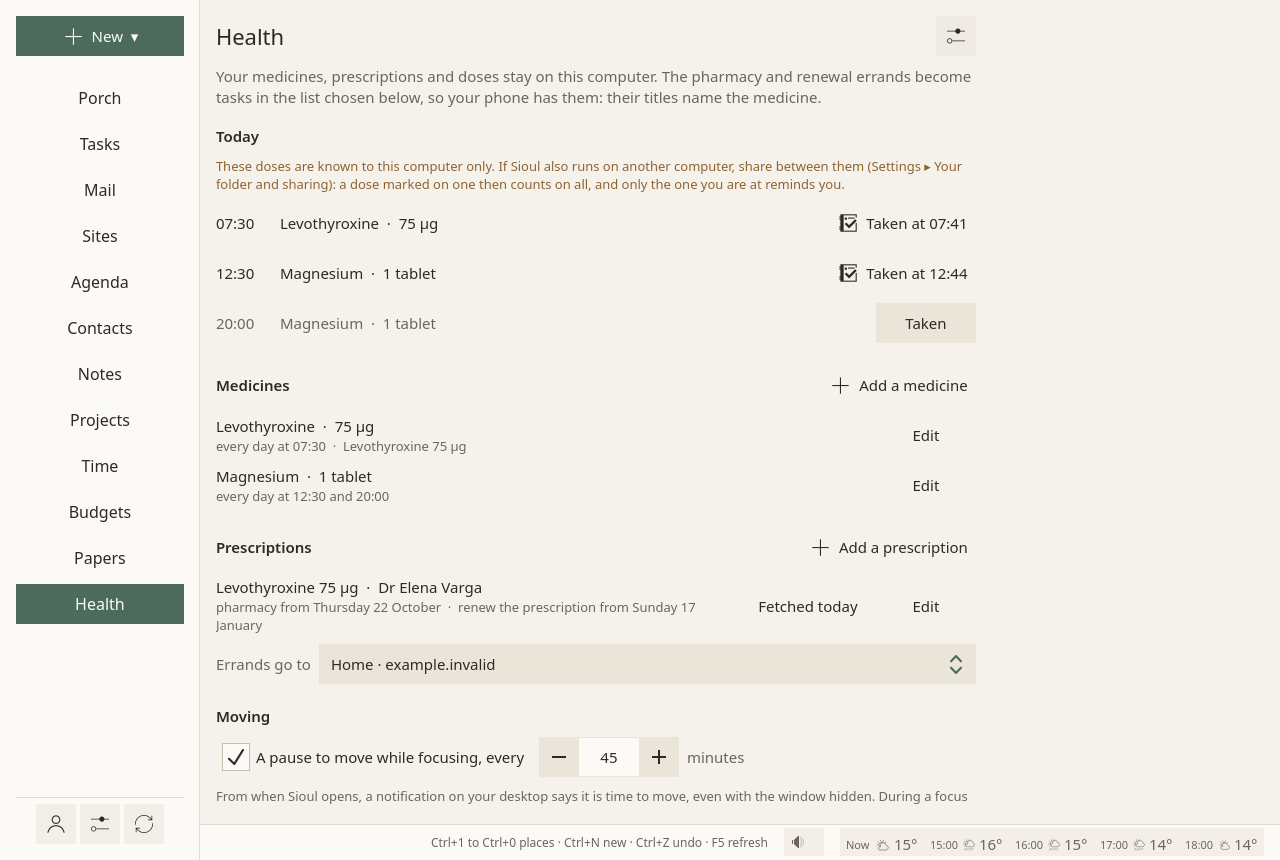
Each dose of the day, in the day's list with Taken, and on its timeline as a dot. A dose taken says when; one click takes it back. A dose not marked is simply not marked. Another day shows its doses plainly: no record of the past.
Taken late: more than half an hour past its time, Taken… asks when you took it (now, unless you change it), or lets you say it was not taken.
Two kinds of medicines. Those taken at set times of the day keep their times. Those taken every few hours keep the hours between two doses, which the body needs to clear one before the next: each dose you mark, on time, early or late, sets the next one that many hours after it. Taking the mark back puts the doses back.
Reminders
One desktop notification per dose, within half an hour of its time, without sound, with Taken (on Windows and macOS the notification has no button: mark the dose on this page). Never repeated. Reminders come in quiet time too: they are yours. They come while you sleep as well, since you set their times; to keep them silent then, choose Later for Doses ▸ Sleep in Settings ▸ What reaches you: each comes when you wake, and so does the question on doses due while Sioul was closed. Sioul never silences a dose without that choice.
On a phone, Android stops apps it does not show, so Sioul gives each dose of the next two days, ahead, to Android's alarm clock. At the dose's time the phone wakes Sioul for a moment, even when it was stopped: Sioul first reads what your other devices marked, on your Nextcloud itself where the sharing folder is found there, else asking your sync app to look now when it can; then it reminds you, or says nothing if the dose was marked elsewhere, or says Check first when it cannot tell. Taken marks it from the notification; more than half an hour late, a tap opens Sioul to ask when you took it. Tapping the notification opens the dose in Sioul, and a dose marked anywhere takes its notification away. These reminders come through Android's "Doses" channel, with the phone's usual notification sound unless you change it in Android's settings. If Android does not let Sioul set exact alarms (Settings ▸ Apps ▸ Sioul ▸ Alarms & reminders), reminders can come late, up to an hour, and this page says so.
If Sioul was closed at the time, a dose of the last twelve hours that was neither marked nor reminded is asked about on the Porch at the next start, and on this page: with Taken… (when you took it) and Not taken. It is a question about the past, never a reminder to take one now.
One plain reminder; every other says "Check first". A dose's reminder comes plainly only from the device that knows it is the first: your computer at the dose's time (or when you wake, or come back from a pause), once your phone has said it saw that computer open; or your phone's alarm once your other devices have said they did not remind you of it. Every other reminder of the same dose, on any device, begins with Check first and says why: you may have been reminded already, or taken it without marking it. Two phones, a phone switched off, a computer stuck for a while, Sioul started again just before a dose: at most one more Check first, never a second plain reminder, but for these few cases:
- a computer opened without network that has never seen your phone in the shared folder takes itself as alone, and both remind you plainly; the same with two computers and no phone, one of them opened offline;
- a computer that stays on while it cannot reach the sharing either way (its network or the server down), said off on your phone within the two hours after it lost touch;
- a phone you forgot on a computer while it still rings;
- a computer you say is off on your phone while it in fact runs (it hears your phone but cannot send), less time before a dose than your phone's news takes to reach it: until that news comes, it may remind you plainly too, whatever the clocks;
- quitting Sioul on the computer in the very minute of a dose.
When a computer's reminder may not have reached you. Sioul never counts a reminder it does not know appeared, and never reminds you of a dose twice without saying so:
- the computer's notification showed: that is the reminder; your phone stays silent once it knows;
- a computer opened just before the dose (or woken from sleep), before every phone of yours could say it saw it open: it keeps quiet until your phone's alarm has rung, then reminds you beginning with Check first, saying that your phone may have reminded you too; the same while any phone in your shared folder has not said so, even one silent for days or that a device of yours counts as off (only a phone you forgot on that computer, or that stopped sharing, is not asked);
- it surely did not show (that computer's notifications were not working): the computer tries again for a few minutes, each time beginning with Check first; with a phone sharing your doses, it then keeps quiet until the phone's alarm has rung, ten minutes after the dose's time, and the phone reminds you plainly if the computer said it showed nothing, else beginning with Check first; after that, if nothing was marked or reminded anywhere, the computer tries again, beginning with Check first, until half an hour after the dose; asked about later, "Due while Sioul ran, but their reminder could not be shown";
- it may have shown (the desktop did not answer in time): should the desktop say later that it showed, that is the reminder, its words turned into Check first ("was not confirmed in time"), its Taken still working, once; your phone reminds you ten minutes after the dose's time, beginning with Check first: "desk may have shown its reminder at 08:00. Check before taking it."; asked about later, it says "their reminder may not have been shown";
- with two phones (a new one and the old one, or a tablet), each phone's alarm begins with Check first: the other may have reminded you too;
- a notification still on the screen goes away once the dose is marked on another device.
What this costs: a phone that never gives its word (an older Sioul, a phone dead or flat, a tablet rarely opened, the entry of an old phone) makes each dose come from the computer fifteen minutes after its time, beginning with Check first, until you forget that phone in Settings ▸ Your folder and sharing (offered once it is silent a week, or said off); a phone whose news comes only through a sync app (Sioul's own pull off) begins every alarm with Check first while a computer shares your doses; and a computer that has not heard from your phone for two hours is not the first either: your phone reminds you of the dose plainly, ten minutes after its time, and the computer, quiet until then, says nothing once it knows, or else reminds you a quarter of an hour after the dose's time, beginning with Check first; with the computer offline, both begin with Check first. That happens after an hour or so without network on either side before a dose, at most doses when Sioul does not keep your devices in step in the background on the phone, and most nights when only a sync app carries the phone's files, unless Android's battery optimisation is off for that app.
On the Porch too, each dose of the day not marked yet waits from its time on, whether its notification reached you or not: its time, its name and Taken (more than half an hour late, Taken… asks when you took it). It shows whatever your hours, and stays until you mark it, the day ends or twelve hours have passed; while you sleep with doses kept silent, it waits for your waking.
On several devices
Only the device you are using reminds you. A dose marked taken on one goes to the others at once. For that, share between your devices (Sharing); without it, the page says the doses are known to this device only.
When Sioul can't tell. A dose taken twice can harm, so Sioul never says a dose was not taken unless it knows. Your devices exchange through a folder another program syncs, sometimes late: a phone's sync can bring files only every half hour. When another of your devices has not shared since the dose was due, or not lately, Sioul says so under the dose, on the Porch and on this page, naming it: "Sioul can't tell whether it was taken: the phone was in use and last shared at 07:45. Check before taking it." The same when part of what a device wrote could not be read, or this device's own record of doses could not be read. And, for a minute or two after the dose, when a device closed before it could have been picked up right then to mark it, its news slow to come: Sioul measures how late that device's news usually comes when it opens, and waits that long, plus two minutes for clocks. A reminder in that case first waits up to ten minutes for news, then comes titled Check first. Look at the other device, or at your pill box, before taking the dose. How each device knows: below.
The doubt goes by itself as soon as that device shares again, or closes properly. If the device is off (a flat battery, a laptop that stopped without closing), say so: This device is off, under the doubt. Sioul then leaves it aside until it starts again, and says so on this page; it never takes that as an answer: the dose stays yours to mark. Say it only of a device really off: said of a computer that still runs but no longer reaches the sharing, it may remind you of the dose plainly at the same time as your phone, for the two hours after it lost touch, or, while it still hears your phone, until your phone's news reaches it. A device silent for a week no longer counts either. Settings ▸ Your folder and sharing lists your devices, how each one is, and when it last shared.
Answered differently on two devices. Each dose that falls due is a record your devices share: not taken yet, until one of them captures your answer. If two devices captured different answers (taken on the phone, not taken here), both are kept and both said, never one picked for you: "Marked taken on the phone at 08:02, skipped here at 08:10. Check which is right before taking it." Choose with Taken or Not taken.
Meals, rest and sleep
Times kept free, set before any work: Sioul plans no task in them, and plans the rest of the day around them.
Set once in the page's settings (⚙), then changed for a day on the page (above, "Change a day"):
- Meals: three to begin with (breakfast, lunch, dinner), each at the time you choose, with the minutes it takes to get it ready and to eat. Add a meal or a snack for more. If two meals are planned more than four hours apart, it is said there, quietly.
- Naps: when, how long, and a few minutes to come back after it.
- The night: bedtime, waking, and the time to wind down before bed.
Name each as you like, choose its weekdays, and turn its notices off if you would rather not have them: it stays kept free.
A meal that would fall in an event moves after it by itself, on that day, with the time to come back from it (the event's After); not one whose time you set for that day.
Notices: two at most for each, each once. First, a quarter of an hour before (you choose), "No new big task" with its name and time, so you do not start something you would have to leave. Then one at the time. On Linux, each has Options…: later, at another time, not today, and one line on where you stopped, shown again when you are back; elsewhere, the same moves are on the page's day, and the night's own notice has Options… on a Mac and on a phone too. On a phone, of these notices, only the night's own comes, at its start. Moving a meal never brings more notices. Nothing during a meeting, nothing for one not today, nothing when one passes. A notice shows only a name and a time.
While you sleep, from winding down to waking and during a nap, nothing disturbs: no notification but doses (above, "Reminders"). The night's own notice still comes at its start. Without a night set, nothing keeps notifications away at night: the Porch asks for it in a card. See Hours. On an Android phone, the night can also end with an alarm: The wake-up alarm.
Nothing about what you eat or how you sleep is asked or recorded: no counts, no history. Why it works this way, and what the research behind it can and cannot say: below.
Before sleep
When the wind-down begins, the night's notice has Close the whole day beside Options…, as long as that day is not closed: as buttons on Linux, on a Mac and on a phone; on Windows the notification has no button, and a click on it opens the sheet. Pressed the next day, it opens nothing. On a phone it comes on time only with Android's "Alarms & reminders" allowed (Settings ▸ This phone): without it, it mostly does not come. In the evening, from three hours before the wind-down, the status line offers it too; and on this page, under today, Close the whole day in the evening and during the night.
It opens the same sheet as at the end of work, over the whole day: what you said of the morning, the end of work as you said it then, tomorrow's first step if one was named, and what the day asked and gave, in words only ("Thinking: heavy for you.", "Some time gave back."). Then how the day felt, its mix, and a note, each optional. Close the whole day keeps them; Not now changes nothing.
No number, no score, no colour. Under each day before, on this page, the words you said then and your notes. From the wind-down on, the status line offers nothing more.
Prescriptions
On the page, under your medicines, Add a prescription: what it is for, who wrote it, until when it is valid, how many days the pharmacy gives at a time, and when it was last fetched. Each is then listed with who wrote it, the next visit to the pharmacy and the day to renew it by, in words ("pharmacy from Tuesday 27 October · renew by Thursday 4 February 2027"), and the medicines that come with it; Edit opens it again.
Its medicines are in its form too, a row each: the name, the dose, and the takes, each with its time and its own amount when it differs, as in a medicine's own form. Add a medicine adds a row; a row left empty is not kept. The button at the end of a row takes the medicine out: one added there goes at once; one saved before says that it goes when you save, with no more reminders for it, and Keep it puts it back. A medicine taken every few days or hours shows when, in words; its own form changes that. A medicine made there is like any other: listed on the page, reminded, its doses in the day. If something cannot be saved (a row without a name, two takes at one time), the form says which medicine, and nothing changes.
Then Sioul makes the errands, once each:
- two days before the medicines run out, a task "Pharmacy: …";
- two weeks before the prescription ends, a task "Doctor: renew the prescription for …".
They go into the list you choose under Errands go to, in the page's settings (⚙), so that your phone has them. Fetched today counts the next visit from today. On the day one starts, a line on the page says so.
Errands are tasks
The errands' titles name the medicine, and they go to your task list, on your calendar server when the list is there. Choose a list on this device only if you would rather keep them here.
Moving
A pause to move, every 45 minutes unless you change it in the page's settings (⚙): a quiet notification says it is time to move and stretch, even with the window hidden; on Linux, its Where I stopped… leaves a line for when you are back. During a focus session, the pause is offered, never imposed: Pause now pauses the session and lets you note in one line where you stopped; Not now goes on, and asks again later. If you miss it, the session keeps counting. Back to it starts it again.
Sioul does not take moving to be good for everyone: the pause is yours to set, or to turn off in ⚙. With even days on, Free time stops offering movement and exercise unless you ask for them; the pause to move stays as you set it.
Chats
A limit a day on chats, off unless you turn it on in the page's settings (⚙). Once the minutes you chose are used (counted while a chat is in front of you), the chats in Sites are covered, muted and silent, for the time you chose. Then they come back by themselves, whatever happens.
Even days
Even days spreads the week's load so that each day holds about the same, rather than full days and empty ones. It is meant for an illness that limits energy, such as ME/CFS or long COVID. It is set with the plan, in the Tasks ⚙, under What a day holds, and is off unless you turn it on.
What a day holds is learned from the days you said were too much, about right or too empty: it rises slowly, only after a stable week, and falls at once when a day that was too much follows a full one. Lighter or Much lighter, in the same place, start below your usual hours. With even days on, Free time stops offering movement and exercise unless you ask for them.
Where it is kept
On this device, in files of Sioul's own folders that only you can read: what you enter, the days that differ, the doses marked, and each dose that fell due with the answers your devices gave. They go nowhere, unless you share between your devices: then they travel sealed, through your own synced folder (Sharing). The errands are the exception: they are tasks, and go to your task list.
Going further
The wake-up alarm
On a phone with Sioul for Android: under the night in the page's settings (⚙), tick the mornings it rings on. It rings when the night ends, as each night is on the page: a night changed that day rings at its own waking, a night removed that day does not ring, and the night's menu offers No alarm at 07:00 for that morning only, even after midnight. It rings with the phone's alarm sound, very low at first and rising over half a minute, over the lock screen, until Stop or 10 min later. Android's do-not-disturb lets alarms through. Android must let Sioul set exact alarms (Alarms & reminders): the setting says when it does not, with a button to allow it. Set on any of your devices, it rings on the phone only. On the phone, Try the alarm rings it ten seconds later, as a waking would, without changing anything: your night and your next alarm stay as they are; when Android refuses what it needs, it says why instead. Not yet tried on a phone.
What an AI agent sees
An AI agent you connect (Using an AI agent) has no tool that reads this page: not your medicines, your doses, your meals nor your nights. It does see the errands, since they are tasks in your list, with the medicine in their titles.
Why it works this way
Health follows trauma-informed computing (Chen et al. 2022), which asks software for safety, trust and the person's own choice. In practice: one reminder, never repeated; nothing that says "missed"; everything set by you, and changed for one day in a tap; and when Sioul cannot know, it says why ("the phone was in use and last shared at 07:45").
The meals are designed with eating disorders in mind, from the research on them and on meal reminders. Eating at planned times, rather than waiting for hunger, is a shared first step of tested treatments for several eating disorders (CBT-E; NICE NG69), and hunger is an unreliable cue in several conditions, ADHD and depression among them. But in the studies of people who used meal reminders, the same reminder helped some and got in the way of others, and food numbers, logs, streaks, colours and "missed" messages are linked to harm in people at risk. So the meals keep time and nothing else: times you set, two notices at most, in words about the work rather than the food, names you choose, silence when a meal passes, and no calories, portions, weights, counts, streaks or colours. Nothing records whether a meal was eaten.
For an illness that limits energy, NICE's guidance (NG206) is to find a level of activity you can keep up, and not to raise it by fixed steps. Even days and what a day holds are built on that guidance.
What the research can and cannot say: the strong evidence supports regular eating and regular sleep themselves; how reminders should be designed rests mostly on small qualitative studies, of 11 to 41 people each; the evidence for pacing is thin, and most of the thresholds are informed guesses. Sioul has not yet been tested with the people it is made for: the research supports its design, not yet its outcome. People differ more than any default, which is why every part can be changed or turned off. The details, with the strength of each finding: meals, naps and sleep, what a day holds, the research on it.
Compared with other apps
As of October 2026, from each app's own documentation. This compares what each app does, not how well it helps anyone.
✓ documented; partly, with a note; ✗ not found in the app's own documentation (for Sioul: not built); ? not confirmed; — not applicable. Sioul's column was checked against its code.
For everyone
| Sioul | Medisafe | MyTherapy | Apple Health | Visible | Bearable | |
|---|---|---|---|---|---|---|
| Reminds each dose | ✓¹ | ✓ | ✓ | ✓ | ✗ | ✓ |
| Reminds again until the dose is logged | ✗² | ✗ | partly³ | ✓⁴ | — | ✗ |
| A dose marked on one device is known on your others | ✓⁵ | ✓⁶ | ✗ | ✓ | — | partly⁷ |
| Someone who helps you is told about your doses | ✗⁸ | ✓⁹ | ✗ | partly¹⁰ | — | ✗ |
| A history of doses, and a report for your doctor | ✗¹¹ | ✓ | ✓ | ✓ | — | partly¹² |
| Refills and prescription renewals | ✓¹³ | ✓ | ✓ | ✗ | — | ✗ |
| Warns of drug interactions | ✗ | ✓ | ✗ | ✓¹⁴ | — | ✗ |
| Meals, naps and the night kept free in your day's plan | ✓ | ✗ | ✗ | partly¹⁵ | ✗ | ✗ |
| Shows no calories, portions or weight | ✓ | ✗¹⁶ | ✗¹⁶ | ✗¹⁷ | — | partly¹⁸ |
| A pause to move after sitting | ✓¹⁹ | ✗ | ✗ | ✓²⁰ | ✗²¹ | ✗ |
| Plans for an illness that limits energy | ✓²² | ✗ | ✗ | ✗ | ✓²³ | partly²⁴ |
| Shows a score, a ring or a streak | ✗²⁵ | partly²⁶ | ✗ | ✓ | ✓ | partly²⁷ |
| Reads a watch | ✗²⁸ | ✗ | ✗ | ✓ | ✓²⁹ | ✓³⁰ |
- Once, quietly, on the device you are using; on a phone through Android's alarm clock, even when Sioul was stopped.
- By choice: one reminder; the dose then waits on the Porch until you answer, the day ends or twelve hours pass.
- Several snooze options.
- A follow-up 30 minutes later when a dose is not logged; Critical Alerts sound even when the phone is muted.
- Sealed, through your own synced folder; only the device you are using reminds.
- Through its account: "Synchronizes the family's medicine pillboxes to one place, in real time."
- "Restore across devices", in its own App Store description.
- By choice: nothing about your doses goes to anyone.
- Medfriend, "a family member or loved one who gets notified if you miss a dose".
- Your list of medications can be shared with a loved one.
- By choice: the page keeps no record of past doses.
- What you entered can be exported.
- As tasks: the pharmacy two days before the medicines run out, the doctor two weeks before the prescription ends.
- In the U.S. only, including factors such as alcohol.
- A sleep schedule with Wind Down reminders and a wake-up alarm; no plan for the rest of the day.
- Weight is among the measurements it records.
- The Move ring counts active calories.
- It records them, and lets you hide calorie counts and weight: "a deliberate choice made to protect our community".
- Every 45 minutes unless you change it, offered, never imposed; it can be turned off.
- The Stand ring: standing and moving at least one minute in each hour, with reminders.
- It tells you when you are over-exerting.
- Even days, and what a day holds learned from the days you describe.
- A daily PacePoints budget from heart rate, which its support team can adjust after your first four days, and a morning score out of 5.
- Energy is recorded through the day, with correlations.
- By choice: no goal, no score, no streak, nothing in red.
- Daily, weekly and monthly progress.
- An "energy score", the average of the energy levels you entered that day.
- Taken out on 8 October 2026: a watch's health figures are not shown to be accurate, and Garmin offers no official way to read them.
- Its own band, made by Polar.
- Through Apple Health, Google Fit or Fitbit.
For technical readers
| Sioul | Medisafe | MyTherapy | Apple Health | Visible | Bearable | |
|---|---|---|---|---|---|---|
| Says when it cannot know whether a dose was taken on another device | ✓ | ✗ | ✗ | ✗ | — | ✗ |
| Where your health data is kept | your devices, in files only you can read | Medisafe's servers, with an account | not stated | your devices; iCloud if you sync | Visible's servers, "an encrypted database" | Bearable's servers, encrypted before backup |
| Encrypted end to end between your devices | ✓¹ | ✗² | ✗ | ✓³ | ✗ | ✓⁴ |
| Free software | ✓ GPL-3.0+ | ✗ | ✗ | ✗ | ✗ | ✗ |
- XChaCha20-Poly1305, with a key made from your passphrase by Argon2id; through a folder your own sync app carries.
- It lists HIPAA, SOC 2 Type II, GDPR and ISO 27001; end-to-end encryption is not mentioned.
- "If you have the default two-factor authentication enabled."
- "Your data is encrypted and thus cannot be read by anyone but yourself."
Others do more in places: Apple reminds again until a dose is logged, with alerts that sound when the phone is muted; Medisafe's Medfriend tells someone who helps you about a missed dose; Medisafe, MyTherapy and Apple keep a history of doses and make a report for your doctor; Medisafe warns of drug interactions, and so does Apple in the U.S.; Visible gives a pacing budget from your heart rate, made for ME/CFS and long COVID; MyTherapy and Bearable record many more kinds of measurement and symptom.
Sources
All read on 8 October 2026.
- Medisafe, its pages for patients and for downloading the app, and its own description in Apple's App Store (its help centre could not be read): https://www.medisafe.com/solutions/for-patients, https://www.medisafe.com/download-the-app, https://apps.apple.com/us/app/medisafe-pill-med-reminder/id573916946
- MyTherapy, its home page and its own description in Apple's App Store: https://www.mytherapyapp.com/, https://apps.apple.com/us/app/mytherapy-pill-reminder/id662170995
- Apple Health, Apple's iPhone and Apple Watch user guides on medications, sleep schedules, sleep and daily activity, and its Health page: https://support.apple.com/guide/iphone/track-your-medications-iph811670c81/ios, https://support.apple.com/guide/iphone/learn-more-about-your-medications-iph2fcefa8d6/ios, https://support.apple.com/guide/watch/medications-apd3dd24d78b/watchos, https://support.apple.com/guide/watch/set-up-sleep-schedules-apd830528336/watchos, https://support.apple.com/guide/watch/track-your-sleep-crpxel1lvun9/watchos, https://support.apple.com/guide/watch/track-daily-activity-apd3bf6d85a6/watchos, https://www.apple.com/ios/health/
- Visible, its home page, its FAQ, its article on the Morning Stability Score and its help on POTS: https://www.makevisible.com/, https://www.makevisible.com/faqs, https://www.makevisible.com/blog/introducing-the-morning-stability-score, https://help.makevisible.com/en/articles/10632758-can-i-use-visible-if-i-have-pots
- Bearable, its home page, its help on entering data, and its own description in Apple's App Store: https://bearable.app/, https://bearable.app/support/howto/configure-and-enter-data-into-bearable/, https://apps.apple.com/us/app/bearable-symptom-tracker/id1482581097
For technical readers
Files. health.toml (what you enter) and health-days.toml (the days that differ) in Sioul's data folder (~/.local/share/sioul/ on Linux); health-state.toml (doses marked, reminders given, errands made, chat minutes) and health-doses.toml (each dose that fell due, and each device's answer) in its state folder (~/.local/state/sioul/). On Linux and macOS, each is written whole beside its place, then moved into it, readable by you only (mode 0600), in folders only you can open (0700), whatever the system's default; on Windows, in your profile's own folders.
Doses as records. Each dose that falls due is a record your devices share. The device that sees it fall due opens it; the first to capture your answer writes it, with when you took it. Each device writes only its own entries, so the sharing never has two devices overwriting one another; answers are merged when read, the earliest first, and answers that differ are all kept. Records are kept nine days.
How Sioul knows. Each device says of itself, in the sharing folder, when it started, whether it closed cleanly, whether it is in use, and when it last shared. A dose due at a time T is known not taken only when every other device that counts either closed cleanly (everything it wrote has been read here; closed before T, once the news of its openings, as measured lately while this device's own news came in time, and two minutes for clocks, had the time to come) or is in use and has shared since T and within the last five minutes, allowing two minutes for clocks. A device in use and silent for an hour may have stopped without closing: Sioul doubts. One silent for seven days stops counting. A device is declared off by you, never by a guess. A reminder in doubt waits up to ten minutes for news, then comes titled Check first.
One device reminds. The device you used most recently keeps the medicines' reminders, through a lease in the sharing folder that follows you, and acts once it has kept them a minute and a half, time for the others to know (Sharing).
A record that never reads as empty. The record of doses is changed under a lock shared with the sharing. If it cannot be read, is empty though it was written, or vanished though a witness file says it existed (one beside it, one with your medicines), it is rebuilt from every device's records, the broken one is kept aside, and doses due before stay "not known" for a day.
On an Android phone. The next two days of doses (48 hours) are given to Android's alarm clock as exact alarms, which wake Sioul at each one, even when it was stopped; Sioul reads your other devices' news on your Nextcloud first, where the sharing folder is found there, else asks your sync app to look first, when the app offers a way. When neither brings anything at the dose's time (the phone offline), a device last known closed is no longer taken as closed: the reminder says to check first, with when that device closed. Without permission for exact alarms, a reminder can come up to an hour late, and the page says so. The "Doses" channel has Android's default importance.
Sealed between devices. The Health part of Sioul's sharing carries the four health files, merged entry by entry, sealed as every part is: XChaCha20-Poly1305 (a random 192-bit nonce each), each record bound to the device that wrote it, its place and its time, under a key made from your passphrase (12 characters at least) by Argon2id (64 MiB, three passes), and kept as the derived key in each device's keyring (Sharing).
Even days. The plan is made once to see the week's load, events included, then again with each day held to the week's mean on each cost, never above 85 % of its budget (What a day holds).
What leaves the device. Health itself makes no network request. What leaves the device is the sharing folder, carried by your own sync app, and the errands, which are tasks and go wherever your task list is kept. An AI agent's tools (sioul mcp) include none for Health.