Contacts and the map
In short
Contacts holds the people you deal with: their names first, their details folded until you open them. Sioul finds the same person written twice and merges the cards when you say so, with thirty days to undo each merge. It shows everyone with a postal address on one map, once you allow it. Each person is on a list, safe, neutral, restricted or blocked, or is a stranger, and that list decides when their mail, their calls and their messages reach you; a forged message cannot take their place. Your contacts stay on your own server, at Google or on this device, and Sioul reaches them only over an encrypted connection.
Protected by default
- Your contacts stay where you keep them: on your own contacts server (a Nextcloud, say), at Google, or on this device. Sioul has no server of its own, and sends your contacts nowhere else.
- Sioul reaches your server only over an encrypted connection, and refuses one that is not. Your password stays in your system's keyring, never in a file.
- The map sends nothing until you allow it. Then it sends postal addresses alone, one at a time, to OpenStreetMap: never a name, a number or an e-mail address.
- Nobody can borrow a place on your lists. Mail that shows a safe contact's address but fails that address's checks counts as a stranger's, and mail forged outright is set aside. Someone you blocked stays blocked, whatever their message proves.
- Who is on which list, and the calls your phones screened, travel between your devices sealed with your passphrase: the server of the shared folder never reads them.
The list
Names come first, with one line under each, and a search field sits on top: a few letters of a name, an organisation, an e-mail address or a phone number find a contact. The search does not look into postal addresses.
When your cards have categories, a choice under the search field shows the contacts of one category only, or All categories.
A contact
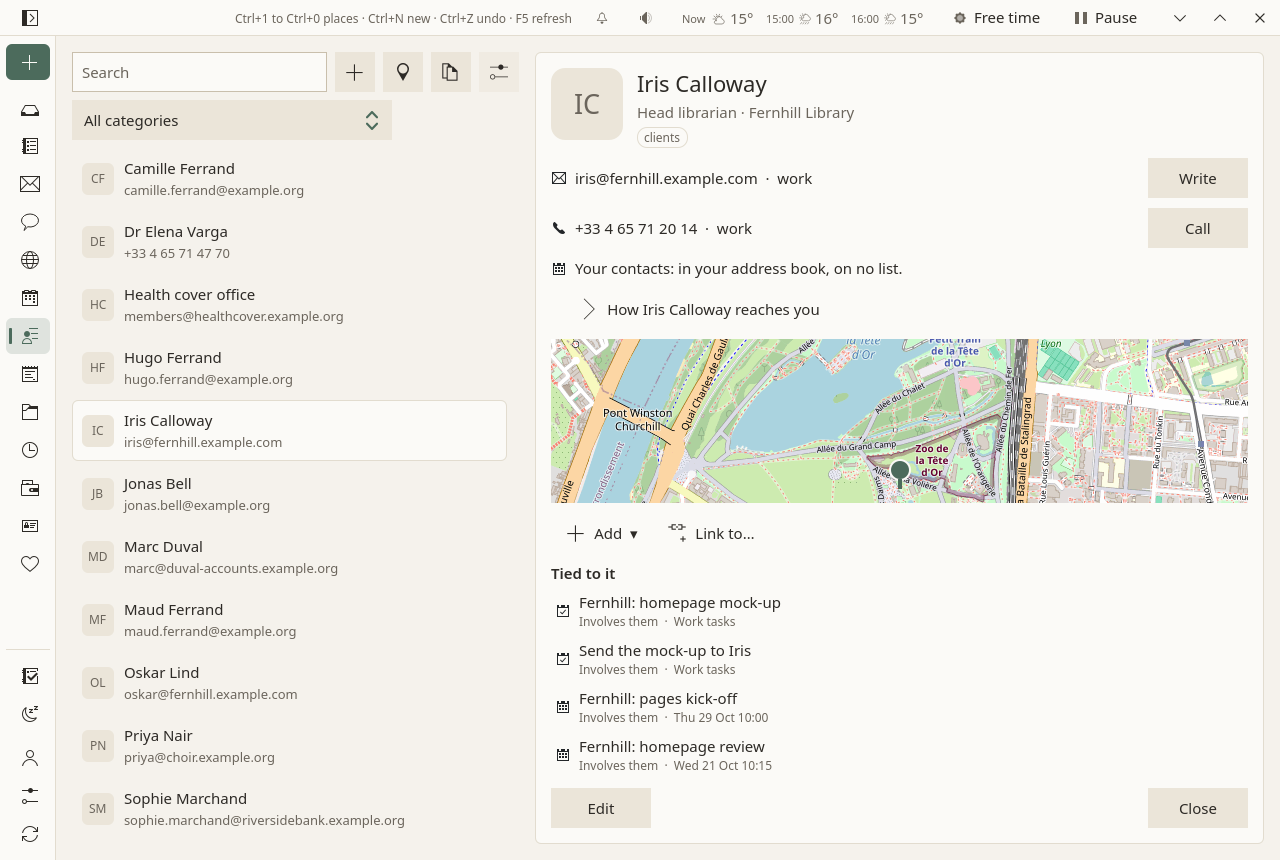
A contact opens on the right:
- its categories, small labels under its name: a click on one shows that category's list;
- its e-mail addresses, each with Write, and its phone numbers, each with Call, which hands the number to your phone, or on a computer to the program that answers phone links;
- How they reach you: who they are to you, in a sentence ("Your contacts: in your address book, on no list."), and their sheet (below);
- a small map with a pin at their address, once it is placed (The map);
- folded under More: their postal addresses, organisation and role, birthday, notes, web sites, and the address book the card is in;
- what is tied to it: the tasks that name them, the events they are invited to, the notes that mention them, and what you tied to them by hand. A message shows there when you tied it to them; the mail search finds the rest of their mail.
To change it, Edit, then Save: it is changed in place. On a phone, Back leaves the form without saving. To add one, the + above the list, or New ▾ ▸ A contact. From a message, Add to contacts makes the sender a contact in one click.
To delete one, Delete: it waits ten seconds, with Undo.
To move one to another address book, across accounts too, choose it under Address book on its card. When the other place would not keep something (Google keeps less than an open server), Sioul says what, and asks before moving.
When you write a message, addresses are completed from your contacts.
How they reach you
Everyone is on one list, and the same list holds for their mail, their calls and their messages in other apps:
- Safe: family, friends, chosen colleagues. Only you put someone there.
- Your contacts (once "Neutral"): anyone in your address books, until you choose otherwise.
- Restricted: people you would rather hear from only at times you choose.
- Blocked: never, on any channel. Their mail is set aside for good, and their calls are declined.
- Strangers: everyone in none of your address books and on no list. Their first message waits on the Porch, in the screener, until you let them in.
Your choice for the person comes first; then their categories, when a list names one of them ("Friends" are safe); then their address book. How … reaches you opens their sheet: their list and why, Always through for the few who should always get through, what reaches you from them at each time of your day, and their calls of the month, rung or declined. When each list reaches you is yours to change, in Settings ▸ What reaches you: by default, for example, a neutral person's mail comes in your working and admin hours, and a stranger's call goes to your voicemail once a phone of yours screens calls.
Categories
Categories are the groups Nextcloud Contacts shows: "Family", "Friends", "Neighbours"; a card can have several. In the form, under Categories, × takes one off, and the field after them adds one, chosen among those your cards already have or typed. "amis" and "Amis" are one category, written as your cards first wrote it.
They are saved in the card itself, so Nextcloud, your phone and other programs see them, and a card saved in Sioul keeps those it had. A list can name a category (Settings ▸ What reaches you, "Your contacts' categories"): its people then reach you as that list says, by mail, by phone and through other apps' messages, unless you chose otherwise for them on their card. Nothing goes on a list by itself, family and friends included.
Duplicates
Duplicates, above the list, looks for two things, and changes nothing until you click:
- A number or an e-mail address written twice on one card. "04 65 71 12 34" and "+33 4 65 71 12 34" are one number: spaces, dots and the country's prefix aside. Each card concerned is listed with what would go, ticked; Take the duplicates off keeps one of each, the one written with its country, with what the others said of it (mobile, work).
- Two cards that may be one person: the same name (in any order, case and accents aside), the same number, or the same e-mail address. They come one pair at a time, side by side, with what they share. Choose the name kept, then Merge: one card keeps everything of both (numbers, e-mail and postal addresses, web sites, categories, notes, and the photo, organisation and birthday of the name kept when it has them), and the other is deleted, here and on the server. Not the same keeps them apart and never asks again on this device; Later shows the next pair.
Done lately lists what was cleaned and merged, each with Undo, for thirty days: the cards come back as they were, here and on the server. Contacts kept on this device only are handled the same way.
Numbers written without their country
"04 65 71 12 34" has no country: Sioul reads it as a number of the country set in the Contacts settings, by default your system's (France for French). This only serves to compare numbers: your cards keep them as they are written.
The map
The map button above the list shows everyone with a postal address on one map, a pin each; a pin opens the card.
To be placed, an address has to be turned into a point on the map. Sioul does not do it by itself: the first time, it asks.
Placing your contacts
Place them sends your contacts' postal addresses to OpenStreetMap's geocoder (Nominatim), once each, one a second. Nothing else goes with them. The places found are kept on this device, and each address is asked only once.
The map images come from OpenStreetMap, fetched sparingly and kept. You can give another source in the settings.
On a phone
On Android, Sioul syncs your address books itself and keeps its own copy of them, apart from the phone's contacts. With your leave, it reads the phone's contacts, and only for three things: to name a caller your address books do not know, to recognise who wrote in another app's notification, and to see which of your Always through people are starred for Android's do-not-disturb. It never writes a contact or a star: for someone who should be starred, it opens their contact in your Contacts app, or that app's own form, filled, for you to save. When the phone screens your calls (Calls), a blocked person's calls are declined before the phone rings.
The Contacts settings
The ⚙ at the top of the page:
- Address books: renamed here, and on the server at the next sync. An empty address book can be deleted; one holding contacts stays.
- Place contacts on the map: on or off.
- Map tiles: where map images come from, as
https://…/{z}/{x}/{y}.png. Empty: OpenStreetMap's. - Country for phone numbers written without one: the country "04 65 71 12 34" belongs to, to find the same number written "+33 4 65 71 12 34". By default, your system's.
Where contacts live
On your contacts server, as standard cards: your phone and other programs see them. Editing in Sioul changes only what you changed: a photo or another program's fields stay as they were. When a card was changed both here and on the server between two syncs, the server's version is kept, and yours is set aside among the earlier versions (Settings ▸ Your folder and sharing ▸ Show earlier versions, under Your calendars and contacts), on a phone too, to put back if you prefer it; the status line says so.
Google contacts work the same way, with less kept: Sioul writes them as Google reads them, and says what would be lost before moving a contact there.
Not there yet
Changing a contact's photo in Sioul is planned. vCard files cannot be imported or exported from a button yet: your cards are plain .vcf files in Sioul's data folder, which other programs read. Sioul makes no calendar of your contacts' birthdays, and keeps no bin for deleted contacts beyond the ten seconds of Undo.
Going further
- When two cards are taken for one person: a number, an e-mail address or a name that more than four cards share (a switchboard, an office, a common name) says nothing of one person, so it makes no pair. The pairs that share most come first. Cards you can only read are never cleaned nor merged.
- What a merge keeps: the card of the name kept stays as it is, and takes from the other what it lacks: numbers, e-mail and postal addresses, web sites, chat addresses, categories, nicknames, public keys; the notes of both, joined; the other's photo, organisation and birthday only when the kept card has none.
- Undo after a sync: when a card changed after its cleaning or merge (a sync, an edit), its new version is set aside in a file before the older one is written back, so nothing is lost either way.
- Who decides a person's list, the most precise first: their own address or number on a list; their card; their categories; a domain or the start of a number (
*@example.org, a switchboard's first digits); then neutral, when they are in an address book or you let them in. At the same level, blocked comes before restricted, neutral and safe. - A card's photo is read from the card itself. A card whose photo is a web address (
httpsonly) has it fetched from there when the card shows: the one request a card can make by itself.
Compared with other apps
Finding duplicates is not Sioul's alone. Google Contacts suggests merges under "Merge & fix". Apple Contacts looks for duplicates on the Mac, and on iPhone and iPad finds cards with the same first and last name. KAddressBook finds cards with the same name or nickname, or a shared e-mail address, and Proton Contacts offers to merge cards with the same name. What Sioul does its own way:
- It merges the cards themselves, on the server that keeps them, your own or Google's, so that your phone and every other app then see one card. KAddressBook does too; GNOME Contacts and Fossify only show two cards as one, in their own window.
- It compares numbers by each country's numbering plan, so that "04 65 71 12 34" and "+33 4 65 71 12 34" are one number, where GNOME Contacts compares their last seven digits.
- It leaves out what many cards share: a number, an e-mail address or a name on more than four cards makes no pair.
- It undoes each merge on its own, for thirty days, here and on the server, where Google, and Apple on iCloud.com, can only put the whole address book back to an earlier moment, and KAddressBook, Proton and Nextcloud describe no undo.
As of October 2026, from each app's own documentation.
✓ documented; partly, with a note; ✗ not found in the app's own documentation (for Sioul: not built); ? not confirmed; — not applicable. Sioul's column was checked against its code.
| Sioul | Apple | Outlook | Thunderbird | DAVx⁵ + Fossify | ||
|---|---|---|---|---|---|---|
| Finds duplicates and merges them when you say so | ✓ | ✓ | ✓ | partly¹ | partly² | partly³ |
| Takes "04 65 71 12 34" and "+33 4 65 71 12 34" as one number | ✓ | ?⁴ | ? | ? | partly⁵ | partly⁶ |
| Undoes a merge later | ✓⁷ | partly⁸ | partly⁹ | ?¹⁰ | ✗ | —¹¹ |
| Shows your contacts on a map | ✓ | partly¹² | partly¹² | ? | ✗¹³ | partly¹⁴ |
| Groups that follow you to your other devices | ✓ | partly¹⁵ | ✓ | ✓¹⁶ | partly¹⁷ | ✓ |
| Blocks someone on every channel at once | ✓¹⁸ | partly¹⁹ | ✓²⁰ | partly²¹ | partly²¹ | partly²² |
| Lets chosen people through at chosen times | ✓²³ | partly²⁴ | ✓ | partly²⁵ | ✗ | partly²⁶ |
| Lists the tasks, events and notes tied to the person | ✓ | partly²⁷ | ? | partly²⁸ | ✗²⁹ | ✗ |
| Lists the mail you exchanged with them | ✗³⁰ | partly²⁷ | ? | ✓ | partly²⁹ | ✗ |
| Gets a deleted contact back | partly³¹ | ✓ | partly⁹ | ✓ | ✗ | ✗ |
| Imports and exports vCard files | ✗³² | ✓ | ✓ | partly³³ | ✓ | ✓ |
| Puts your contacts' birthdays in your calendar | ✗³⁴ | ✓ | ✓ | ✓ | ✗ | ✓³⁵ |
- New Outlook and Outlook on the web hide a card that is an exact copy or a subset of another, without asking and without merging; classic Outlook asks only when you save or import a duplicate.
- Only with the Duplicate Contacts Manager add-on, made by someone else: you edit or delete one card of each pair.
- Fossify shows cards with the same name as one entry, without asking; the stored cards are not merged.
- Google keeps each number's international form, but does not say whether it finds duplicates by it.
- With the add-on of note 2, once given a country code; numbers are compared, never rewritten.
- On a contact's screen, numbers that end with the same nine digits are shown once.
- Each cleaning and each merge on its own, for thirty days.
- "Undo changes" puts the whole address book back to a moment of the last 30 days, undoing every later change.
- No undo of a merge and no bin are described; iCloud.com can put back a whole earlier copy of your contacts.
- New Outlook merges nothing; classic Outlook describes no undo of its "Update information of selected contact".
- Nothing is merged in storage: turning the setting off shows the cards apart again.
- One contact's address opens in Google Maps, or in Apple's Maps; a map of all your contacts is not described.
- "Get Map" went away with the new address book of Thunderbird 102; the request to bring it back is open.
- A postal address opens in the map app you installed.
- Labels show in Gmail and in Google's Android app; Google's CardDAV does not carry them to other apps.
- Within Outlook's apps on the same Microsoft account.
- Mailing lists, in address books kept on the computer only; a server's groups are not shown yet.
- Their mail is set aside, their messages in other apps never come, and their calls are declined on an Android phone that screens calls.
- Android's Contacts app blocks a contact's calls and texts; Gmail blocks mail apart, and neither applies to the other.
- One block covers Phone, FaceTime, Messages and Mail, on every device of the same Apple Account.
- Mail only, through a block list or a filter; it handles no calls.
- Calls and texts, through Android's blocked numbers; no mail.
- Mail on every device; calls and other apps' messages on an Android phone that runs Sioul.
- Android's modes let chosen people's calls and messages through; mail is apart.
- Its phone app mutes its notifications on a schedule; letting chosen people through is not described.
- Android's do-not-disturb can let starred contacts through.
- For work and school accounts only: mail conversations and meetings with people of your organisation.
- The profile card in Outlook's phone app shows the events you share.
- A button searches the contact's mail, another makes an event with them; the card lists nothing.
- Only a message you tied to them; the mail search finds the rest.
- Undo for ten seconds after Delete; no bin after that.
- No button yet; your cards are plain
.vcffiles that other programs read. - Classic Outlook opens and saves single vCards; new Outlook and the web import and export CSV only.
- Sioul makes no birthday calendar; one your server keeps (Nextcloud keeps one) shows as any other calendar you can only read.
- In Fossify Calendar; Etar has none.
| Sioul | Apple | Outlook | Thunderbird | DAVx⁵ + Fossify | ||
|---|---|---|---|---|---|---|
| Any CardDAV server, read and write | ✓ | partly¹ | ✓ | ✗² | ✓ | ✓ |
| Google contacts, read and write | ✓ | — | partly³ | partly⁴ | ✓⁵ | ✓⁶ |
| Keeps groups inside each card, where other apps find them | ✓ | ✗⁷ | ✗⁷ | partly⁸ | ✗⁹ | ✓¹⁰ |
| Contacts encrypted end to end | ✗¹¹ | ✗ | ✗¹² | ✗¹³ | ✗ | ✗ |
| Free software | ✓ GPL-3.0+ | ✗ | ✗ | ✗ | ✓ MPL-2.0 | ✓ GPL-3.0 |
- Other apps reach Google's contacts by CardDAV; Google Contacts cannot add another server's address book.
- Microsoft lists no CardDAV among the accounts Outlook adds, and says Outlook for Mac does not support it.
- Read and write on iPhone and iPad; read only on the Mac.
- New Outlook and Outlook's phone app copy a Gmail account's contacts into Microsoft's cloud; classic Outlook imports a CSV export.
- Through Google's CardDAV and Google's sign-in; labels do not come through.
- Through Android's own Google account, or through DAVx⁵, which calls it "not officially supported"; labels do not come through.
- Groups are objects of their own (Google's labels, Apple's groups), not words in each card.
- Categories are kept on each contact, in Microsoft's own format.
- A server's groups and categories are not shown yet.
- DAVx⁵ keeps groups as categories in each card, or as cards of their own, as you choose for each account.
- Contacts on a server can be read by that server, as with every CardDAV app. What Sioul shares between your devices (who is on which list, the calls screened, the address books kept on a device) is sealed.
- Not with Advanced Data Protection either: Apple says CardDAV has no end-to-end encryption built in.
- Encrypted on the way and on Microsoft's disks, with keys Microsoft holds.
Other address books. GNOME Contacts suggests linking two cards that share a number, an e-mail address or a similar name, remembers a "no", and lets you unlink them at any time; it leaves both cards as they are in their address books. Nextcloud Contacts merges two cards you pick, side by side, field by field, and keeps groups in each card as Sioul reads them; it does not look for duplicates by itself. Proton Contacts encrypts every field of a card end to end, except the name and the e-mail addresses, and has no CardDAV.
Sources
- Google Contacts: merging duplicates ("Merge & fix"), https://support.google.com/contacts/answer/7078226, read 8 October 2026.
- Google Contacts: deleting, restoring and blocking contacts, and undoing changes, https://support.google.com/contacts/answer/7280886, read 8 October 2026.
- Google Contacts: contacts on Android, grouped and labelled, https://support.google.com/contacts/answer/30970, read 8 October 2026.
- Google Maps: a contact's address on the map, https://support.google.com/maps/answer/3131570, read 8 October 2026.
- Google Account: blocked users, and what a block covers, https://support.google.com/accounts/answer/6388749, read 8 October 2026.
- Gmail: blocking a sender, https://support.google.com/mail/answer/8151, read 8 October 2026.
- Android: modes and do-not-disturb, https://support.google.com/android/answer/9069335, read 8 October 2026.
- Phone by Google: Call Screen, https://support.google.com/phoneapp/answer/9118387, read 8 October 2026.
- Google Workspace Updates: the contact page for work accounts (June 2021), https://workspaceupdates.googleblog.com/2021/06/update-google-contacts-experience.html, read 8 October 2026.
- Google Calendar: birthdays, https://support.google.com/calendar/answer/6084659, read 8 October 2026.
- Google People API: CardDAV, https://developers.google.com/people/carddav, read 8 October 2026.
- Google People API: the person resource (numbers' international form), https://developers.google.com/people/api/rest/v1/people, read 8 October 2026.
- Google People API: contact groups, https://developers.google.com/people/api/rest/v1/contactGroups, read 8 October 2026.
- Apple Contacts for Mac: merging contact cards, https://support.apple.com/guide/contacts/merge-contact-cards-adrbk1456/mac, read 8 October 2026.
- iPhone User Guide: merging or hiding duplicate contacts, https://support.apple.com/guide/iphone/merge-or-hide-duplicate-contacts-iph2ab28320d/ios, read 8 October 2026.
- iCloud User Guide: restoring contacts, https://support.apple.com/guide/icloud/restore-contacts-mm1d9cfdb498/icloud, read 8 October 2026.
- Apple Contacts for Mac: a contact's address on a map, https://support.apple.com/guide/contacts/show-a-contacts-address-on-a-map-adrb183385bb/mac, read 8 October 2026.
- Apple Personal Safety User Guide: blocking calls and messages, https://support.apple.com/guide/personal-safety/block-calls-and-messages-ipsac1e87c54/web, read 8 October 2026.
- iPhone User Guide: Focus, allowing people, https://support.apple.com/guide/iphone/allow-or-silence-notifications-for-a-focus-iph21d43af5b/ios, read 8 October 2026.
- iPhone User Guide: screening and blocking calls, https://support.apple.com/guide/iphone/screen-and-block-calls-iphe4b3f7823/ios, read 8 October 2026.
- Apple Calendar for Mac: holidays and birthdays, https://support.apple.com/guide/calendar/show-holidays-and-birthdays-iclead4e0ec3/mac, read 8 October 2026.
- Apple Contacts for Mac: accounts and what they let you change, https://support.apple.com/guide/contacts/update-contact-information-adrbk1515/mac, read 8 October 2026.
- Apple Developer: CNGroup, https://developer.apple.com/documentation/contacts/cngroup, read 8 October 2026.
- Apple: iCloud data security overview, https://support.apple.com/en-us/102651, read 8 October 2026.
- Outlook: managing duplicate contacts, https://support.microsoft.com/en-us/Outlook/people/manage-duplicate-contacts-in-outlook, read 8 October 2026.
- Outlook on the web: contacts and lists, https://support.microsoft.com/en-us/outlook/using-contacts-people-in-outlook-on-the-web, read 8 October 2026.
- Outlook: blocking senders, https://support.microsoft.com/en-us/Outlook/mail/block-or-unblock-senders-in-outlook, read 8 October 2026.
- Outlook: notifications on a phone, https://support.microsoft.com/en-us/outlook/how-can-i-turn-push-notifications-and-sounds-on-or-off, read 8 October 2026.
- Microsoft 365: profile cards, https://support.microsoft.com/en-us/Outlook/profile-cards-in-microsoft-365, read 8 October 2026.
- Outlook.com: contacts and contact lists, https://support.microsoft.com/en-us/outlook/create-view-and-edit-contacts-and-contact-lists-in-outlook-com, read 8 October 2026.
- Outlook: restoring a deleted contact, https://support.microsoft.com/en-us/Outlook/people/restore-or-recover-a-deleted-contact-in-outlook, read 8 October 2026.
- Outlook: importing vCards, https://support.microsoft.com/en-us/outlook/import-vcards-to-outlook-contacts, read 8 October 2026.
- Outlook for Mac: iCloud calendars, and no CalDAV or CardDAV, https://support.microsoft.com/en-us/outlook/sync-your-icloud-calendar-with-outlook-for-mac, read 8 October 2026.
- Outlook: accounts synced through the Microsoft cloud, https://support.microsoft.com/en-us/Outlook/getstarted/sync-your-account-in-outlook-to-the-microsoft-cloud, read 8 October 2026.
- Microsoft Purview: encryption in Microsoft 365, https://learn.microsoft.com/en-us/purview/encryption, read 8 October 2026.
- Outlook: a birthday calendar, https://support.microsoft.com/en-us/outlook/calendar/add-a-birthday-calendar-and-reminder-in-outlook, read 8 October 2026.
- Thunderbird: bug 259531, merging duplicate contacts (open since 2004), https://bugzilla.mozilla.org/show_bug.cgi?id=259531, read 8 October 2026.
- Thunderbird add-ons: Duplicate Contacts Manager, https://addons.thunderbird.net/en-US/thunderbird/addon/duplicate-contacts-manager/, read 8 October 2026.
- Thunderbird: bug 94407, undo for a deleted card, https://bugzilla.mozilla.org/show_bug.cgi?id=94407, read 8 October 2026.
- Thunderbird: bug 1781076, "Get Map" in the new address book, https://bugzilla.mozilla.org/show_bug.cgi?id=1781076, read 8 October 2026.
- Thunderbird: bug 1764184, a CardDAV server's groups, https://bugzilla.mozilla.org/show_bug.cgi?id=1764184, read 8 October 2026.
- Thunderbird Support: blocking a sender, https://support.mozilla.org/en-US/kb/blocking-sender, read 8 October 2026.
- Thunderbird Support: junk mail and your address books, https://support.mozilla.org/en-US/kb/thunderbird-and-junk-spam-messages, read 8 October 2026.
- Thunderbird blog: the address book of Thunderbird 102, https://blog.thunderbird.net/2022/05/7-great-new-features-coming-to-thunderbird-102/, read 8 October 2026.
- Thunderbird: bug 151994, a birthday calendar from the address book, https://bugzilla.mozilla.org/show_bug.cgi?id=151994, read 8 October 2026.
- Fossify Commons: ContactsHelper.kt, same-name cards shown as one, https://github.com/FossifyOrg/Commons/blob/main/commons/src/main/kotlin/org/fossify/commons/helpers/ContactsHelper.kt, read 8 October 2026.
- Fossify Contacts: issue 607, merging by name only, https://github.com/FossifyOrg/Contacts/issues/607, read 8 October 2026.
- Fossify Contacts: ViewContactActivity.kt, numbers compared on nine digits, https://github.com/FossifyOrg/Contacts/blob/main/app/src/main/kotlin/org/fossify/contacts/activities/ViewContactActivity.kt, read 8 October 2026.
- Android Developers: BlockedNumberContract, https://developer.android.com/reference/android/provider/BlockedNumberContract, read 8 October 2026.
- Android Developers: NotificationManager.Policy, https://developer.android.com/reference/android/app/NotificationManager.Policy, read 8 October 2026.
- Fossify Calendar: its strings ("Add contact birthdays"), https://github.com/FossifyOrg/Calendar/blob/main/app/src/main/res/values/strings.xml, read 8 October 2026.
- Etar: issue 234, birthdays, https://github.com/Etar-Group/Etar-Calendar/issues/234, read 8 October 2026.
- DAVx⁵: tested with Google, https://www.davx5.com/tested-with/google, read 8 October 2026.
- DAVx⁵ manual: technical information (groups), https://manual.davx5.com/technical_information.html, read 8 October 2026.
- KAddressBook: its page, https://apps.kde.org/kaddressbook/, read 8 October 2026.
- KAddressBook: the duplicate search's code, https://invent.kde.org/pim/kdepim-addons/-/blob/master/kaddressbook/plugins/mergelib/job/searchpotentialduplicatecontactjob.cpp, read 8 October 2026.
- KAddressBook Handbook: the command reference, https://docs.kde.org/stable_kf6/en/kaddressbook/kaddressbook/commands.html, read 8 October 2026.
- Proton: merging contacts, https://proton.me/support/merge-contacts, read 8 October 2026.
- Proton: Proton Contacts and its encryption, https://proton.me/support/proton-contacts, read 8 October 2026.
- Proton: adding and importing contacts, https://proton.me/support/adding-contacts, read 8 October 2026.
- GNOME Help: linking and unlinking contacts, https://help.gnome.org/gnome-help/contacts-link-unlink.html, read 8 October 2026.
- GNOME Contacts: contacts-store.vala, https://gitlab.gnome.org/GNOME/gnome-contacts/-/blob/main/src/contacts-store.vala, read 8 October 2026.
- GNOME folks: phone-details.vala, numbers compared on seven digits, https://gitlab.gnome.org/GNOME/folks/-/blob/main/folks/phone-details.vala, read 8 October 2026.
- GNOME Contacts: issue 145, linking two cards of one Nextcloud address book, https://gitlab.gnome.org/GNOME/gnome-contacts/-/issues/145, read 8 October 2026.
- Nextcloud user manual: Contacts, https://docs.nextcloud.com/server/latest/user_manual/en/groupware/contacts.html, read 8 October 2026.
- Nextcloud Contacts: issue 5619, finding duplicates, https://github.com/nextcloud/contacts/issues/5619, read 8 October 2026.
For technical readers
- vCard: Sioul reads vCard 4.0 (RFC 6350) and 3.0 (RFC 2426), through calcard, and writes new cards in 3.0. An edit rewrites only the lines that changed: an unchanged card comes back byte for byte, and Apple's grouped labels (
item1.X-ABLabel), photos and other programs' fields are kept. Categories are the card'sCATEGORIESlines, as Nextcloud Contacts writes its groups. Groups kept as cards of their own (vCard 4'sKIND:group, Apple'sX-ADDRESSBOOKSERVER-KIND) show as cards, not as categories (Works with). - CardDAV (RFC 6352, over WebDAV, RFC 4918): discovery by
/.well-known/carddav(RFC 6764) and the current user's principal (RFC 5397); changes fetched with the sync token (RFC 6578), else by ETags, inaddressbook-multigetbatches of 50; writes withIf-Match, so nothing is overwritten silently, andIf-None-Match: *for a new card. When both sides changed a card, the server's version wins and yours is kept among this device's earlier versions, to put back from the window. An interrupted sync resumes. - Transport: HTTPS only (an
http://address is refused), TLS by rustls with the system's root certificates. During discovery, a redirect to another domain is not followed, so your password never goes to a host your domain merely points at. Basic authentication, over TLS only. - Google contacts go through Google's own CardDAV, signed in with OAuth 2.0 for native apps (RFC 8252, a loopback redirect) and PKCE (RFC 7636): the refresh token in the keyring, the access token in memory only. Cards are written as vCard 3.0 for Google: labels, birthdays without a year and newer fields are lost there, which Sioul says before a move.
- Secrets: passwords in the Secret Service (KWallet, GNOME Keyring), the macOS Keychain, the Windows Credential Manager, or Android's KeyStore. Passwords never travel between your devices: an account shared from another device asks for its password, which the server checks before this device's keyring keeps it.
- Phone numbers are compared by an E.164 key, built from a table of the numbering plans of 34 countries and territories (the trunk prefix, the international prefix, the numbers' lengths, the French overseas departments), not by libphonenumber. Short codes ("112", "3631") and numbers with letters are compared as written. Values are never rewritten.
- Duplicates: names are compared with case, accents, ligatures (ß, æ, œ) and punctuation folded and their words sorted; a name, number or e-mail address shared by two to four cards makes pairs, ranked by how many kinds of evidence they share. "Not the same" is kept by UID in
$XDG_STATE_HOME/sioul/contacts-not-the-same.toml. A merge keeps the kept card's single-valued properties (ORG,TITLE,BDAY,PHOTO,TZ,GEO…) and adds the multi-valued ones it lacks (ADR,URL,IMPP,RELATED,NICKNAME,KEY,CALURI…); a vCard 4.0 line going into a 3.0 card is converted. Every change is first recorded, with the cards before and after, in$XDG_STATE_HOME/sioul/contacts-undo, for thirty days; a failed write rolls back the ones before it. - Who someone is: their own address or number on a list, then their card (
contact:<UID>), then their categories, then the most precise pattern (*@example.org,tel:+3319900*), then neutral when they are in an address book or were let in, else a stranger; at the same precision, blocked before restricted, neutral and safe. The lists are plain text files; numbers are matched by their E.164 key. - Proof before lists: a message whose SPF and DKIM both fail, with no DMARC pass, is judged a stranger's whatever list its address is on, unless an ARC seal (RFC 8617) from your own provider or domain vouches for it once forwarded. A DMARC failure under a
quarantineorrejectpolicy is judged forged and set aside before that. Blocked is checked first and always holds. A name read in another app's notification can only lower someone's standing, never raise it, since anyone can pick any name in a chat. - Geocoding follows Nominatim's usage policy: a User-Agent that names Sioul, one request every 1.1 seconds, over HTTPS, the address alone (its lines joined); the answers, found or not, are kept in
$XDG_CACHE_HOME/sioul/places.toml. The map is Qt Location's OpenStreetMap plugin, with Qt's online lookup of providers turned off; the full map loads tiles only once at least one address is placed. The tile server, as with any web map, sees which areas you look at. - Showing a card: a card comes from a server or from anyone's vCard, so it is shown without markup: notes as plain text, web sites as links only when they are
httporhttps, their text escaped. An embedded photo is kept in the cache, named by its content. - Storage: one
.vcffile per card in vdir folders (~/.local/share/sioul/contacts), which khard and vdirsyncer read too; the sync's state is kept apart. Sioul does not encrypt them on the disk: your disk encryption does. Sioul's data, state and cache folders are made, or narrowed, to mode 0700 at each start on Linux and macOS, so that other accounts on the computer cannot read them; on Android, they are in the app's private storage. - Sealed sharing: each record is encrypted with XChaCha20-Poly1305, under a key made from your passphrase by Argon2id and kept in each device's keyring; the shared folder's server sees which device wrote, when and how much, never what. The part Senders carries the four lists, the senders let in, Always through and others' public keys; Calls carries the screened calls, never a blocked number's; Lists kept here carries the address books kept on a device only. Contacts on a server are not in the sharing: they travel by their server (Sharing).
- Android: Sioul syncs address books into its private storage, not into Android's contacts provider. It asks for
READ_CONTACTSonly, neverWRITE_CONTACTS. Calls are screened as Android's "Caller ID & spam app" (CallScreeningService), from a table Rust writes ahead and Java reads in milliseconds, without the network; a call that cannot be decided rings.