Time and invoices
In short
Sioul notes the time you spend, while you work or afterwards by hand, and keeps it for two uses. For clients, it becomes invoices: what is left to bill stays in view, each hour is billed once, and invoice numbers follow each other without a gap. For you, set beside your guesses, it shows how long things really take, and the plan of your days takes that into account (How long things take). Your time and your invoices stay in plain files on your own devices.
Protected by default
- Your time, your clients and your invoices stay in plain files on your devices. There is no account to open, no subscription, and no server of Sioul's.
- An invoice number is never given twice, even with several devices: one device numbers the invoices, and Sioul waits rather than risk a number twice.
- Time already billed cannot be changed, nor billed again.
- The spreadsheet for your accountant cannot carry a hidden formula: a task title that came from someone's mail is written as plain text.
- When your devices share, your time and your invoices travel sealed, through a folder your own sync carries: the folder and its server see that something changed, never what (Sharing).
The Time page
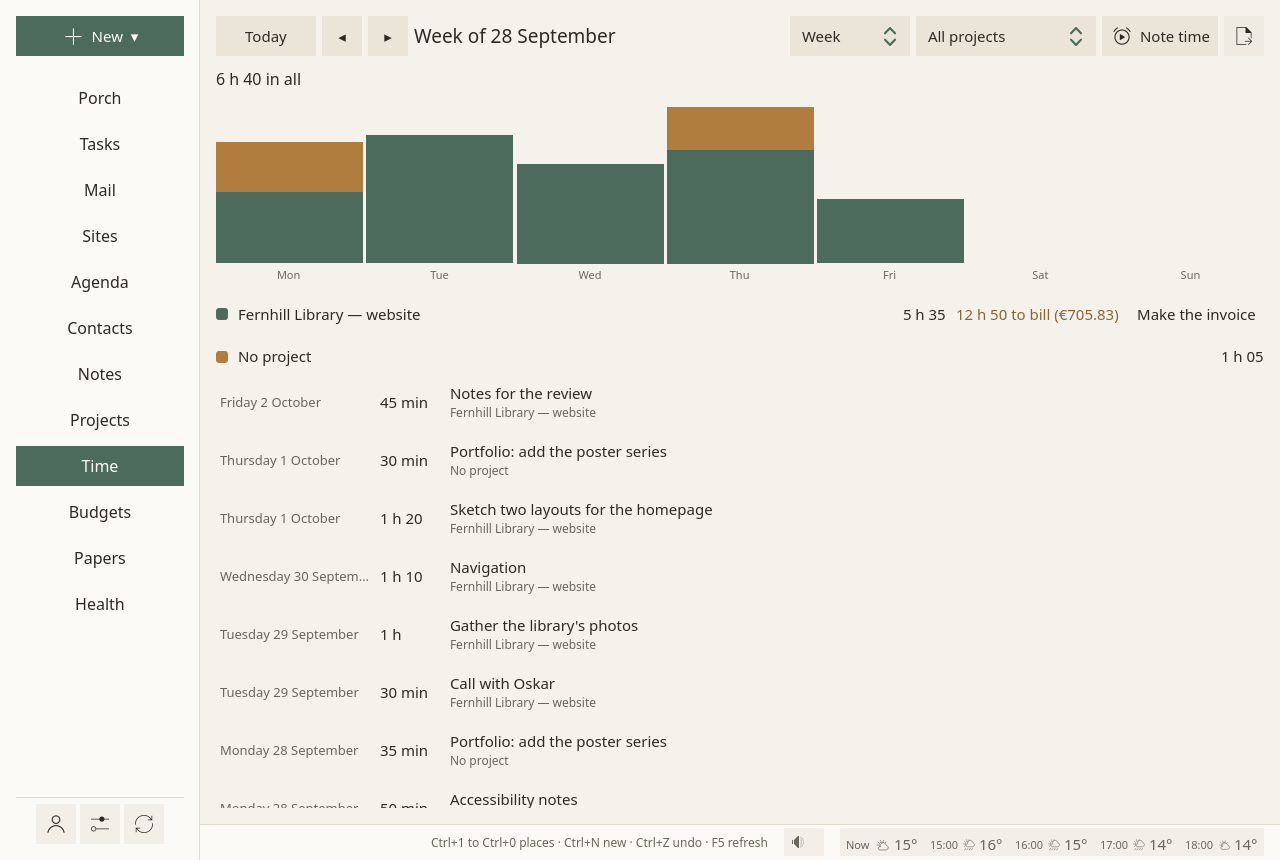
Week, Month or Year, for All projects or one; Today and the arrows ◂ ▸ move through time:
- a bar per day (per month, over a year), stacked by project;
- each project's hours, and what is left to bill, in hours and in money at its rate;
- then each stretch of time, newest first.
Where time comes from
- The focus timer: the minutes of a focus session count for its task, and for the task's project.
- Note time, on this page, on a project's page, or with New ▾ ▸ Time spent: a meeting, a call, work done away from the timer. For (a project, or a task), How long (
1h30,45m,90), When, What it was, and Not to bill when it should not be.
While a focus session runs, on Linux and on a phone, a notification shows it: its task, since when, and Pause (Go on once paused) and Stop, which do what the focus window's buttons do. On a Linux desktop it stays among the desktop's notifications while Sioul is open (in KDE Plasma, under the bell once its popup goes), and goes when Sioul quits. On a phone, a chronometer counts in it, and its buttons work with Sioul in the background or closed. Paused or stopped elsewhere, in the focus window or on another device, it follows. On Windows and macOS, the focus window alone shows the time running, for now.
Click any stretch of time, timed or noted by hand, to change it: its task, its project, its day, from when to when, and what it was; the time the timer kept after a pause you missed comes back that way. A right click also offers Take this time out. Time already on an invoice stays as it was billed.
A timer you forgot is cut when you stop it: past twice the time you chose (or that time and half an hour more, whichever is longer), only the time you chose counts; a session without an end counts three hours at most.
Each stretch says quietly how its minutes were known:
- timed;
- noted by hand;
- timed, then corrected, once you changed a timed stretch's length, or Sioul cut a timer left running;
- not known how, for time noted before Sioul kept this.
Billed or not
Work for a client is billed. A task can say otherwise, under Billed in its panel: As its project says, Its time is billed, or Not billed.
How long things take
A task's Takes about is a guess. The time noted for it is what it took. Sioul sets the two side by side, and corrects your guesses in the plan only: each task takes its corrected length in the plan and in the day, while Takes about stays as you wrote it, and the focus timer starts from it. Only finished tasks teach it, recent ones most; minutes noted by hand count less than timed ones, because remembered durations are less sure. How it learns, in detail: below.
It never scores you, never shows anything as late, never fills in Takes about for you, and never compares you with anyone.
Timing leisure is up to you. Gaps are fine: time not noted is left out, not counted against anything.
A spreadsheet of billable time
The export button, at the top right of the Time page: Billable time, as a spreadsheet (CSV)…, for one project, and a stretch of time (this week, last week, this month, last month, all time, or from one day to another). One line per task, with its hours, the hourly rate and the amount, then the total. In French, the file uses ; and a decimal comma, as French spreadsheets read them. A task title that came from someone's mail is written as plain text: a spreadsheet never runs it as a formula.
Invoices
On a project's page, or beside the project on the Time page, Make the invoice when billable time waits.
- Numbers. With the usual prefix, the year, numbers start again at 001 each January: 2026-001, 2026-002. With a prefix of your own, they go on from the last one, year after year. A number is never given twice, and an invoice cannot be deleted from Sioul.
- Lines: one per task (or per note of time noted without a task), its hours at the project's rate.
- Billed once: the time an invoice bills carries its number; the next invoice leaves it out, and that time can no longer be changed.
- What it prints: your name or business name, your address and your SIRET; the client's name and postal address; its number; the day it is issued, the date or period of the service (the first and last days of the sessions it bills, or their one day), and the day payment is due; the project; each line with its hours, rate and amount, then the total; your VAT line (« TVA non applicable, art. 293 B du CGI » for a micro-entrepreneur); your payment details; and a line on late payment: penalties at three times the French legal interest rate, the €40 recovery fee, and no discount for early payment. « EI » after your name is not added for you: see Not there yet.
- The PDF (A4) goes to
Documents/Invoicesin your home folder, or the folder you chose. Print again writes it anew. - Your budget: the total is expected in the project's budget, due thirty days later. Paid dates it today, and the money counts.
Your name, address, numbers, currency, payment details and hourly rate are set once, in Settings ▸ Invoices.
On several devices
An invoice number must never be given twice. When you share between your devices, one device numbers the invoices: another says "Invoices are numbered on …", and Make invoices on this device takes them over, after a minute and a half, once your other devices know. If your sharing folder cannot be written, or another device has not been heard from for a few minutes, Sioul waits rather than risk a number twice.
In quiet time
Outside working hours, the Time page waits behind Show anyway. See Hours.
Not there yet
- « EI » after your name. An entrepreneur individuel's name must come with the words « entrepreneur individuel » or « EI » (service-public.gouv.fr, sheet F31808). Sioul does not add it by itself: write it right after your name in Settings ▸ Invoices, as the field's help says (« Camille Exemple EI »).
- Electronic invoices. From 1 September 2027, a French micro-enterprise, under the VAT franchise too, must issue its invoices to French businesses electronically, through an approved platform (« plateforme agréée »), in UBL, CII or a mixed format such as Factur-X, with the client's SIREN. From the same date, the data of sales to private individuals and abroad must be reported (e-reporting). Sioul makes PDF invoices only, for now.
- Quotes, fixed-price lines, expenses, VAT amounts and credit notes.
- The time running in the notifications of Windows and macOS: the focus window alone shows it there.
Going further
How the plan learns from your time
- Your first guess is kept. The first time a task gets a length, Sioul keeps it with the task and never changes it, even when you change Takes about later. A task given a length before this existed has none kept; its current length is used instead.
- Only finished tasks teach it, each one's time spent against its first guess, all its stretches added up.
- Timed minutes count fully, corrected ones too.
- Minutes noted by hand count a quarter, because remembered durations are less sure.
- Dropped tasks never count.
- Recent tasks count most: a task's weight halves every four or five days.
- Few tasks, little correction. Until about nine tasks stand behind it, the correction leans toward "a little longer than guessed".
- By what tasks are for: work, your admin and leisure each have their own correction, pulled toward yours until they have enough tasks of their own.
- The plan uses it; you see your own. Each task takes its corrected length in the plan and in the day, while Takes about stays as you wrote it, and the focus timer starts from it.
- The margin is the day's, not each task's. Each day keeps some time free after its last step for steps running long: about enough to cover a day going worse than usual, never more than a third of the day. Once today's first tasks are done, a day going slower keeps more. The next step always keeps part of today.
- On request, in a task's panel, a line such as "Tasks like this usually take about 1.3× the first guess; the plan already allows for it", only once enough tasks stand behind it.
The detail, with what comes from research and what is a guess: What a day holds.
From the command line
sioul focus start <task> [--minutes 25], sioul focus status and sioul focus stop [--done] [--note "…"] run the focus timer from a terminal; its minutes count as the window's do.
Compared with other apps
As of October 2026, from each app's own documentation.
✓ documented; partly, with a note; ✗ not found in the app's own documentation (for Sioul: not built); ? not confirmed; — not applicable. Sioul's column was checked against its code.
Time and invoices
| Sioul | Toggl Track | Clockify | Harvest | Kimai | Freebe | |
|---|---|---|---|---|---|---|
| A timer, and time noted by hand | ✓ | ✓ | ✓ | ✓ | ✓ | ✓ |
| A timer left running is caught | partly¹ | ✓² | ✓² | ? | partly³ | ? |
| Billable or not, with hourly rates | ✓ | ✓⁴ | ✓⁴ | ✓ | ✓ | ✓ |
| What is left to bill, per project | ✓ | ✗⁵ | partly⁶ | ✓ | partly⁷ | ? |
| Invoices made from the time | ✓ | partly⁸ | ✓⁹ | ✓ | ✓ | ✓ |
| Each hour billed once, never twice | ✓ | ✗⁵ | ✓ | ✓ | ✓ | ? |
| Invoice numbers in sequence, by themselves | ✓¹⁰ | ✗¹¹ | ✓¹² | ✓¹² | ✓ | ✓ |
| Quotes, expenses or VAT amounts | ✗ | partly¹³ | ✓ | ✓ | ✓ | ✓¹⁴ |
| A spreadsheet for your accountant | ✓ | ✓ | ✓ | ? | ✓ | ? |
- Cut when you stop it: past twice the time you chose (or that time and half an hour), the time you chose counts; without an end, three hours at most. Nothing watches whether you are at your computer.
- Idle detection: Toggl Track in its desktop apps and browser extension; Clockify on Mac, Windows and in Chrome.
- A longest entry, 8 hours unless the administrator changes it.
- Billable rates from Toggl Track's Starter plan and Clockify's Basic plan.
- Toggl Track does not mark time as invoiced; its help suggests tagging billed entries by hand.
- Invoiced entries carry an "Invoiced" mark in the Detailed report; a left-to-bill total is not described.
- The records not yet exported are what the next invoice takes; a left-to-bill amount is not described.
- A PDF made from a report, every field editable; the invoice is not kept in Toggl Track.
- From the Standard plan.
- Never given twice, also across your devices: one device numbers them. With the usual prefix, the series starts again each year.
- The invoice ID is typed by hand.
- Automatic by default; it can be changed.
- A tax field, typed on the invoice.
- Quotes, credit notes and deposit invoices.
France, and where your data lives
| Sioul | Toggl Track | Clockify | Harvest | Kimai | Freebe | |
|---|---|---|---|---|---|---|
| French legal mentions printed for you | partly¹ | ? | ? | ? | ?² | ✓ |
| Electronic invoices for France (Factur-X, UBL, CII) | ✗³ | ? | ? | ? | partly⁴ | ✓ |
| Works without a connection | ✓ | ✓⁵ | ✓⁵ | ? | ? | ? |
| Your time on your own devices, no account | ✓ | ✗ | ✗ | ✗ | partly⁶ | ✗ |
| Free software | ✓ | ✗⁷ | ✗⁷ | ✗⁷ | ✓ | ✗⁷ |
- Printed: SIRET, the VAT exemption line, the date or period of the service, the late-payment penalties, the €40 fee, no discount for early payment. Not printed for you: « EI » (type it after your name), and the client's SIREN, which micro-enterprises must give from 1 September 2027.
- Its invoice templates are yours to edit; no French template was confirmed.
- Sioul makes PDF invoices. From 1 September 2027, a French micro-enterprise must issue invoices to French businesses electronically, through an approved platform.
- With a paid plugin, 99 € a year: Factur-X, ZUGFeRD, XRechnung, UBL and CII.
- Toggl Track's desktop apps; Clockify on Mac, Windows, Linux, Android and iOS. Both send the time to their servers once back online.
- On your own server, or in Kimai's cloud.
- A hosted service under its own terms; no free-software licence is published for it.
Others do more for invoicing itself: idle detection (Toggl Track, Clockify); quotes, expenses, VAT, credit notes and payment links (Clockify, Harvest, Kimai, Freebe); electronic invoices for the French reform (Freebe, and Kimai with a plugin); URSSAF declarations (Freebe); teams, approvals and integrations (the four commercial ones). Sioul keeps what is left to bill, bills each hour once, numbers without a double even across devices, feeds the same time to the plan of your days, and keeps it all on your own devices.
Sources
All read on 8 October 2026.
- Toggl Track, its help on invoices and on the Windows desktop app, its desktop apps page and its prices: https://support.toggl.com/creating-invoices-in-toggl-track, https://support.toggl.com/en-us/article/toggl-track-desktop-app-for-windows-5w1y5/, https://toggl.com/track/toggl-desktop/, https://toggl.com/track/pricing/
- Clockify, its help on invoices and on invoicing tracked time, its invoicing and apps pages, and its prices: https://clockify.me/help/projects/invoicing, https://clockify.me/help/projects/invoicing-tracked-time-expenses, https://clockify.me/features/invoicing, https://clockify.me/apps, https://clockify.me/pricing
- Harvest, its invoicing page, its API documentation (uninvoiced report, invoices, time entries), its apps and its prices: https://www.getharvest.com/features/invoicing, https://help.getharvest.com/api-v2/reports-api/reports/uninvoiced-report/, https://help.getharvest.com/api-v2/invoices-api/invoices/invoices/, https://help.getharvest.com/api-v2/timesheets-api/timesheets/time-entries/, https://www.getharvest.com/apps, https://www.getharvest.com/pricing
- Kimai, its documentation on invoices, exports and timesheets, its e-invoice plugin and its repository: https://www.kimai.org/documentation/invoices.html, https://www.kimai.org/documentation/export.html, https://www.kimai.org/documentation/timesheet.html, https://www.kimai.org/store/invoice-bundle.html, https://github.com/kimai/kimai
- Freebe, its home page, its pages on time and on invoices, and its prices: https://www.freebe.me/, https://www.freebe.me/fonctionnalite/gestion-du-temps, https://www.freebe.me/fonctionnalite/facture-client, https://www.freebe.me/tarifs
- French law, service-public.gouv.fr's sheet on an invoice's mandatory mentions (updated 11 August 2026), the BOFiP on invoice numbers, impots.gouv.fr on electronic invoicing (modified 26 May 2026), and service-public.gouv.fr's news of 2 September 2026: https://entreprendre.service-public.gouv.fr/vosdroits/F31808, https://bofip.impots.gouv.fr/bofip/140-PGP.html/identifiant=BOI-TVA-DECLA-30-20-20-10-20131018, https://www.impots.gouv.fr/professionnel/je-decouvre-la-facturation-electronique, https://entreprendre.service-public.gouv.fr/actualites/A18953
For technical readers
- Time records: TOML, one file a month (
~/.local/share/sioul/time/2026-10.tomlon Linux), the running session intime/running.toml, so closing the window loses nothing. Each record says how its minutes were known (kind: measured, typed, corrected). - A timer left running: a session past
max(2 × chosen, chosen + 30)minutes counts the time chosen; one without an end counts 180 minutes at most; either is then marked corrected. - Invoices: one record each (
invoices/<number>.toml), written whole then renamed into place, holding your details as they were that day; a record that no longer reads still holds its number. The PDF is A4, with 18 mm margins, written by Qt'sQPdfWriterfrom aQTextDocument. - Numbering: the highest number of the prefix plus one, three digits. The default prefix is the year and a dash, so that series starts again each year; a prefix of your own simply continues.
- Billed once: each session billed carries its invoice's number, and a new invoice leaves out every session that has one.
- One numbering device: a lease in the sharing folder (
leases/invoices/<computer>.lease, sealed like the records), renewed each minute and alive for five; another device acts only after 90 seconds of settling, and only while the other devices were heard from lately (Sharing). - The spreadsheet: RFC 4180 quoting; a cell starting with
=,+,-,@, a tab or a carriage return gets a leading quote, so that a spreadsheet never runs it as a formula (CSV injection);;and a decimal comma in French. - Sharing: the Time part carries the time records, the running session and the day's reviews; Drafts and invoices carries the invoice records. Each record is sealed with XChaCha20-Poly1305 under a key made from your passphrase with Argon2id (64 MiB, 3 passes) and kept in each device's keyring (Sharing).
- How long things take, in numbers: y = ln(time spent ÷ first guess) on finished tasks; weights halve every 4.5 days; typed minutes weigh a quarter; pulled toward 1.1× until about nine tasks, and per area toward yours; robust to outliers (three scaled median deviations, held within ×8 and ÷8); each day keeps the 85th percentile of a seeded simulation as free time, at most a third of the day (What a day holds).