Tasks¶
In short¶
A plan written as a list is a wall: every line is there at once, and the next step has to be found again each time. Sioul turns the plan into tasks that wait for each other, and shows the one step to take now, with the reason. It lays out your day by itself, around your events, your meals and your rest, in the hours you keep for each kind of work, and nothing is ever overdue. You say how the day is, clear, haze or fog, and a hard day holds less. Your tasks are standard tasks on your own calendar server, which your phone and your other programs see.
Protected by default¶
- Your tasks go only to the calendar server you chose, always over an encrypted connection: Sioul refuses a server address that is not encrypted.
- Your password stays in your system's keyring, never in a file Sioul writes. With Google, you sign in on Google's own page; Sioul never sees your Google password.
- How each day went, the time you spent and where you stopped stay in plain files on your devices. Between your devices they travel sealed, through a folder your own sync carries: the folder and its server see that something changed, never what (Sharing).
- A list can live on this device only. It then reaches your other devices only through that sealed sharing.
- What you rate on a task (what it costs, what it gives back, how it was) is part of the task, so it is stored on your calendar server like the rest of the task. Choose a server you trust with it, or a list kept on this device.
- GitHub, if you turn it on, is only read, with a token of yours kept in your keyring: nothing is written to GitHub.
- There is no server of Sioul's. Nothing about your tasks or your days goes anywhere you did not set up.
Now¶
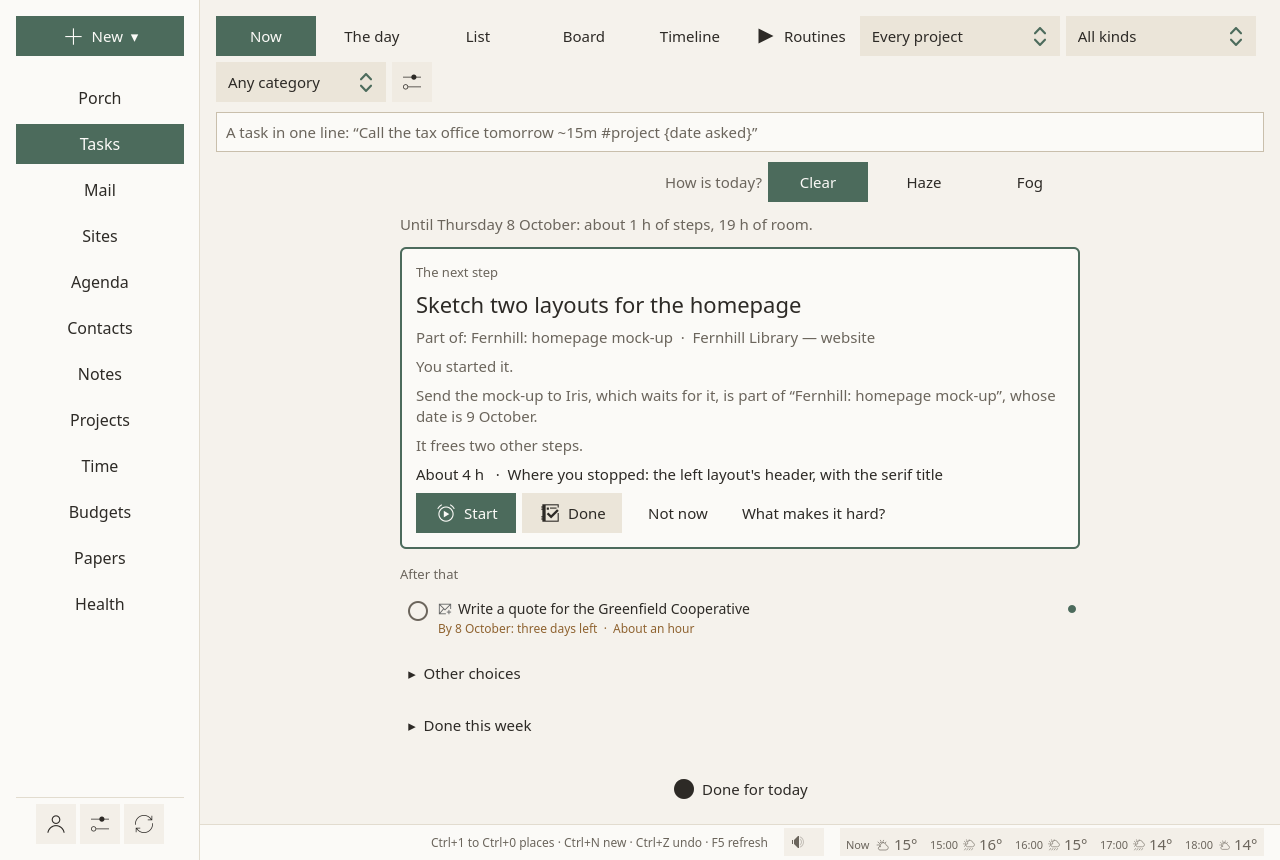
Now shows one step, why it comes now, and the one after it:
- "Its date is 30 October: three weeks left."
- "It frees two other steps."
- "Nothing comes before it."
When several steps are equal, Sioul picks one and says so; it does not hand you a choice to make. Two other choices wait behind Other choices. Folded below: what is started, what you might do if you want, and what got done this week.
Five buttons: Start, Done, Not now, Details (the task's details, nothing started) and What makes it hard?
Finishing says what it changed, once, in the status line: "Done. This frees: Send the registered letter."
A new task¶
New task, beside the line at the top of the page, opens a new task's whole form on the right (on a phone, it takes the page), its title first. New ▾ ▸ A task does the same from anywhere, and so does Add ▾ ▸ A task on a message, an event, a note, a contact or a project, its title and its tie already given.
- Every field is there at once: the list, the dates, how long it takes, what it waits for, the time before and after, what it costs and what it gives back, the notes.
- The task is made as soon as it has a title: press Enter, or go on to another field. From then on, each field is kept as you change it, as for any task.
- Closing the form keeps what you typed: with a title, the task is made; without one, nothing is. A task made by mistake is deleted like any other, with Undo.
Making a task in one line¶
The line at the top of the page takes a task in one sentence, from anywhere on the page:
At the end of the line, in English or French:
| Write | For |
|---|---|
| tomorrow, friday, next week, in 3 days, 30/10, 30 October (or demain, vendredi, dans 3 jours…) | the day it can start |
~15m |
how long it takes |
#taxes |
a project or a tag |
{30/10} |
the date asked, from outside: a deadline |
@call, @write, @online, @out, @read, @think, @make |
its kind |
What Sioul understood shows as small labels before you press Enter. A first word that says it plainly also gives the kind: "Call…" is a call. "Ask…" says nothing, since it could be a call or a message. Enter makes the task and opens it on the right.
Tasks live in a task list, on your calendar server or on this device only. The first time, Make the list makes one in a click.
Nothing is overdue¶
- A day to start that has passed says nothing: the task is simply free.
- A date asked from outside is said as time left: "By 30 October: three weeks left". Once passed, "Date asked: 1 October". Never in red, never counted.
- The plan always starts from today. A new day starts clean.
Not now is honoured without argument. It puts the step off until tomorrow, with the steps tied to it (those that wait for it, or that are part of the same task), so that the next step comes from something else.
Nothing counts what you did not do: no streak, no score, no count of postponements. Done this week, folded under Now, shows what got done.
How is today?¶
At the top of the page: Clear, Haze or Fog. Only you know; nothing is guessed from what you do.
- Haze keeps less for today.
- Fog shows only small steps. One step is a full day.
Haze and fog lower what today holds as well as its room (What a day holds). Saying how today is can only make the day lighter, never fuller.
A task can also say what it takes, in its panel: light, the usual, heavy, or it gives back (a walk, music). A clear day takes two heavy tasks, a hazy day one, a foggy day none. What gives back takes no room in the plan and is never pushed: after a heavy step, it is offered. Once one of its costs is rated (below), the word follows the ratings instead of being chosen.
Starting, and stopping¶
Starting is the hard part, so it is helped. Start offers Just two minutes first, then 15, 25 or 45 minutes, or Without an end.
The focus window stays on top while you work elsewhere. A disc drains, in a neutral colour, without ticking and without sound. On Linux and on a phone, a notification also shows the time running, with Pause and Stop (Time).
- While it runs: Pause (Go on once paused), Five more minutes when the session has an end, and Stop.
- Two minutes before the end: "Two minutes left: time to find a stopping point."
- At the end: Keep going, or Stop here, it counts.
- Stopping offers one line, Next time, start by…, shown when the task comes back.
The time is noted for the task, and for its project: to bill it, and to learn how long things really take (Time). A timer you forgot is cut when you stop it, and the stretch says so (Time). Every 45 minutes, unless you change it in Health, a pause to move is offered: Pause now, with a line on where you stopped, or Not now; missed, the session keeps counting.
Where you stopped. Whenever something interrupts you (a pause, a meal, the night, the end of the day, a timer stopped), you can leave one line on where you were; New ▾ ▸ Where I stopped… leaves one at any time. It shows again at the top of the Porch and of the Tasks page, and in the focus window, until you press Done. When you share between your devices, your other devices show it too.
What makes it hard?¶
Five answers: I do not know how to start, It is too big, I dread it, It is boring, No energy today. Each brings one help: the task's details opened, with its notes and messages; a step added; two minutes offered (Just two minutes, under the card: the time starts only when you press it); or a lighter day. Only Start starts the time.
The day¶
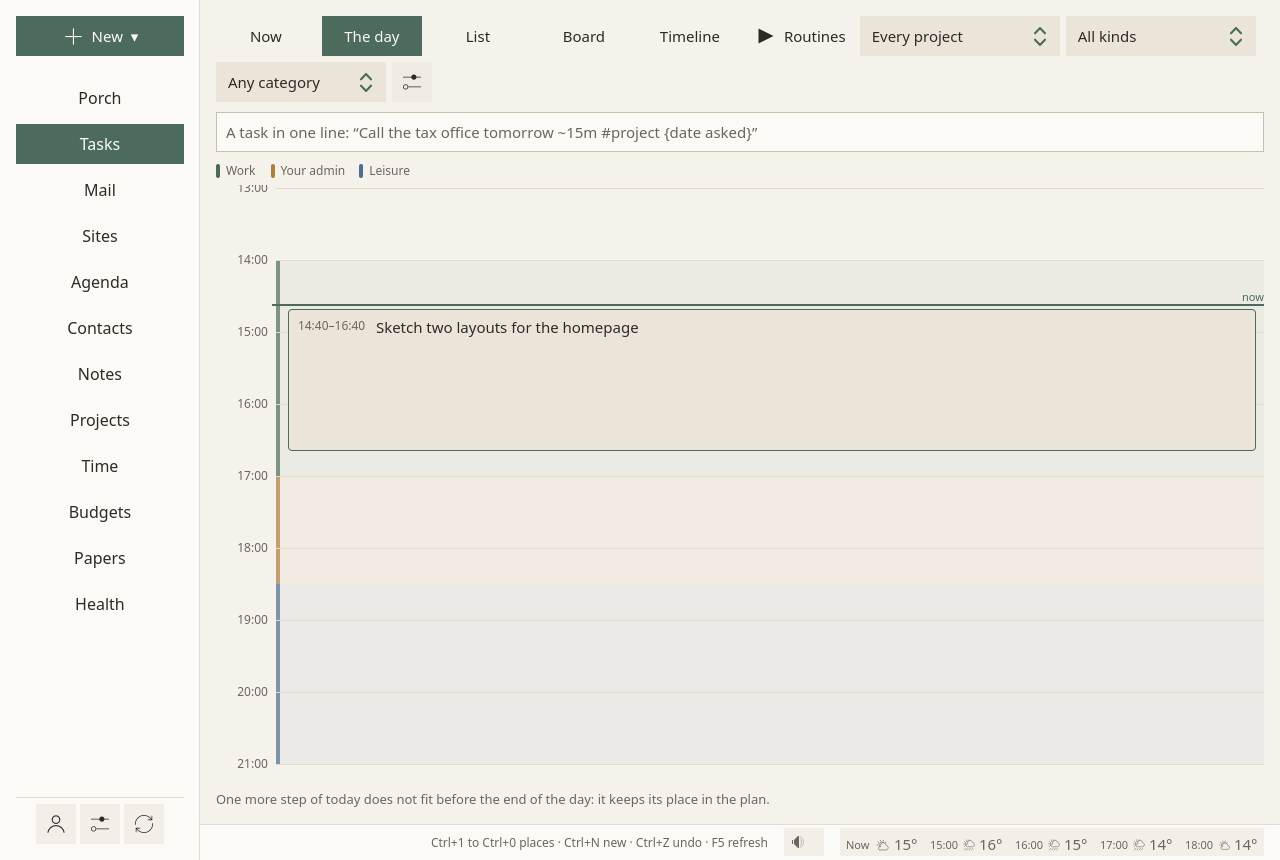
The day lays out today: your hours by what they are for (work, your admin, leisure), the events at their times, your meals and naps (Health), and the steps the plan gives today in the hours meant for them, from now on, with a pause between them. The time kept before and after a task or an event shows apart, "Around: …". A line shows where now is; the step under way is marked, the next one outlined. What you finished today stays where it ended, ticked ✓ and dimmed.
The day follows the clock: the line moves with the minutes, and the day is laid out again from now every five minutes and whenever you come back to Sioul, with what your other devices marked or noted meanwhile, and at once after anything changes what it holds (The plan).
It is a layout to look at, never a schedule: nothing is written into the tasks; a time you pin a step to is an event in your calendar (below). What does not fit before the day ends keeps its place in the plan, said in one line.
Move a step by hand: drag it to another time today. It is pinned there (below): its block goes into your calendar, as long as the step you dragged, and the day lays the other steps around it. Its time shows in colour. Right click it (or hold it and let go) for Let the plan place it, which takes the block away. Nothing else of the task changes: its day to start and its date asked stay as you set them. You can also drag a meal or a nap (as on the Health page) and an event of a calendar you can write to (as in the Agenda). While you drag, the new times show, by five minutes; let go, and Undo waits ten seconds. With a mouse, press and drag; on a touch screen, hold until it lifts, then slide; a plain swipe scrolls.
The day spreads what it asks:
- never two heavy steps in a row;
- after a heavy step, a light one, or a quarter of an hour's break first;
- two steps that weigh on the same thing (thinking, feelings, anxiety, the body) are kept apart when another step can come between.
It keeps two slots of Time for you, half an hour each:
- one right after the day's heaviest step or appointment;
- one in the evening, once your hours are over.
They are yours to fill or to leave empty, and they are quiet: messages from sites and the pauses to move wait until they end. Doses, meals, codes you asked for, calls and an event's alarm still come. Once you have said some things gave back well (How was it?), one of them may be suggested, a different one each day. Time for you can be turned off in the Tasks ⚙.
After the last step, some time is Kept free, in case steps take longer (How long things take). When something changed what today holds, a line above the day says why, in words.
List, Board, Calendar¶
One switch away from Now:
- List: every open task in the plan's order, a bigger task followed by its steps, grouped By project or By list, with a search, and Done too on request. The optional ones come last.
- Board: Free to start, Started, Waiting, Done (the last two weeks). Cards move by dragging, with a mouse or a touchpad; on a touch screen, a drag scrolls the board. "Waiting" is decided by what each task waits for, and each card says what. Past three started tasks, one line asks: "Finish or park one?"
- Calendar: each open task on its days, the date asked as a small diamond, days without room shaded. One project, or all. A project's Calendar button opens this view, kept to the project.
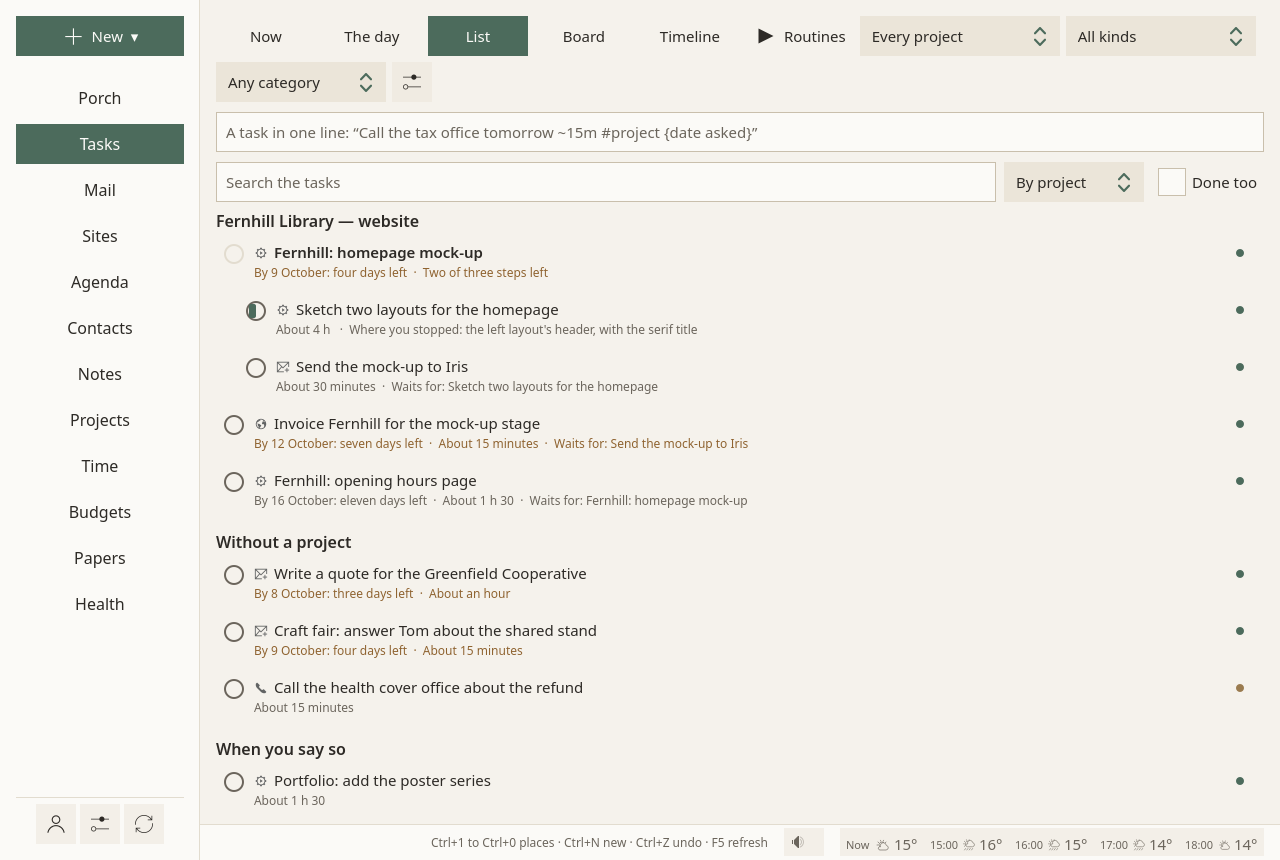
Three choices at the top of the page, Every project, All kinds and Any category, show only the tasks of one project, one kind or one category, in every view, Now included: "the next call". The plan stays whole: a call that waits for a message still waits. Sioul remembers your choices.
A task, open¶
A task opens on the right with its details, from any view: a click on it, Details in its menu (right click, or a long press on a touch screen), or Details on Now's card. Nothing starts until you say.
- Start, Done, Not now, Do at… (pinned to a time) and Drop (not to be done after all: kept, struck out, out of the plan; Open again brings it back), then what matters, in words: its date, its length, what it waits for, where you stopped, the time spent; and, when there is something to say, How long things like this take, against your first guesses;
- its tags, its steps (each can be ticked here; their minutes are added up), what it waits for, each wait with its gap when it has one ("two weeks after it"), and what it frees;
- its fields in words, those that are said: Can start from, Before and After, what it costs and what it gives back, What it takes, Project, Billed, Kind, For, Needs an open office, Comes back, List; its notes;
- Tied to it: the mail it came from, its notes, the people, the drafts, the project. Write an email starts a message to the people it involves; Make a note starts a note tied to it; Link to… ties anything else.
Edit, at the top, turns the details into its form, and Details turns it back. Each field is kept as you change it:
- its steps, and one more in a line ("A step, in one line"); what it waits for ("Waits for…": another task, found by its title), and, for the next wait you add, Then wait: a gap in days or weeks after the other is done ("the answer comes within two weeks"; 0, none);
- under More: Can start from, Date asked, Takes about, Project, Tags, Comes back (repeating), Before and After (the time to get ready, get there and come back: kept free around it in your plan, never counted as a pause; the day never cuts such a task in parts), what it costs and what it gives back, What it takes, For (work, your admin, leisure: see Hours), Billed (Time), Needs an open office, List, and Notes, in Markdown. Another List moves the task there; when that list would not keep everything (Google Tasks keeps less), Sioul says what, and asks first.
Anything can become a task: a message, a line of a note, an event to prepare.
The end of the day¶
Done for today ends the work day, early or not. It opens a short sheet first:
- what you said of the morning, and what the plan did with it: "This morning: haze. The plan kept a lighter day.";
- The day felt: light, usual, heavy, or gave back;
- The mix: too much, about right, or too empty;
- a note if you like, in Markdown, with Preview;
- your notes on the last days, folded, in the words you used then.
Every answer is optional. Close the work day closes it with no answer as well as with one; Not now changes nothing. Nothing asks whether to stop, and nothing compares what was planned with what was done. "Undo" waits in the status line.
Then a short screen, read in ten seconds, says:
- when work comes back, and that the rest of the day is yours;
- what got done or worked on, if anything was;
- that everything else has its place;
- the first step when work comes back, which you can say your own way ("After breakfast, open the form");
- a date asked before then, if there is one, with Ask for more time, which writes a draft to the people the task involves for you to read and send (nothing is sent by itself), or you leave it;
- and what still gets through: one-time codes, and the senders your lists let through then.
There is no count of what was not done. The next working day opens on that first step. Until then, work rests (quiet time). A thought that comes in the evening can be noted in one line; it waits, out of sight, for work to come back.
At the end of your hours, the status line offers Close the work day, and one quiet notification says "Work hours are over", once, never while you sleep or during a meeting. On Linux, on a Mac and on a phone, the notification has Close the work day too; on Windows it has no button, and a click on it opens the same sheet. Pressed once the day turned (05:00), it opens nothing. On a phone it comes on time only with Android's "Alarms & reminders" allowed (Settings ▸ This phone): without it, it mostly does not come. A day that ends without the button closes as usual; its review stays offered until the evening.
At any hour, two buttons at the bottom of the places close the work day, Close the work day (a ticked list), and the whole day, Close the whole day (a moon), one under the other. The status line offers each only at its time; these buttons are always there, on a phone in the places' drawer. On a computer, the menu of Sioul's icon in the system tray (on a Mac, in the menu bar) has the same two.
Before sleep, Close the whole day looks back over the whole day: work, admin and leisure (Health).
Your answers stay on your devices, in plain files, and travel sealed with the sharing's Time part. The mix is what the plan learns from: which days went fine, which were too much. Nothing is shown as a score.
Where tasks live¶
Tasks are standard tasks, in task lists on your calendar server: your phone and your other programs see them. Sioul writes what ties them together (steps, waits, links, kinds) in the standard's own terms, so that a program which keeps what it does not use keeps it too. A task pinned to a time has its block in a calendar, as an ordinary event, tied to the task both ways.
Few other task apps understand waits between tasks. Most show a wait as a step of the other task, and some, when you change such a task there, turn the wait into a step for good, or drop it. Which apps keep what: Works with.
Google Tasks keeps less: a list there greys what Google does not keep (a day to start, a length, a project, a kind, waiting for another task…), with why. A list can also live on this device only.
In quiet time, and while you sleep¶
In quiet time (Hours), the task pages keep only what fits now: in leisure and during a meal, what is yours; work waits for work to come back.
While you sleep (Hours: the night from winding down to waking, a nap), the page waits behind one sentence, "Sleep: nothing disturbs until 07:00.", and Show anyway. A field there notes a thought for later, in one line, out of sight until work comes back. New ▾ ▸ A task shows the page anyway, a new task's form open. Task reminders wait too, for waking.
Going further¶
Pinned to a time¶
Do at…, in a task's details, pins it to a day and a time: its block, an event of its own, goes into your calendar, "Planned tasks", made the first time on the account of the task's list (on this device for a list kept here; the Tasks ⚙ can name another calendar). It lasts as long as the plan lays the task, unless you say otherwise. It shows in every calendar, your phone's too, and the task and its block are tied both ways. Its details then show a pin and when, under its title: "Pinned: Thursday 8 October, 10:00–10:30". A click there opens the block in the Agenda; its menu (right click, a long press on a touch screen, or ⋯) offers Move… and Let the plan place it. In the list and on the board, its row shows a small pin and its time; Now shows the pin when the next step is pinned, and the day marks its step with one.
- The plan lays the task in its block, whatever else is there, and what else fits around it. The block counts once, as the task: never as an event besides.
- Move it with Change…, by dragging the step in the day, or by dragging the block in the Agenda or in any other calendar program: the task follows, at the next sync for another program. Delete the block anywhere, and the plan places the task again.
- Let the plan place it takes the block away; Undo waits ten seconds.
- The block passes and the task is not done: the plan places it again. The block stays in your calendar as it was; nothing is said, nothing counted.
- Done or dropped: a block still to come goes, its time freed; one under way ends then; one over stays, the record of when the work was done. A task deleted takes its blocks to come with it, and Undo brings both back.
- A repeating task: a block pins one turn; the next turn is planned as usual.
- No alarm in the block unless you ask for one in the Tasks ⚙: Sioul reminds you of it as of any event, and a phone would remind you twice.
- The block keeps the task's title, changed with it.
- Your meals move past a block as past any event.
What it costs, and what it gives back¶
Four tiles, in a task's form and in an event's, two by two (one under the other on a phone): Thinking, Feelings, Worry and Body and senses, then Gives back under them. Each takes a number from 0 to 10, as you feel it, and asks a question in small print about what counts:
| Tile | What it asks |
|---|---|
| Thinking | Deciding, many things to hold in mind, something new to learn? |
| Feelings | Talking to someone, being judged or disappointing someone, a painful reminder? |
| Worry | A deadline, an answer you wait for, a risk of getting it wrong? |
| Body and senses | Moving, standing, noise, crowds, screens, travel? |
| Gives back | Will it give you anything back: rest, joy, meaning? |
- A tap sets a value. Each gauge has a small cell for 0, then ten cells for 1 to 10: tap the one you mean. Tap it again and the tile is unsaid again. 0 is a rating, not a blank: it says nothing.
- With the keyboard, Tab goes from tile to tile; a digit gives 0 to 9, + or = gives 10, the arrows go up or down by one, and Delete clears.
- A word beside each number says what it means, as on the scale used to rate effort in sport and in pacing: nothing, very light, light, moderate (3 and 4), hard (5 and 6), very hard (7 to 9), the most. What gives back goes from nothing through a little, some, a good deal and a lot to the most.
- What you said before. When you said how this task went the last times, or tasks of its kind (How was it?), the unsaid tiles show those values faintly, and a line says where they come from. Looks right takes them all; a tap on a tile sets that one alone. Nothing faint is kept until you choose it.
- Each value is kept as you give it. Once a cost is rated, What it takes follows the ratings, shown rather than chosen: light when no cost is above 3, the usual up to 6, heavy from 7; it gives back when the gain is 5 or more and no cost is above 3. That is how the plan counts the heavy tasks a day can hold (How is today?).
Feelings count when you have to hide or carry them, not only when they are sad; worry counts the dread before and after, not only during; the body and the senses count standing, noise, light and crowds. The questions ask about what stirs feelings rather than which feeling it is, for whoever finds feelings hard to name (what the research says).
How was it?¶
When a task is done, the status line offers How was it? for a moment; a done task's details offer it too. It opens the same tiles, a thin mark on each gauge where you foresaw it. Only what you tap is kept, as felt, beside what you foresaw; the rest stays unsaid, never copied from the forecast, and nothing faint is offered there. Ignore it and nothing changes: it is never asked again, never counted.
Offices have hours¶
A task marked Needs an open office is proposed only while offices are open (Monday to Friday, 9:00 to 17:00, unless you change it in the Tasks ⚙) and planned only on those days. On a Saturday, the next step is one you can do. A task can also take its own office's hours, with a lunch break.
If you want, and when you say so¶
A task tagged joy is offered under If you want, never proposed as the next step. One tagged someday waits at the end of the list. Neither takes room in the plan.
The plan¶
- The order: a task never comes before what it waits for. Tasks that wait for each other in a loop are said, calmly: "These wait for each other: … One of them has to go first."
- The next step, among the tasks free to start: the one you started; then the one whose date comes soonest, counting the work behind it; then your own order; then the one that frees the most others; then the smaller one.
- The days: each task goes into the first days with room. The room is your hours, each kind for its own tasks: working hours for work, hours for your admin for your admin; leisure has no hours, so what is only for leisure takes no room and waits for none (Hours). Events are taken out of it, with their Before and After, and five minutes before and after each; not an event marked free in its calendar (shown as available), nor an invitation you declined, which still show in the agenda; each step leaves five minutes after it. A task's own Before and After take room with it. Your meals, naps and night are kept free too (Health). A step of up to an hour is never cut; a longer one is cut into parts of a quarter of an hour at least. A task with a Before or an After is never cut: it goes whole on a day whose room holds it, or gets a day of its own. Without any hours set, the room is Monday to Friday, 9:00 to 17:00. Each task takes its corrected length (How long things take), and each day keeps some time free for steps running long, and half an hour for you. Today's room starts now, and haze or fog make it smaller. Days off, and today once closed, have none.
- Your dates stay yours. The days the plan gives are worked out again each time, and never written into your tasks. Only what you set is kept: a day to start, a date asked, an order, and the times you pin tasks to, as events in your calendar.
- Always up to date: the plan is made again at once whenever something it depends on changes (a task, its estimate or the time noted for it, an event, a meal or the night, your hours or days off, the day's weather, Done for today, what your other devices or a sync bring), as well as when Sioul starts, every twelve hours and at midnight.
- When a date will not hold, the task says so once: "At this pace, the plan ends after 30 October. Doing it sooner, making it smaller or handing it over would keep the date." Near a date asked, Now says how much fits: "Until Wednesday 7 October: about 30 min of steps, 3 h of room."
A reminder comes, once, two working days before a date asked, and when a wait is over. These two come from a computer, while Sioul is open or, if you ask, with its window closed; a phone does not tell them (Settings).
What a day holds¶
The plan also learns, from your own days, how much a day holds for you: in thinking, feelings, anxiety, body and senses, and in all. It is a planning aid, nothing more: it measures nothing about your health and says nothing about you.
- Where it starts. Until your days say more, a day holds what it held before: your hours of usual work, and two heavy steps. Lighter or Much lighter, in the Tasks ⚙, start below that: to start again after a hard time, or with an illness that limits energy.
- What it learns from. The days whose end you described (The end of the day): too much, about right, too empty. A day you did not describe counts for nothing; it is never taken as light. What each day held is counted from the costs you gave, or from what you felt when you said How was it?, times the time it took, half an hour at least for anything.
- How it moves.
- A day said too much after a full day lowers what a day holds at once, by a fifth, on what was full.
- It rises only after a week of days that went well and were full, by a tenth at most.
- Three days too much in a week hold it where it is for a while.
- No day is planned heavier than the heaviest one that went well in the last month, and a little more.
- Light days that went fine say only "at least this much": they never lower it.
- How the plan uses it. Each day is filled to a little less than it holds, after its appointments. The days before and after a heavy appointment hold less. A step too heavy for what a day still holds goes to another day; one heavier than any day gets a day of its own.
- Even days, in the Tasks ⚙: the week's load spread so that each day holds about the same, rather than full days and empty ones. Off unless you turn it on. With an illness that limits energy, see also Health.
- What gives back has a minimum too, learned from the days you said were about right. The slots of time for you stay whatever it is, and the end of the day says in words whether the day gave back.
- In words only. When a rule changes today, a line over the day says why: "Today holds a little less: yesterday was too much after a full day." Never a number, a percentage, a gauge or red.
How each rule is set, which numbers come from research and which are guesses still to check: What a day holds.
Routines¶
A routine is a sequence you go through often, in the same order: getting ready to go out, starting the work day, your admin hours. You write its steps once, each with its minutes; Sioul then plays them one at a time on a timer and says the next step before it comes, so the order and the clock are not yours to keep in mind. Autistic adults who find starting and switching hard name routines among what helps, "so that I don't have to think about it quite so hard" (Buckle et al. 2021). A routine is not a task: nothing is planned, counted or late, and you can stop at any step.
Routines, at the top of the Tasks page, lists them; a new one is written one step a line, with its minutes: "10 min Open the Porch", "Make tea 5".
A routine plays in a small window on top: the step, its time draining in a neutral colour, "Then: …", and the routine as dots. Done, Open (what the step opens), +5 min, Skip, Pause, Stop. None of it is counted.
When a step's time is up, the next one starts by itself only if the routine says so. Otherwise it waits, and asks without a sound: "Its time is up: done, or a few more minutes?"
The admin window is a routine made from what is there now: the Porch, the plan's next step, and a line to come back to.
Sounds¶
The sound button in the status line plays, never by itself:
- To focus: white, pink or brown noise;
- Nature, made here: waves on a beach, rain, wind in the trees, crickets at night, a distant storm;
- Your recordings: any sound in a
soundsfolder of your notes (Ogg, Opus, FLAC or WAV loop without a gap).
One at a time, looping without a seam, fading in and out over five seconds. Noise helped attention a little for people with ADHD traits, and cost a little for others (Nigg et al. 2024): it is offered, not pushed. Across studies, natural sounds lowered stress and improved mood (Buxton et al. 2021).
The Tasks settings¶
The ⚙ at the top of the page:
- When offices are open.
- Kinds of task: renamed, taken away or added; tasks keep the kind they have.
- Categories: renamed on every task that has them, or taken off them all.
- Task lists: renamed, here and on the server; an empty one can be deleted.
- A task without an estimate counts so many minutes.
- New tasks go into: the list a new task goes into, typed in one line or in its form (where another can be chosen).
- Time blocks go into: the calendar of the tasks you pin to a time; unless you choose one, "Planned tasks", made the first time with each task's list (on this device for a list kept here, or for a Google account).
- An alarm in each block: off unless you turn it on; five minutes before it, in the blocks made or moved from then on.
- What a day holds (above):
- Start from: As now, Lighter or Much lighter;
- Days learned from: 28 unless you change it, from 14 to 90;
- Even days: off unless you turn it on;
- Time for you: on unless you turn it off.
- What is work and What is yours: the categories that say what a task is for (Hours).
- Code, last: GitHub issues and pull requests as tasks, off unless you turn it on. Yours come into a "GitHub" list on this device, every thirty minutes; nothing is written to GitHub.
Elsewhere in Sioul¶
- An AI agent you connect (Using an AI agent) can list your tasks, add one and mark one done, on this computer's files; what it does with what it reads is up to the agent.
- From the command line:
sioul tasksandsioul focusdo what the page does (below).
Why it works this way¶
- One next step, small, with a when: "When X, I do Y" plans raise follow-through (Gollwitzer & Sheeran 2006). Too many options weigh most when choosing is hard (Chernev, Böckenholt & Goodman 2015).
- Nothing overdue: forgiving oneself for procrastinating lowered later procrastination (Wohl, Pychyl & Bennett 2010).
- Splitting a task makes it startable and its estimate truer (Kruger & Evans 2004).
- Time made visible, without a ticking clock: visual timers helped children with ADHD manage time (Wennberg et al. 2018).
- A line for where you stopped frees the mind for the next thing (Leroy & Glomb 2018).
- Capacity is lower on some days, and only you know which (Raymaker et al. 2020; Chen, Meng & Nie 2026).
- Closing work with a place for what remains helps leave it in the evening (Smit 2016), and a list for tomorrow written at bedtime helped people fall asleep sooner (Scullin et al. 2018). One answer a day on how it went is what a plan needs to learn what a day can hold, rather than what you usually do.
More in what the research says, findings 6 to 23.
Compared with other apps¶
As of October 2026, from each app's own documentation.
✓ documented; partly, with a note; ✗ not found in the app's own documentation (for Sioul: not built); ? not confirmed; — not applicable. Sioul's column was checked against its code.
Things 3 and OmniFocus, which run on Apple's devices only (OmniFocus also on the web), are described in one sentence each under the first table. How other CalDAV programs treat waits between tasks is in For technical readers.
Your tasks
| Sioul | Todoist | TickTick | Microsoft To Do | Tasks.org | |
|---|---|---|---|---|---|
| One next step, with why it comes now | ✓ | ✗ | partly¹ | partly² | ✗ |
| Tasks that wait for others | ✓ | ✗³ | ✗ | ✗ | ✗⁴ |
| A day to start, apart from the date asked | ✓ | ✗⁵ | partly⁶ | ✗ | ✓ |
| Plans your day by itself | ✓ | ✗ | partly⁷ | ✗ | ✗ |
| A task in one typed line | ✓ | ✓ | ✓ | partly⁸ | partly⁹ |
| Board and timeline views | ✓ | partly¹⁰ | ✓¹¹ | ✗ | ✗ |
| A focus timer | ✓ | ✗¹² | ✓ | ✗ | partly¹³ |
| Nothing counted against you: no red overdue, no points | ✓ | ✗¹⁴ | ✗¹⁵ | ? | ✗¹⁶ |
| An end-of-day review | ✓ | ✗ | partly¹⁷ | ✗¹⁸ | ✗ |
| Reminders at a place | ✗ | ✓¹⁹ | ✓²⁰ | ✗²¹ | ✓ |
| Shared lists, tasks given to others | ✗²² | ✓ | ✓ | ✓ | partly²³ |
| Standard tasks on a server you choose (CalDAV); free software | ✓ | ✗ | ✗²⁴ | ✗²⁵ | ✓ |
| Tasks encrypted end to end when they sync | partly²⁶ | ✗²⁷ | ✗²⁷ | ? | partly²⁸ |
- "Suggested Tasks" sorts tasks into four groups to pick from: recently added, postponed, long overdue, upcoming.
- My Day's suggestions, to pick from; whether a reason is shown is not confirmed.
- Only through a third-party add-on listed in its directory.
- Requested on its tracker since 2020.
- "Todoist does not support start dates that hide your tasks until their start date is due."
- A task can have a start and an end time (Premium); it is not hidden until then.
- Its AI assistant can place tasks in your free time when you ask, and changes nothing until you confirm (Premium).
- Hashtags become tags; dates typed in the title are not confirmed.
- Tags, priority and simple dates, from its own code; fuller parsing is an open request.
- A board, and a calendar on the Pro plan; no timeline.
- The Timeline is a Premium view.
- Its own page points to other apps for a timer.
- A timer per task that notes the time spent; no Pomodoro.
- Overdue dates in red; Karma points are lost for tasks five days overdue (Karma can be turned off).
- An "Overdue" group; achievement points can be lost when tasks are delayed.
- An "Overdue" filter; overdue dates in the error colour (from its own code).
- A daily reminder to review and plan, and a "Summary" of what got done.
- My Day empties at midnight; there is no review.
- On the Pro plan, on phones.
- On phones (its help says iOS and Android; its feature page says iOS only).
- Requested on Microsoft's own forum since 2019.
- Sioul has no sharing or assigning of its own.
- Shared lists through its cloud, or a Nextcloud, ownCloud or sabre/dav server; no assigning.
- It can show CalDAV calendars; its own tasks are not offered over CalDAV.
- Tasks live in Exchange Online.
- A list kept on this device travels sealed between your devices; a list on your CalDAV server is stored there as the standard has it, sent over an encrypted connection but readable by whoever runs the server.
- Encrypted in transit and at rest on the company's servers; end-to-end encryption is not in its security pages.
- With EteSync only.
Things 3 keeps a start date apart from the deadline and has no points, and no dependencies: its own tip for a blocked to-do is a "Waiting" tag. OmniFocus has sequential projects, where only the first action is available and the next ones wait, defer and planned dates apart from due dates, and sync encrypted end to end; overdue items show in red.
Planning your day
| Sioul | Motion | Reclaim.ai | Sunsama | Tiimo | |
|---|---|---|---|---|---|
| Places your tasks in the day by itself, around your events | ✓ | ✓ | partly¹ | partly² | ✗³ |
| Plans again by itself when something changes | ✓ | ✓ | ✓ | partly⁴ | ✗⁵ |
| Hours for each kind of work (work, personal…) | ✓ | ✓ | ✓ | ✓ | ✗ |
| Room kept for meals, breaks and rest | ✓⁶ | partly⁷ | ✓⁸ | partly⁹ | ✗ |
| Tasks that wait for others | ✓ | ✓ | ✗ | ✗ | ✗ |
| One next step, with why it comes now | ✓ | partly¹⁰ | partly¹¹ | ✗ | partly¹² |
| A lighter plan on a hard day | ✓¹³ | ? | partly¹⁴ | partly¹⁵ | partly¹⁶ |
| Learns how long your tasks really take | ✓ | ✗ | ✗ | ✓ | ✗ |
| An end-of-day review | ✓ | ✗ | partly¹⁷ | ✓ | partly¹⁸ |
| Missed dates and undone tasks never counted or shown in red | ✓ | ✗¹⁹ | ? | ✗²⁰ | ✗²¹ |
| A visual timer; routines played step by step | ✓ | ✗ | ✗ | partly²² | ✓ |
| Free software; your data on your own devices and servers (CalDAV) | ✓ | ✗²³ | ✗²³ | ✗²³ | ✗²³ |
- Reclaim 1.0 places tasks. Reclaim 2.0, the default for new accounts since May 2026, recommends tasks and places only focus, habit and buffer blocks.
- On request, for one task or many, inside your schedules and around your events.
- Its Co-planner suggests times that you save; full automatic planning was left out by design.
- Only its own task blocks, when they overlap or end early; meetings never move.
- When you ask the Co-planner.
- Your meals, naps and night, a pause after each step, a quarter of an hour after a heavy one, and two slots of time for you.
- "A 15-minute break every 2 hours" and travel time; lunch as a fixed event.
- A lunch habit inside a window, breaks between tasks, decompression after meetings, travel buffers.
- A gap before each planned task and break reminders; no rule for lunch or travel.
- Its agenda shows what is next; reasons are given only for tasks it could not place.
- Reclaim 2.0 suggests three to five "Relevant Now" tasks, without a reason for each.
- Its Co-planner suggests one task to do now.
- You say how the day is (clear, haze or fog), and what a day holds is learned from how your evenings say the days went.
- You can ask its assistant for something lighter.
- A daily workload limit in hours, with warnings.
- Its Co-planner asks about your energy; a mood log on iOS.
- A nightly calendar review and a morning digest (2.0); a weekly report.
- A "Review today" check-in, where you choose what to move and can log your mood.
- A red "Past Due".
- Tasks roll over at midnight with a counter of the days they rolled over.
- Streaks and trophies, on iOS.
- A task timer, a focus mode and a Pomodoro view; no step-by-step routines.
- Google, Outlook or iCloud calendars, no CalDAV; your data in the company's cloud; a proprietary service.
Others do more in places: reminders at a place, sharing and assigning (Todoist, TickTick, Microsoft To Do); tasks encrypted end to end on their way between devices (Tasks.org with EteSync, OmniFocus); Reclaim.ai's protected lunch and travel time in shared calendars; Sunsama's workload limit in hours; Tiimo's visual timers on every step; apps on every platform and many integrations (Todoist). Sioul also warns once when a date asked will not hold, as Motion and Reclaim 2.0 do: the row on red and counting is about colour and counting, not about that warning.
Sources
All read on 8 October 2026.
- Todoist, help centre articles on start dates, dates and times, Karma, time blocking, quick add, the board layout and location reminders, its Pomodoro page, the Ganttify add-on's listing and its plans: https://www.todoist.com/help/articles/does-todoist-support-start-dates-qhqlgZhk, https://www.todoist.com/help/articles/introduction-to-dates-and-time-q7VobO, https://www.todoist.com/help/todoist/features/introduction-to-karma-OgWkWy, https://todoist.com/help/articles/time-blocking-in-todoist-d6Pf1uTpc, https://www.todoist.com/help/articles/use-task-quick-add-in-todoist-va4Lhpzz, https://www.todoist.com/help/articles/use-the-board-layout-in-todoist-AiAVsyEI, https://www.todoist.com/productivity-methods/pomodoro-technique, https://www.todoist.com/help/articles/use-location-reminders-in-todoist-uGcwH2AJ6, https://www.todoist.com/integrations/apps/ganttify, https://www.todoist.com/help/account-and-billing/plans/todoist-plans-pricing-and-billing-faq-Vq2z0HWL6
- TickTick, its help centre (all 96 articles searched) and its upgrade page: https://help.ticktick.com/articles/7401564165023727616, https://help.ticktick.com/articles/7055782010496745472, https://help.ticktick.com/articles/7503016104470511616, https://help.ticktick.com/articles/7055782381696843776, https://help.ticktick.com/articles/7082302534169133056, https://help.ticktick.com/articles/7056594711640801280, https://help.ticktick.com/articles/7055782395743567872, https://help.ticktick.com/articles/7209388126463066112, https://ticktick.com/upgrade
- Microsoft To Do, Microsoft's support pages on My Day, To Do in Outlook, dragging a task to the calendar, assigning in shared lists, and the request for location reminders on Microsoft's own forum: https://support.microsoft.com/en-us/todo/my-day-and-suggestions, https://support.microsoft.com/en-us/outlook/calendar/manage-tasks-with-to-do-in-outlook, https://support.microsoft.com/en-us/outlook/calendar/drag-a-task-to-your-calendar-with-to-do-in-outlook, https://support.microsoft.com/en-us/todo/assign-tasks-in-shared-lists, https://support.microsoft.com/en-us/todo/welcome-to-microsoft-to-do, https://techcommunity.microsoft.com/discussions/to-doinsiders_android/feature-request-location-based-reminders/401454
- Tasks.org, its documentation on sync and places, its prices, its post on shared lists, its tracker and its source code: https://tasks.org/docs/sync, https://tasks.org/docs/location, https://tasks.org/pricing, https://tasks.org/blog/shared-lists-are-coming, https://github.com/tasks/tasks/issues/1202, https://github.com/tasks/tasks
- Things 3, Cultured Code's support articles: https://culturedcode.com/things/support/articles/2803579/, https://culturedcode.com/things/support/articles/2237050/
- OmniFocus, the OmniFocus 4 Reference Manual 4.9.3 ("Project Type", "Dates and Times", "Encrypted Sync", "Overdue"): https://support.omnigroup.com/documentation/omnifocus/universal/4.9.3/en/print
- Motion, its whole help centre (176 pages, from its index), with how auto-scheduling works, project stages and blockers, task states, and its prices and downloads: https://www.usemotion.com/help/llms.txt, https://www.usemotion.com/help/time-management/auto-scheduling/reference-auto-scheduling/how-auto-scheduling-works-behind-the-scenes, https://www.usemotion.com/help/project-management/projects/reference-projects/project-stages-and-blockers, https://www.usemotion.com/help/project-management/task/reference-tasks/task-states-and-task-types, https://www.usemotion.com/pricing, https://www.usemotion.com/download
- Reclaim.ai, its whole help centre (223 articles, from its index), with the 2.0 tasks overview, hours and buffer time, and its prices: https://help.reclaim.ai/llms.txt, https://help.reclaim.ai/en/articles/16558552-reclaim-2-0-tasks-overview, https://help.reclaim.ai/en/articles/3600766-set-your-working-meeting-personal-custom-hours, https://help.reclaim.ai/en/articles/4281992-buffer-time-overview-travel-decompression-and-tasks-habit-breaks, https://reclaim.ai/pricing
- Sunsama, its user manual (105 pages), with timeboxing, daily planning, planned and actual times, task rollover, and its prices: https://help.sunsama.com/, https://help.sunsama.com/docs/usage-guides/timeboxing/timeboxing-auto-scheduling, https://help.sunsama.com/docs/usage-guides/daily-planning, https://help.sunsama.com/docs/usage-guides/tasks/planned-and-actual-times, https://help.sunsama.com/docs/getting-started/basics/task-rollover-and-recurring-tasks-the-basics, https://www.sunsama.com/pricing
- Tiimo, its FAQ and feature guides, its article on the Co-planner's design, and its streaks page: https://www.tiimoapp.com/faq, https://www.tiimoapp.com/resource-hub/ai-co-planner-design, https://www.tiimoapp.com/faq/focus-timer, https://www.tiimoapp.com/product/streaks
For technical readers¶
In the standards¶
Each task is a VTODO (RFC 5545 §3.6.2) in a CalDAV task list, one file each, changed line by line, so that what another program wrote comes back exactly and a form saved unchanged writes nothing.
| What | Written as |
|---|---|
| A step of a bigger task | RELATED-TO;RELTYPE=PARENT:<UID>, in the step |
| Waits for another task | RELATED-TO;RELTYPE=DEPENDS-ON:<UID> (RFC 9253 §5), in the task that waits |
| Waits, with a gap ("the answer comes within two weeks") | RELATED-TO;RELTYPE=FINISHTOSTART;GAP=P14D:<UID>, in the task that comes first (RFC 9253 §4). Written by sioul tasks import, and by the form's Then wait. Read from any program, NEXT too |
| Can start from; the date asked | DTSTART; DUE |
| How long it takes | ESTIMATED-DURATION (draft-ietf-calext-ical-tasks) |
| Its kind; "needs an open office" | CONCEPT with a tag URI (RFC 9253 §8.1, RFC 4151) |
| Its project | REFID (RFC 9253 §8.3) |
| Its notes, the mail it came from, its drafts, an event | LINK with LINKREL describedby, via or related; a message as mid: (RFC 2392) |
| The people and offices involved | CONTACT;ALTREP="sioul:contact/<UID>" |
| Costs, gain, felt ratings, first estimate, time before and after, area, office hours, billed | X-SIOUL-COST, X-SIOUL-GAIN, X-SIOUL-FELT-COST, X-SIOUL-FELT-GAIN, X-SIOUL-ESTIMATE-FIRST, X-SIOUL-BEFORE, X-SIOUL-AFTER, X-SIOUL-AREA, X-SIOUL-OFFICE-HOURS, X-SIOUL-BILLABLE |
| Pinned to a time | a VEVENT in a calendar, tied both ways: LINK with a tag-URI LINKREL in each, and X-SIOUL-TASK in the event |
Taking a wait away in Sioul also takes away a FINISHTOSTART or NEXT that another program wrote for the same pair in the other task.
New lists are made with MKCALENDAR (RFC 4791 §5.3.1) and renamed with PROPPATCH. Google Tasks goes through Google's REST API, since Google serves no tasks over CalDAV.
Waits in other CalDAV programs¶
RFC 9253 (August 2022) added DEPENDS-ON and four temporal relation types (FINISHTOSTART and its kin, with an optional GAP) to iCalendar's RELATED-TO, and three new properties: LINK, CONCEPT and REFID. Few task programs use them yet. cfait, free software for the terminal, the desktop and Android, has written DEPENDS-ON since November 2025. None of the seventeen established CalDAV task apps checked has waits between tasks, and requests have stayed open for years: Thunderbird's since 2003, Nextcloud Tasks' since 2017, Tasks.org's since 2020. What was found only in Sioul, among the projects searched, is the combination: DEPENDS-ON and FINISHTOSTART with GAP, each in the direction RFC 9253 gives it; LINK, CONCEPT and REFID; and a planner that schedules around waits.
As of October 2026, from each program's own code and issue tracker, not tried with Sioul:
| Program | Platforms | Steps (subtasks) | Waits between tasks |
|---|---|---|---|
| Sioul | Linux, Windows, macOS, Android | ✓ | ✓ |
| cfait | Linux, FreeBSD, Windows, macOS, Android | ✓ | ✓¹ |
| Tasks.org | Android | ✓ | ✗² |
| Nextcloud Tasks | web (in Nextcloud) | ✓ | ✗³ |
| jtx Board | Android | ✓ | ✗ |
| OpenTasks | Android | partly⁴ | ✗ |
| Thunderbird | Linux, Windows, macOS | ✗⁵ | ✗⁵ |
| KOrganizer, Merkuro | Linux | ✓ | ✗⁶ |
| Errands | Linux | ✓ | ✗⁷ |
| Vikunja | web | ✓ | partly⁸ |
| Apple Reminders | iOS, iPadOS, macOS | ?⁹ | ✗ |
DEPENDS-ON, in the task that waits, as Sioul writes it, since version 0.1.7 (November 2025); so a wait made in one should show in the other.- Requested since 2020. Through DAVx⁵, an RFC 9253 relation type has been rewritten as a parent (reported in 2023).
- Requested since 2017, and
DEPENDS-ONby name since June 2026. - In its storage, not in its screens; DAVx⁵'s FAQ says it no longer seems developed.
- Subtasks and dependencies requested since 2003. Thunderbird keeps a relation it does not show as it is.
- A wish for dependencies was declined as out of scope in 2004. KCalendarCore, beneath both, reads every
RELATED-TOas the parent. - Reads every
RELATED-TOas the parent, and writes one plain line back when it saves the task. - Blocking and preceding relations inside Vikunja; over CalDAV it writes only parent and child, and reads any other type as a parent.
- Subtasks in iCloud; how they travel over CalDAV is not documented.
Also checked, with steps at most and no waits: GNOME Evolution, GNOME Endeavour, Planify, Chiri, 2Do (its "dependencies" are task titles written in a note), Fantastical, todoman and org-caldav. Two small, recent tools also carry dependencies over CalDAV: caldawarrior, a bridge for Taskwarrior (DEPENDS-ON), and tasknotes-caldav, a plugin for Obsidian's TaskNotes, which writes the temporal types with GAP in the task that waits, the other way round from RFC 9253: Sioul would read such a wait backwards.
What other programs do with a wait. RFC 5545 (§3.2.15) tells a program that does not know a relation type to read it as PARENT, which is why most apps show a wait as a subtask. KCalendarCore (under KOrganizer and Merkuro) and Errands read every RELATED-TO as the parent. DAVx⁵, the usual bridge on Android, rewrites RFC 9253's types as PARENT (for OpenTasks and Tasks.org) or drops them (for jtx Board) when it uploads a task. So a wait made in Sioul can turn into a subtask, or disappear, once another app saves that task (Works with). Google serves no tasks over CalDAV at all.
Sources
All read on 8 October 2026, in each program's own repository, documentation or tracker.
- RFC 9253, "Support for iCalendar Relationships" (August 2022), §4, §5, §6.2, §8: https://www.rfc-editor.org/rfc/rfc9253.txt
- RFC 5545, §3.2.15 (
RELTYPE): https://www.rfc-editor.org/rfc/rfc5545.txt - cfait, its specification,
src/model/adapter.rsand its changelog (0.1.7), and its F-Droid page: https://github.com/trougnouf/cfait, https://f-droid.org/packages/com.trougnouf.cfait/ - Tasks.org, its sync documentation,
iCalendar.kt, and issues 1202 and 2527: https://tasks.org/docs/sync/, https://github.com/tasks/tasks, https://github.com/tasks/tasks/issues/1202, https://github.com/tasks/tasks/issues/2527 - Nextcloud Tasks,
src/models/task.js, and issues 131 and 3188: https://github.com/nextcloud/tasks, https://github.com/nextcloud/tasks/issues/131, https://github.com/nextcloud/tasks/issues/3188 - jtx Board,
Relatedto.ktand its contract: https://github.com/TechbeeAT/jtxBoard - OpenTasks, its task contract, and DAVx⁵'s FAQ on tasks: https://github.com/dmfs/opentasks, https://davx5.com/faq/tasks/advanced-task-features
- DAVx⁵, its synctools mapping of relations (
RelationsBuilder.kt,RelationsHandler.kt,RelatedToHandler.kt): https://github.com/bitfireAT/davx5-ose - Thunderbird,
CalRelation.sys.mjsand bug 194863: https://github.com/thunderbird/thunderbird-desktop, https://bugzilla.mozilla.org/show_bug.cgi?id=194863 - KOrganizer, Merkuro and KCalendarCore,
incidence.h,icalformat_p.cpp,incidencewrapper.cpp, and KDE bug 37011: https://invent.kde.org/frameworks/kcalendarcore, https://github.com/KDE/korganizer, https://github.com/KDE/merkuro, https://bugs.kde.org/show_bug.cgi?id=37011 - Errands,
errands/lib/data.py: https://github.com/mrvladus/Errands - Vikunja, its pages on task relations and CalDAV, and
pkg/caldav/caldav.go: https://vikunja.io/help/task-relations/, https://vikunja.io/help/caldav/, https://github.com/go-vikunja/vikunja - Apple Reminders, its user guide: https://support.apple.com/guide/reminders/welcome/mac
- GNOME Evolution,
e-cal-model.cand issue 838: https://github.com/GNOME/evolution, https://gitlab.gnome.org/GNOME/evolution/-/issues/838 - GNOME Endeavour, its sources and issues 347 and 488: https://gitlab.gnome.org/World/Endeavour
- Planify,
core/Objects/Item.vala: https://github.com/alainm23/planify - Chiri,
src/lib/ical/vtodo.ts: https://github.com/chiriapp/chiri - 2Do, its pages on CalDAV sync and task links: https://www.2doapp.com/docs/macos/sync-with-caldav, https://www.2doapp.com/docs/macos/task-links
- Fantastical, its help: https://flexibits.com/fantastical/help
- todoman,
todoman/model.pyand issue 568: https://github.com/pimutils/todoman, https://github.com/pimutils/todoman/issues/568 - org-caldav,
org-caldav.el: https://github.com/dengste/org-caldav - caldawarrior, its README: https://github.com/alexandrebarsacq/caldawarrior
- tasknotes-caldav,
src/caldav/vtodoRelations.ts: https://codeberg.org/schobernoise/tasknotes-caldav - Google Calendar, its CalDAV guide ("Doesn't support VTODO or VJOURNAL data"): https://developers.google.com/workspace/calendar/caldav/v2/guide
How the plan is made¶
- Order: Kahn's topological sort over the open tasks; loops found as strongly connected components (Tarjan 1972) and said, calmly. Tasks tied by waits or by being steps of one task form a stream (union-find): Not now sets a whole stream aside for the day.
- The next step, among the tasks free to start: the one started; then the one whose latest start comes first (its date asked, minus the work behind it); then your order (
PRIORITY); then the one that frees the most; then the smaller. - The days: each task goes into the first day with room in the hours of its kind, after what it waits for (and its gap); events, meals, naps and the night are taken out first, with five minutes around each event and after each step. Each day is filled to 85 % of what it holds, cost by cost and in total; haze keeps 60 % of today's room, fog 30 %.
- Lengths: each task is laid at its corrected length (How long things take); each day keeps as free time the 85th percentile of a seeded simulation of its steps (one effect shared by the day, one per step), at most a third of the day. The simulation is seeded by the date and the tasks, so every device lays the same day.
- What a day holds is replayed from your days each time, never stored: the same record gives the same plan on every device. Its rules, and which numbers are guesses: What a day holds.
- The plan is made again at start, every twelve hours, at midnight, and at once after any change it depends on, off the window's thread.
Security, precisely¶
- CalDAV only over HTTPS: an
http://address is refused. TLS through rustls, with your system's root certificates. - Passwords in the system keyring: the Secret Service (KWallet, GNOME Keyring) on Linux, the Keychain on macOS, the Credential Manager on Windows, Android's KeyStore.
- Google: OAuth 2.0 for native apps (RFC 8252) with PKCE (RFC 7636, S256), through a loopback address on a random port; the refresh token in the keyring, the access token in memory only.
- Sharing between your devices: each record sealed with XChaCha20-Poly1305 (a random 24-byte nonce each, bound to its place), under a key made from your passphrase with Argon2id (64 MiB, 3 passes) and kept in each device's keyring. The Time part carries the time records, the session running, the day's reviews, the day's weather and where you stopped; Lists kept here carries the task lists kept on this device (Sharing).
- Files, on Linux: the reviews in
~/.local/share/sioul/reviews/, the time in~/.local/share/sioul/time/, plain TOML; the system's own data folders elsewhere. - GitHub, when you turn it on: its REST API, read only, with a fine-grained token kept in the keyring; issues come into a list kept on this device.
From the command line¶
sioul tasks [now]                      the next step, why, and the one after it
sioul tasks list [--by project|list] [--done] [words]
sioul tasks board | timeline [--project <id>] | show <task>
sioul tasks add "Call the tax office tomorrow ~15m #taxes" [--list <account/id>] [--parent <task>] [--after <task>]
sioul tasks done | start | not-now <task>
sioul tasks weather clear|haze|fog
sioul tasks lists | new-list <account|local> <name> [--events]
sioul tasks import <file.toml> [--dry-run] [--no-sync]
sioul focus start <task> [--minutes 25] | status | stop [--done] [--note "…"]
A task is named by its UID or the start of its title. sioul tasks import takes a plan written as a TOML file, waits with a gap included: its format.