Papers and letters
In short
Papers keeps the documents you are asked for again and again (an identity card, a tax notice, rent receipts), says in words where each one stands, and reminds you once, when renewing one should start. Paper letters you scan or photograph are read on your own computer: each one comes to the Porch as a calm card that says who wrote, what it asks, how much and by when, with "within two months" turned into a date, and a task for that date in one click. Nothing is sent anywhere to be read.
Protected by default
- Your papers and your letters stay in your notes folder, on your devices. There is no server of Sioul's.
- Letters are read on your own computer, by programs of your system: no scan is sent anywhere to be read.
- An attachment becomes a paper only after your antivirus checked it (a phone has none Sioul can call: there it is kept unchecked, and Sioul says so), and a program never does.
- Between your devices, papers travel by your folder's own sync, or through Sioul's sharing once you switch Papers on: each file sealed apart, so that the folder and its server see neither names nor contents (Sharing).
- The tasks made from a letter or a renewal go to your task list: if that list is on your calendar server, their titles are there too. Choose a list kept on this device if you would rather not.
- An AI agent, only if you connect one, can read the letters' texts with codes and account numbers masked; it sees your papers' files by their names only, never what they hold.
Papers
The same papers are asked again and again: an identity card, the last tax notice, bank details, rent receipts less than three months old, a health insurance attestation. An expired one blocks what depends on it: a lease, a cover, a trip. Remembering that a passport ends in March is the kind of remembering that fails most (Landsiedel, Williams & Abbot-Smith 2017). So Sioul keeps your papers, says where each one stands, and reminds you when renewing should start.
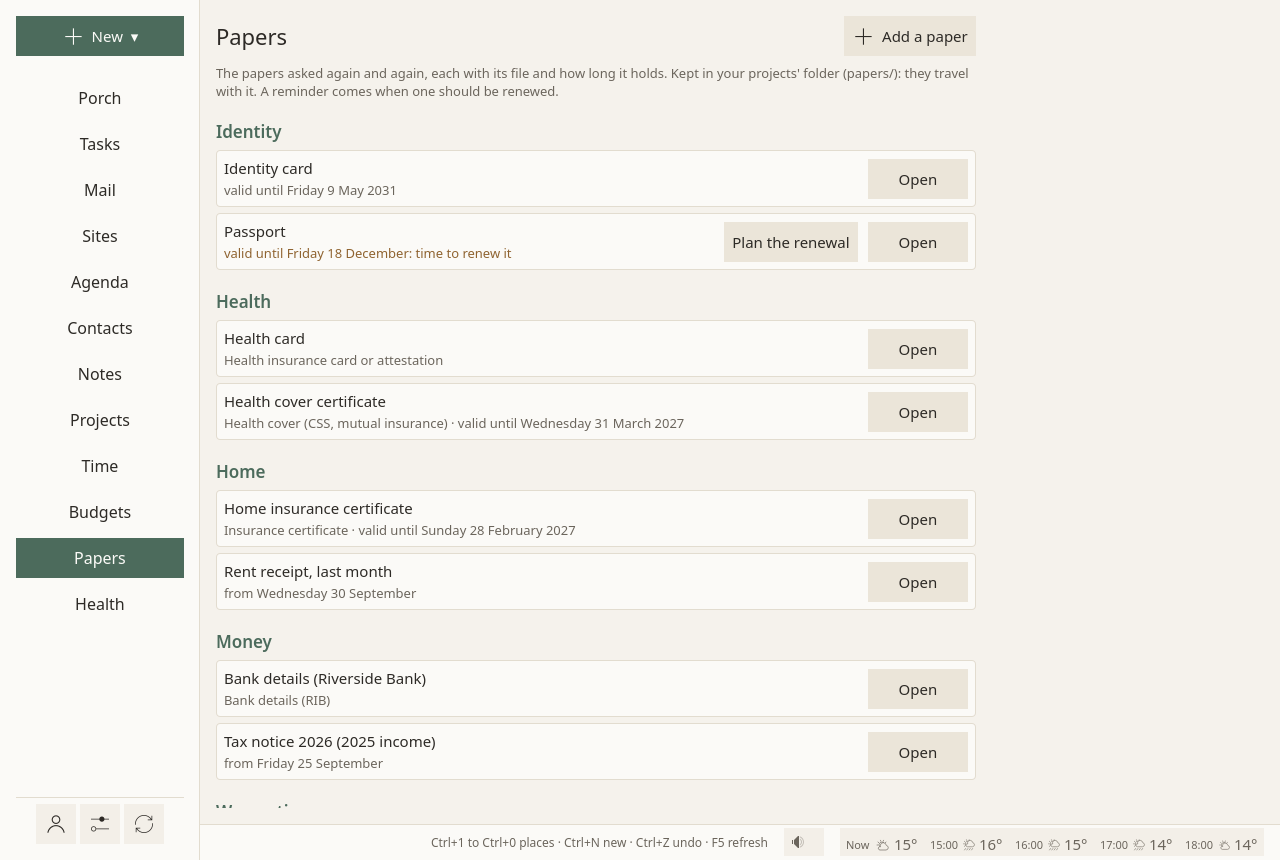
Where each stands
In words, never in red:
- "valid until 20 December";
- "valid until 20 December: time to renew it";
- "ended on 3 May";
- "from 30 June, older than what is usually asked", for a rent receipt or a payslip.
Adding a paper
Add a paper (or New ▾ ▸ A paper), then:
- What: an identity card, a passport, a residence permit, a driving licence, a health insurance card or attestation, a health cover, an insurance certificate, a tax notice, a rent receipt, bank details, a payslip, an attestation or certificate, a warranty, or another paper;
- Name: "Passport", "Rent receipt September";
- File: a scan or a photo, copied into your papers;
- Issued on and Valid until. For a passport, an identity card or a warranty, an end is proposed from the issue when you give none;
- Whose, in a household;
- Notes.
From a message, Keep in papers beside an attachment does the same: the antivirus checks the file, it is kept, and the form opens with a name and a kind guessed from the file's name and the subject. You only say what cannot be guessed.
To send one, the writing window has A paper, beside Attach. One that has ended, or is older than usually asked, says so in the list.
Renewing in time
| Kind | Renewing starts |
|---|---|
| Identity card, passport | 3 months before it ends: an appointment, then the making |
| Residence permit | 4 months before |
| Driving licence | 2 months before |
| Health cover | 3 months before: some covers do not renew by themselves |
| Insurance certificate | 1 month before |
| Warranty, proof of purchase | 1 month before |
Rent receipts, payslips and attestations have no end: they are said older than three months. A tax notice is usually asked as the last one.
A reminder comes once, when renewing starts, at the next working hours: "Passport: valid until Sunday 20 December", with what renewing takes. Not for a paper you added after renewing began (you have just seen it), nor once its renewal is planned. It comes from a computer only, while Sioul is open or, if you ask, with its window closed (Settings ▸ Reminders; not on Windows yet): a phone does not tell it.
Plan the renewal makes a task in your usual list, so your phone has it, from when renewing starts to the day the paper ends, tied to the paper, with the steps known for its kind.
Where papers live
sioul-papers.toml at the root of your notes folder, and the files in its papers folder: they travel with your notes folder, or through Sioul's sharing once you switch Papers on in it (Sharing). Take out removes a paper from the wallet; its file stays where it is.
Paper letters
The envelope stays outside. A scan, a phone photo or a PDF dropped in a folder, by you, a scanner, or someone who opens the post for you, is read by Sioul on a computer (a phone does not read them) and waits for your hours as a card, like mail. Opening post is part of admin anxiety (Money and Mental Health 2018), and a delay written "within two months" is remembered by no one: the card says it as a date.
Setting it up
- In the Porch's ⚙, Paper letters ▸ Where scans arrive: the folder your scans come to. Unset, it is
letters/inboxin your notes folder. A phone's scanner app syncing into it works too. - Sioul reads scans with two programs of your system. Without them, the scans wait, unread, and the Porch says how to install them (Install).
- On the Porch, under Paper letters, Open the folder opens it and Add a scan… copies a PDF or a picture into it; the New menu's A paper letter (scan)… does the same from any page (The Porch).
PDF, PNG, JPEG, TIFF and WebP files are read. A file still being written is read the next minute. Nothing leaves your device.
The card
On the Porch, each letter is a card: who sent it and what it is, then a sentence each for what it found:
- "Asks for €86.40."
- "By Sunday 15 November", with the words that set it, as the letter writes them.
- "An appointment: Thursday 12 November at 14:15."
- "Sent registered, with acknowledgment of receipt."
- "Dated 28 September." "Your number: …"
Then:
- See the scan;
- A task for that date: a task in your usual list, due that day, tied to the scan, such as "Pay the water bill €86.40";
- Into the agenda, for an appointment;
- the project it belongs to;
- Done, filed: the scan moves to
letters/<year>/, named by its day, its sender and its kind; its text is kept.
Not there yet
Planned: an AI that reads a letter line by line; a check that a letter is genuine (the office's domain, its bank details); an address where a helper could send scans by mail; searching the text of every letter at once; reading scans on a phone.
Going further
How a letter is understood
The rules read French first, and English too, by rules rather than guesses. They know the French bodies that write to everyone (the tax office, health insurance, family allowances, Urssaf, France Travail, a court, a hospital, a town hall, a bank, an energy supplier), and the kinds of letters, the gravest first: a formal notice, a tax notice, a decision with its ways of appeal, a reminder, an appointment, a bill. Other senders are named by the first line of their letterhead. A delay is counted from the day the scan came, as from a notification, or from the letter's own date when it says so.
Filed, with its text
Done, filed moves the scan to letters/<year>/, named by its day, its sender and its kind. What Sioul read of it is kept too, as a text file in the letters folder.
Where the tasks go
A task made from a letter or a renewal goes to your usual task list, so that your phone has it. If that list is on your calendar server, its title is there too ("Pay the water bill €86.40", "Renew: Passport"): choose a list kept on this device if you would rather not.
Contracts
What you are bound to (your rent, energy, insurances, subscriptions), with its renewal and the last day to send a notice, is on the Budgets page: Contracts and subscriptions.
With an AI agent
If you connect an AI agent (Using an AI agent), it can read the letters' texts as it reads your notes, with one-time codes, account and card numbers masked. It sees your papers' files by their names only, never what they hold.
Compared with other apps
As of October 2026, from each app's own documentation.
✓ documented; partly, with a note; ✗ not found in the app's own documentation (for Sioul: not built); ? not confirmed; — not applicable. Sioul's column was checked against its code.
For everyone
| Sioul | Paperless-ngx | Docspell | Adobe Scan | Evernote | Digiposte | |
|---|---|---|---|---|---|---|
| Reads the text of scans and photos | ✓¹ | ✓ | ✓ | ✓ | ✓ | partly² |
| Says who wrote and what the letter asks: amount, date, appointment | ✓ | partly³ | partly⁴ | ✗ | ✗ | ✗ |
| Turns "within two months" into a date | ✓ | ✗ | ✗ | ✗ | ✗ | ✗ |
| A task, a reminder or an agenda entry for that date | ✓ | partly⁵ | partly⁶ | ✗ | partly⁷ | ✗ |
| Files each scan by year, sender and kind | ✓ | ✓ | partly⁸ | partly⁹ | ✗ | ✗ |
| Identity papers with their end date, and a reminder when renewing should start | ✓ | partly⁵ | partly⁶ | ✗ | partly⁷ | ✗¹⁰ |
| Says when a paper is older than usually asked | ✓ | ✗ | ✗ | ✗ | ✗ | ✗ |
| Keeps an attachment from your mail | ✓¹¹ | ✓ | ✓ | ✗ | ✓ | partly¹² |
| Scans with your phone's camera | ✗¹³ | partly¹⁴ | partly¹⁵ | ✓ | ✓ | ✓ |
| Searches the text of every document | ✗¹⁶ | ✓ | ✓ | ✓ | ✓ | partly² |
| Several people, each with their own access | partly¹⁷ | ✓ | ✓ | partly¹⁸ | partly¹⁹ | partly²⁰ |
- On your own computer, by your system's Tesseract and Poppler.
- "Recherche dans le contenu", in Premium.
- Suggests the sender, the kind of document, tags and a storage path, and reads the document's date; reading amounts or deadlines is not described.
- Suggests correspondents and tags, and finds dates.
- A scheduled workflow can send an e-mail or a webhook a set time before or after a date field you fill.
- Notifications for documents with due dates, by e-mail, Matrix or Gotify.
- Dates and reminders you set yourself, from the Starter plan.
- Tags and folders, inside Docspell.
- Suggested file names with dates.
- Folders that gather what a procedure asks (renewing an identity card, renting); no reminder is described.
- After your antivirus checked it.
- Documents sent by connected employers and providers.
- Your phone's scanner app can save into the scans' folder, which Sioul reads.
- "Mobile devices are supported", with scanning tools of your choice.
- An Android app uploads files.
- Notes are searched by title, folder and tags.
- Whose says whose paper it is in a household; sharing is between your own devices only.
- Sharing by link or e-mail.
- Tasks can be assigned to others.
- Sharing with an expiry date and a code.
For technical readers
| Sioul | Paperless-ngx | Docspell | Adobe Scan | Evernote | Digiposte | |
|---|---|---|---|---|---|---|
| Where the text is read | your computer | your server; Azure AI if you choose it | your server | not stated | not stated | not stated |
| How letters are sorted | written rules, French and English | matching rules and machine learning; a language model if you turn it on (OpenAI-compatible, or Ollama on your machine) | machine learning and language rules (German, English, French, Spanish) | — | — | — |
| Where documents are kept | your notes folder | your server, "in clear text without encryption" | your server | Adobe Document Cloud | Google Cloud, in the United States | La Poste's servers, in France |
| Encrypted end to end between your devices | ✓¹ | —² | —² | ✗ | ✗³ | ✗ |
| Needs an account with the maker | no | no | no | yes, across devices | yes | yes |
| Free software | ✓ GPL-3.0+ | ✓ GPL-3.0 | ✓ AGPL-3.0+ | ✗ | ✗ | ✗ |
- Each file compressed and sealed apart (XChaCha20-Poly1305), its name hidden; once you switch the Papers part on.
- One server, reached with a browser: nothing travels between copies.
- Encrypted at rest with keys Google manages; end-to-end encryption is not mentioned.
Others do more in places: all five search the text of every document, Adobe Scan, Evernote and Digiposte scan with the phone's own camera, and Paperless-ngx and Docspell serve several people with permissions and learn your own sorting by machine learning. What Sioul adds is the letter read for what it asks and by when, its delay turned into a date, and one reminder when a paper should be renewed, all read on your own computer.
Sources
All read on 8 October 2026.
- Paperless-ngx, its documentation's own files in its repository (its documentation site could not be read): the index, usage, configuration and advanced usage, its README and its licence: https://raw.githubusercontent.com/paperless-ngx/paperless-ngx/main/docs/index.md, https://raw.githubusercontent.com/paperless-ngx/paperless-ngx/main/docs/usage.md, https://raw.githubusercontent.com/paperless-ngx/paperless-ngx/main/docs/configuration.md, https://raw.githubusercontent.com/paperless-ngx/paperless-ngx/main/docs/advanced_usage.md, https://raw.githubusercontent.com/paperless-ngx/paperless-ngx/main/README.md, https://github.com/paperless-ngx/paperless-ngx
- Docspell, its features, its page on file processing and its README: https://docspell.org/docs/features/, https://docspell.org/docs/joex/file-processing/, https://raw.githubusercontent.com/eikek/docspell/master/README.md
- Adobe Scan, Adobe's page on the scanner app and its own description in Apple's App Store (Adobe's help could not be read): https://www.adobe.com/acrobat/mobile/scanner-app.html, https://apps.apple.com/us/app/adobe-scan-pdf-scanner-ocr/id1199564834
- Evernote, its features, its plans and its security page: https://evernote.com/features, https://evernote.com/en-us/compare-plans, https://evernote.com/security
- Digiposte, La Poste's page on it: https://www.laposte.fr/digiposte/tous-mes-documents-partout-et-tout-le-temps
For technical readers
Reading a scan. A PDF that holds its text is read by Poppler's pdftotext; otherwise its pages are made images by pdftoppm and read by Tesseract, as photos and images are, in French and English (fra+eng) when those languages are installed. These are your system's own programs, run as local processes on your computer; their pages are written in Sioul's cache while read, then emptied. Nothing leaves the computer. When they are missing, the scans wait, and the Porch says how to install them.
The inbox. letters/inbox in the notes folder, or a folder you choose; PDF, PNG, JPEG, TIFF and WebP. A file changed in the last 20 seconds waits for the next minute, and each file is read once (by its name, size and time).
Understanding it. Written rules, no machine learning: the sender by the words of its letterhead; the kind by its phrases; the amount on the line that asks for it ("à payer", "montant dû", "amount due"), else the first amount after a word that names one; the deadline, a date within six words after words that ask by when ("avant le", "au plus tard le", "date limite", "échéance", "no later than", "due by"), never more than 30 days before the scan's day; a delay ("dans un délai de deux mois à compter de la notification", "sous huitaine", "within 30 days") counted from the day the scan came, or from the letter's own date.
Files. sioul-papers.toml and the papers folder at the root of your notes folder, each written whole beside its place, then moved into it; letters/letters.toml, each letter's text in letters/<id>.txt, the scans filed in letters/<year>/. Plain files, readable by other programs.
Sealed between devices. With Papers on in Sioul's sharing, sioul-papers.toml travels sealed like every record, and each file of the papers folder compressed and sealed apart, in pieces of 1 MiB, each sealed with XChaCha20-Poly1305 with the file's name, its index and an end flag as associated data, so that pieces cannot be swapped, cut or added. Their names in the folder are HMAC-SHA-256 of the content's hash, under a sub-key derived by HKDF-SHA-256 from the sharing key: the folder sees neither the files' names nor their contents. Files over 64 MiB stay on the device that has them (Sharing). Letters travel with the notes.
The antivirus. Keep in papers goes through your system's antivirus first: ClamAV on Linux and macOS (clamdscan, else clamscan), Microsoft Defender through AMSI on Windows (Attachments and the antivirus). Without one, Sioul asks you first; a phone has none Sioul can call, and there the file is kept unchecked. A program (.exe, .js, .lnk, .desktop…) is never kept as a paper, and mail set aside never has its attachments opened.
An AI agent. Its read_note tool reads text notes only (.md, .txt), masked; a PDF or a picture is named, never read; sioul-papers.toml is not a note.
What is not built. Searching inside every letter from the window (notes are searched by title, path and tags); reading scans on a phone, which has no text-recognition programs; a check that a letter is genuine.